
The Easiest Way to Fix WCAG 2.2 Parsing Errors
The Easiest Way to Fix WCAG 2.2 Parsing Errors
Understanding WCAG 4.1.1 Parsing in WCAG 2.2
When working with modern web accessibility guidelines, developers often ask why a standard rule like WCAG 4.1.1 Parsing seems so confusing. Under original WCAG 2.0 and WCAG 2.2 specifications, Success Criterion 4.1.1 was a Level A requirement under the Robust principle. Its primary objective was ensuring that web content was written in valid syntax so user agents and assistive technologies could render it cleanly without crashing.
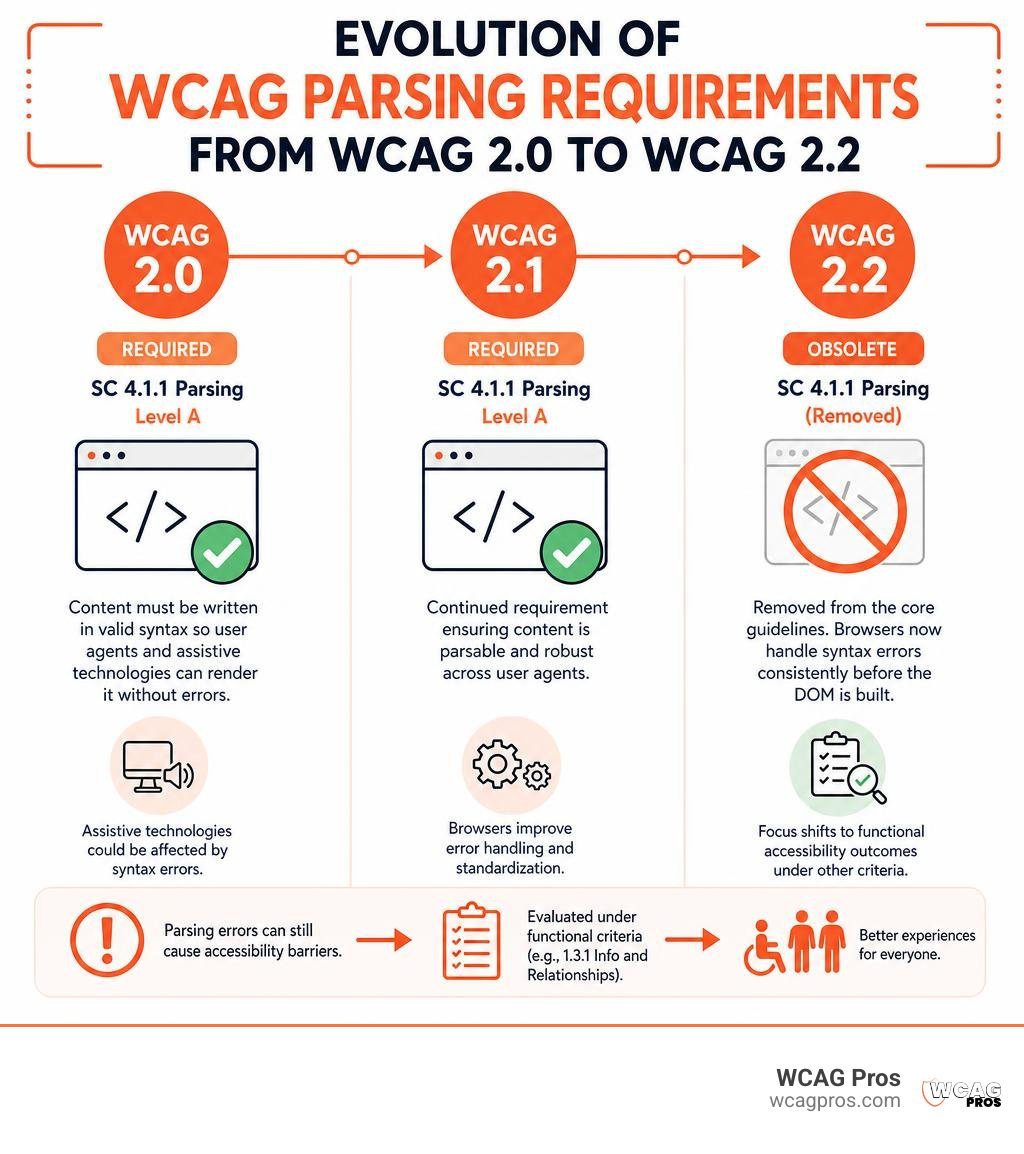
With the official release of WCAG 2.2 as a W3C Recommendation, Success Criterion 4.1.1 Parsing was officially marked obsolete and removed from the core guidelines. The rationale behind this removal is simple: mainstream web browser engines have evolved significantly. Modern HTML standards dictate strict, predictable error-handling routines for unclosed elements or bad syntax. Because browsers now standardise how they parse broken markup before building the Document Object Model (DOM), assistive technologies no longer need to parse raw HTML source code independently.
However, modern standardisation does not mean syntax errors are harmless. As detailed in the official W3C documentation on Understanding Success Criterion 4.1.1: Parsing (Obsolete and removed) | WAI | W3C, removing this criterion does not grant developers permission to ignore code quality. Parsing defects that cause actual accessibility barriers are now evaluated under functional criteria. For instance:
- Broken programmatic relationships caused by duplicate form IDs fall under SC 1.3.1 Info and Relationships.
- Controls missing appropriate accessible labels or states due to malformed nesting fall under SC 4.1.2 Name, Role, Value.
Understanding this shift helps teams prioritize fixes that matter. For more detail on standard updates, read about Understanding the Removal of 4.1.1 Parsing in WCAG 2.2. Additionally, many legal frameworks such as Section 508 and European accessibility mandates still reference WCAG 2.2 Level AA baselines. Effective WCAG parsing error remediation ensures full compliance across all legal frameworks.
Why Parsing Errors Still Affect User Experience
Even though browser parsing engines attempt to repair malformed code automatically, auto-repair routines do not understand developer intent. When code is ambiguous, a browser must make a guess. Sometimes that guess leads to subtle visual glitches, or other times it completely breaks the accessibility tree.
Screen readers rely on the accessibility tree created by the browser. If raw HTML contains structural defects, the accessibility tree can become corrupted in several ways:
- Duplicate ID attribute values: When two form fields share identical IDs, screen readers usually grab the label associated with the first instance. A user filling out a form with repeated IDs may hear the wrong label announced for subsequent inputs, leading to data entry errors.
- Broken ARIA label association failures: Attributes like
aria-labelledbyoraria-describedbyreference specific element IDs. If those IDs are missing or duplicated, screen reader bindings fail silently. - Unclosed container tags: Leaving structural tags unclosed can cause semantic containers to bleed into unintended page sections. This can hide focus indicators, ruin document order, or trigger screen reader crashes on complex web apps.
As discussed by accessibility experts in Parsing errors and compliance (ugh), Human-centred, automated checks flag raw HTML errors regardless of actual user impact. However, true remediation prioritizes fixing markup issues that disrupt actual assistive technology interactions.
Step-by-Step WCAG Parsing Error Remediation

Remediating parsing errors efficiently requires a systematic process. Fixing code issues line by line without testing can introduce unexpected layout regressions. Follow our step-by-step framework to clean up code quickly.
For a broader perspective on conducting site audits, check out The Ultimate Guide to a WCAG Comprehensive Website Audit.
To ensure your HTML document builds a clean DOM tree, always start with a correct HTML5 standard doctype at the very top of your files:
Here is a handy overview of common parsing errors, how they impact assistive technology, and the code changes required to resolve them:
| Parsing Error Type | Assistive Technology Impact | Code Fix Strategy |
|---|---|---|
| Duplicate ID Values | Screen readers misassociate labels and ARIA references | Assign unique string IDs or use framework ID hooks |
| Unclosed HTML Tags | Semantic layout breaks and screen reader container bleeding | Close all elements explicitly with matching end tags |
| Improper Nesting | Interactive controls become unclickable or unannounced | Follow standard nesting rules (e.g., no interactive controls inside buttons) |
| Duplicate Attributes | Attribute value ambiguity (e.g., double alt text tags) |
Remove redundant attribute declarations from source code |
Remediating Duplicate IDs and Attributes
Duplicate IDs represent one of the most common issues during WCAG parsing error remediation. These errors frequently occur when developers copy component templates without updating internal element IDs, or when dynamic web lists render multiple form inputs with identical attributes.
Consider an electronic checkout form with duplicated ID attributes:
When a screen reader user navigates to the second input field, the browser looks up id="user-input" and returns the first instance in the DOM tree. The screen reader incorrectly announces “First Name” for both input fields!
To resolve this issue, assign explicit, unique string values to every element:
When building modern web applications with component frameworks like React, hand-crafting unique string IDs can be difficult. Use built-in utilities like the useId hook to generate unique, stable IDs across server and client rendering cycles:
Duplicate attributes on a single element can also confuse parsers. Content management systems often generate redundant alt or title tags when developers combine manual fields with automated media uploads. Ensure every HTML tag contains only one instance of any given attribute.
Fixing Unclosed Tags and Improper Nesting
Unclosed tags and mismatched HTML elements mess up document structure. When an opening tag lacks a corresponding closing tag, the browser must infer where the element ends. This often results in unintended layout nesting.
Adhering to Plain Old Semantic HTML (POSH) principles ensures your application remains accessible:
In the invalid snippet above, an inline Fix the issue by restoring proper block structure and removing nested interactive elements: Resolving code syntax issues manually across thousands of web pages is impractical. Efficient WCAG parsing error remediation blends automated validation tools with targeted DOM inspection. To streamline your overall evaluation workflow, review our Practical Accessibility Testing Guide 2026. Automated checkers like the W3C Nu Markup Validation Service process raw page code and surface broken markup instantly. However, standard validation reports often return high volumes of non-critical warnings that do not impact screen reader users. To focus strictly on WCAG-relevant issues, auditors often use filtering bookmarklets. Explore Steve Faulkner’s tool via the WCAG 2.2 parsing error bookmarklet, TPGi resource. Integrating syntax verification into developer text editors and local terminal scripts catches errors before code reaches production environments. Modern development environments rely on these key validation utilities: When reviewing complex web apps, automated tools will occasionally highlight markup warnings that do not affect accessibility. For guidance on navigating JavaScript testing without getting overwhelmed, read How to Audit JavaScript for WCAG Without Losing Your Mind. The best way to eliminate parsing errors long-term is by embedding automated validation rules directly into your continuous integration and delivery (CI/CD) pipelines. Implement this process to keep invalid code out of production releases: No, Success Criterion 4.1.1 Parsing was officially removed in WCAG 2.2 and is classified as obsolete. However, you must still ensure your HTML code is clean enough to support active criteria such as SC 1.3.1 (Info and Relationships) and SC 4.1.2 (Name, Role, Value). Additionally, if your organization is legally required to conform with WCAG 2.2 Level AA or older federal standards, remediating classic parsing errors may still be required during accessibility audits. When multiple DOM elements share an identical No. Automated validators are great for flagging malformed syntax, missing tags, and non-unique element IDs, but they cannot evaluate context. An automated tool cannot verify whether an assigned label makes functional sense, or whether focus indicators behave correctly when navigating dynamic menus. Combining automated scans with human inspection is essential for achieving full WCAG 2.2 Level AA compliance. Mastering WCAG parsing error remediation helps maintain clean source code, stable document trees, and reliable screen reader interactions. While WCAG 2.2 removed Success Criterion 4.1.1 Parsing as a standalone requirement, resolving duplicate element IDs, unclosed tags, and invalid nesting remains essential for satisfying active guidelines like Info and Relationships and Name, Role, Value. At WCAG Pros, based in Norco, CA, we help organizations eliminate accessibility barriers through expert website compliance consulting. We perform comprehensive page-by-page audits covering all 54 WCAG A through AAA points, deliver actionable code fixes, and provide free re-audits to help you earn compliance badges with confidence. Ready to protect your digital presence and deliver seamless web experiences for all users? Explore our Comprehensive WCAG Audit Services today! attempts to wrap block-level tags like and is nested directly inside a element. Nesting interactive controls inside other interactive controls confuses screen readers and breaks focus handling.
Testing and Automating Code Cleanups

Essential Tools for WCAG Parsing Error Remediation
nu-validator): The industry standard validator for checking rendered HTML output against modern specifications.How to Automate WCAG Parsing Error Remediation in CI/CD
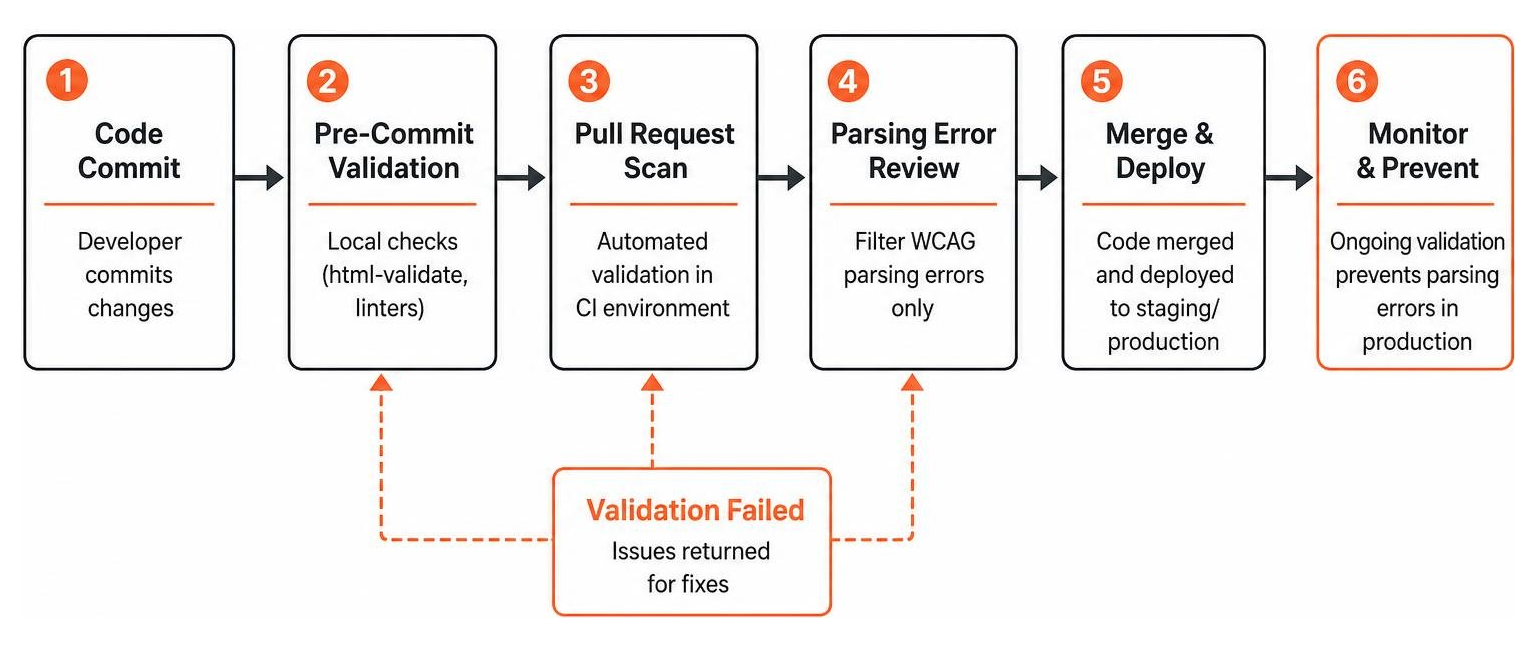
html-validate on modified files before commits are saved.Frequently Asked Questions About WCAG Parsing Error Remediation
Is WCAG 4.1.1 Parsing still required under WCAG 2.2?
How do screen readers react to duplicate ID attributes?
id string, screen readers retrieve information from the first matching instance in the document tree. If form labels or ARIA descriptions point to a duplicate ID value, the screen reader will repeatedly read the first label for subsequent form controls, misleading blind or low-vision users.Can automated HTML validators replace manual accessibility code reviews?
Conclusion
Read more website accessibility articles
Get Help With Your Website
We'll follow up with info about:
- The process
- Cost
- Timeline
We promise to respect your privacy, and never abuse the information you provide. We will not sell or rent your information to any third party.
By submitting this form, you consent to receive SMS messages and/or emails from SEM Dynamics LLC, dba WCAG Pros. To unsubscribe, follow the instructions provided in our communications. Msg & data rates may apply for SMS. Your information is secure and will not be sold to third parties.