
Practical Steps to Audit Locked Content for WCAG 2.2 Accessibility
Practical Steps to Audit Locked Content for WCAG 2.2 Accessibility
Why You Need a WCAG Audit for Membership Sites
To audit locked membership content for WCAG 2.2 accessibility, start by scoping every authenticated workflow, then combine session-authenticated automated scans with manual keyboard and screen reader checks. This practical approach uncovers barriers that crawlers miss behind login walls. Over 1.3 billion people worldwide live with a significant disability. When a subscription business or association locks its content behind authentication without evaluating accessibility, it inadvertently turns away a massive community of loyal members. Digital inclusion is not merely an ethical priority. It is also a fundamental driver of subscriber retention and sustainable recurring revenue.
Subscription businesses suffer when accessibility issues block paying users. A customer who encounters an inaccessible onboarding flow or a broken video player cannot consume the benefits they purchased. This friction creates immediate churn, generates repetitive customer support tickets, and destroys brand loyalty. Reviewing our complete guide to website WCAG audits demonstrates how comprehensive evaluations identify barriers across your entire digital property.
Critical Differences Between Public Sites and Gated Portals
Auditing a public marketing website is relatively straightforward because crawlers can inspect the static HTML pages without friction. Gated membership portals introduce layered complexity. They rely heavily on dynamic authentication states, individualized permission tiers, account dashboards, and interactive user flows that change according to member behavior.
| Dimension | Public Marketing Website | Authenticated Membership Portal |
|---|---|---|
| Access Requirements | Open access, fully crawlable by indexers | Protected by login credentials and session tokens |
| State Management | Mostly static or basic asynchronous forms | Dynamic Single-Page Application (SPA) states and role views |
| Interaction Depth | Informational reading and lead generation forms | Account settings, recurring payments, media streaming |
| Audit Complexity | Automated URL scanning covers baseline issues | Requires persona-based manual inspection and live user journeys |
A public page might simply present text and static images. In contrast, an authenticated area features complex components like profile update modals, downloadable member assets, private community discussion boards, and interactive progress trackers. Each of these components requires deep, contextual evaluation to ensure universal usability.
Legal Compliance Risks Under ADA and EAA in 2026
The legal landscape surrounding digital accessibility has intensified significantly. Under Title III of the Americans with Disabilities Act (ADA), courts consistently treat commercial and private member portals as places of public accommodation. Plaintiffs file thousands of ADA digital accessibility lawsuits annually, targeting transactional barriers like broken checkout forms, unannounced modal windows, and inaccessible login mechanisms.
In Europe, enforcement of the European Accessibility Act (EAA) requires digital services, including subscription platforms and e-commerce portals, to deliver accessible experiences across the European Union. Failing to comply can result in substantial regulatory fines and formal legal notices. Conducting a WCAG audit for membership sites protects your organization from costly demand letters while establishing verified proof of conformance.
Core WCAG 2.2 Criteria for Gated Workflows and Dashboards
Achieving conformance requires adhering to WCAG 2.2 Level AA. This standard is organized around four foundational principles: Perceivable, Operable, Understandable, and Robust. Developers working on membership platforms should consult our detailed website accessibility field manual to understand how these criteria apply directly to codebase components.
Accessible Authentication and Cognitive Friction (WCAG 3.3.8)
One of the most vital additions in WCAG 2.2 is Success Criterion 3.3.8: Accessible Authentication (Minimum). Traditional login systems often rely on cognitive function tests, such as memorizing complex strings or solving visual puzzles. These tests pose severe barriers for users with cognitive or learning disabilities.
To conform with WCAG 2.2, membership portals must provide an authentication method that does not rely exclusively on cognitive function tests. Excellent alternatives include:
- Allowing password managers to auto-fill credentials without blocking paste actions.
- Supporting WebAuthn biometrics such as Touch ID, Face ID, or external security keys.
- Offering one-click email login links or one-time verification tokens sent via SMS or authenticator apps.
- Ensuring third-party OAuth flows are keyboard operable and announce their status clearly to screen readers.
Session Timeouts, CAPTCHAs, and Security Balance (WCAG 2.2.1)
Security is paramount for membership platforms that handle billing and private customer data. However, tight security protocols frequently conflict with accessibility if they are not engineered thoughtfully.
Under WCAG 2.2.1: Timing Adjustable, any automated session timeout must warn the user before expiring. It must also give them at least twenty seconds to extend the session with a simple keyboard action, such as pressing the spacebar. An exception exists for timeouts longer than twenty hours, but standard security practices usually expire sessions much sooner.
Visual CAPTCHAs present another common pitfall. If your login or signup form uses a visual puzzle or distorted text, you must provide an accessible alternative. Non-visual alternatives include audio challenges, email verification codes, or background honeypot fields that trap automated bots without burdening real human users.
Subscription Management, Recurring Billing, and Modals
The billing section of a membership portal contains some of the highest-risk interaction patterns. Inaccessible payment gateways directly impede revenue generation and prevent users from updating payment methods or modifying their subscription tiers.
Payment forms must explicitly associate all form controls with programmatically determinable text labels. When a user triggers a modal dialog to upgrade or cancel a membership, keyboard focus must move cleanly into the modal and stay trapped within it until dismissed. If a transaction fails due to an expired credit card, developers must use ARIA live regions to announce the error message clearly to screen reader users without requiring a full page refresh.
Step-by-Step Methodology to Audit Authenticated Content
A comprehensive evaluation requires a structured, multi-layered approach. Because automated crawlers cannot naturally navigate behind complex paywalls, you must combine automated scans with systematic manual testing across real user accounts. You can follow our WCAG 2.2 manual testing guide alongside the official W3C list of web accessibility evaluation tools to execute every phase correctly.
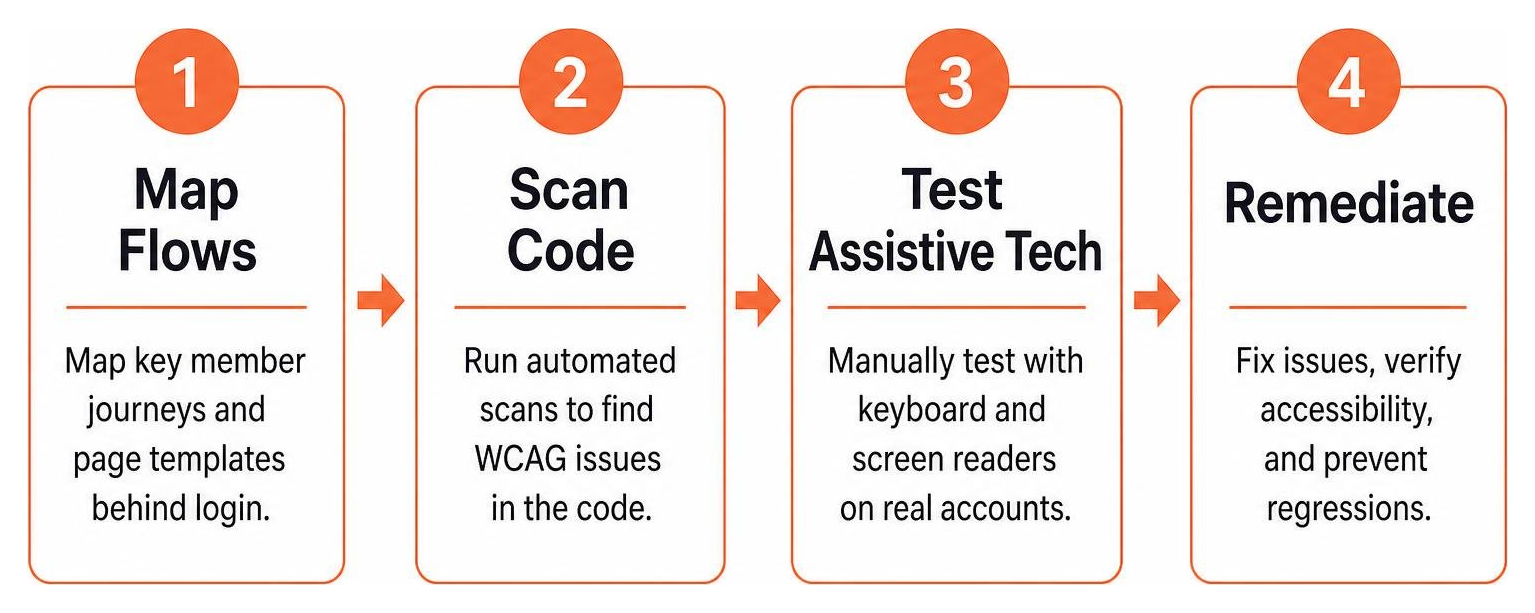
Scoping Authenticated Workflows for a WCAG Audit for Membership Sites
Begin your audit by mapping out every distinct page template and high-priority user journey within the platform. Scoping your audit by unique screens and functional user flows ensures complete code coverage without wasting time testing hundreds of identical content pages.
Key member workflows to include within your audit scope:
- Member registration, plan selection, and payment processing.
- Initial onboarding questionnaires and profile setup steps.
- Member dashboard navigation and resource filtering.
- Gated media consumption, including video players, podcasts, and downloadable PDF worksheets.
- Community forums, private comments, and interactive messaging tools.
- Account management, password reset, and membership cancellation flows.
Best Tools to Execute a WCAG Audit for Membership Sites
Automated testing tools help establish a fast baseline by scanning rendered DOM trees for structural errors, missing attributes, and poor contrast. To audit locked content, use browser extensions like axe DevTools or IBM Equal Access Accessibility Checker while logged in to an active member session.
For automated continuous integration testing, configure headless browser scripts using Playwright or Cypress integrated with axe-core. By supplying session cookies or authentication tokens, these scripts can crawl authenticated routes automatically and flag basic regressions during every software build.
Conducting Rigorous Manual and Assistive Technology Checks
Automated testing tools identify common issues like missing alt text, improper semantic HTML, low-contrast text, and broken links, but they catch only 30 to 40 percent of total accessibility barriers. Manual testing is essential for meeting WCAG conformance standards because automated tests cannot verify logical keyboard focus or real screen reader behavior.
Execute your manual testing protocol using the following steps:
- Keyboard Navigation: Navigate through every dashboard workflow using only the Tab, Shift+Tab, Enter, Space, and Arrow keys. Ensure that all interactive controls display a visible, high-contrast focus indicator and that focus never gets trapped.
- Screen Reader Testing: Test the member portal using NVDA or JAWS on Windows, and VoiceOver on macOS and iOS. Verify that buttons, status updates, dynamic accordions, and custom widgets announce their name, role, and current state accurately.
- Visual Presentation and Zoom: Magnify the browser interface to 200 percent to confirm text resizes cleanly without clipping. Increase the zoom to 400 percent to ensure the layout reflows into a single column without forcing horizontal scrolling.
- Contrast Verification: Use a color contrast analyzer to verify that normal body text maintains at least a 4.5:1 contrast ratio against its background, while large text and user interface components achieve at least 3:0:1.
Prioritization, Remediation, and Ongoing Compliance Cycles
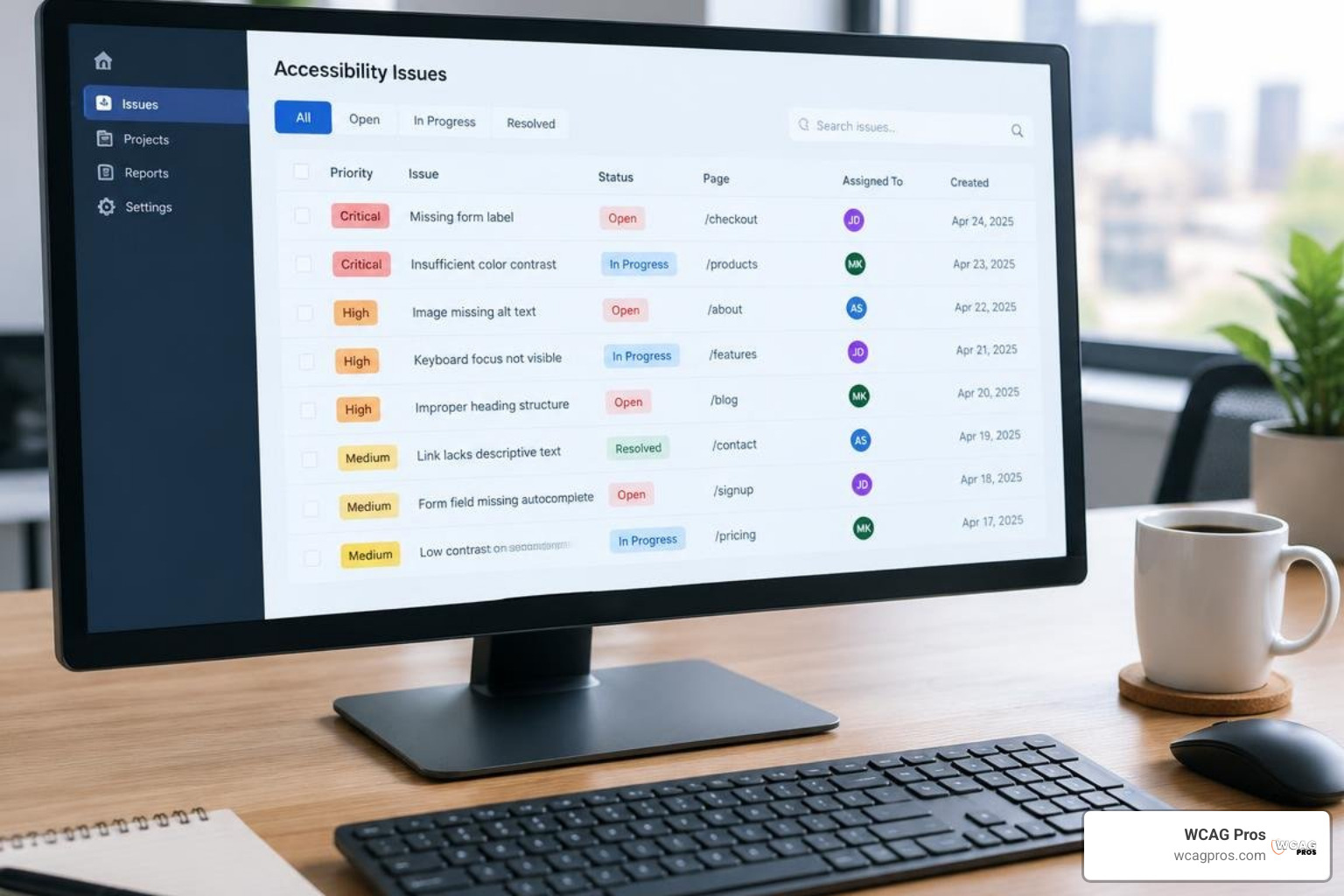
After compiling your audit findings, organize every discovered barrier into an actionable engineering backlog. Prioritize issues by their severity and their impact on critical member tasks. A login barrier or broken checkout modal must be resolved immediately, whereas a minor contrast inconsistency in an archival footer can follow in a subsequent sprint. Following a practical guide to website accessibility certification helps document your remediation roadmap for legal protection.
Resolving Code Barriers in Complex Single-Page Apps (SPAs)
Modern membership portals frequently rely on JavaScript frameworks like React, Vue, or Angular. These frameworks often manage page views on the client side, which can disorient assistive technologies if focus is not handled intentionally.
When a user clicks a navigation link in a Single-Page Application, the URL changes without triggering a traditional browser refresh. Developers must programmatically shift focus to the main content container or update an ARIA live region to announce that the new view has loaded. Always choose native HTML5 elements such as button, nav, main, and form before building custom ARIA widgets. Native elements provide built-in keyboard operability and assistive technology support out of the box.
Establishing a Continuous Audit Cadence
Accessibility is not a one-time project. It is an ongoing operational standard. Every time your engineering team pushes a new feature, updates a membership plugin, or uploads new learning content, new accessibility defects can appear.
Maintain a sustainable compliance rhythm by running automated scans on every code release and conducting quarterly manual reviews of critical conversion funnels. Integrating accessibility into the design stage minimizes rework, saves time, and reduces overall engineering expenses across the product lifecycle.
Frequently Asked Questions About Membership Site Accessibility
Can automated tools scan pages behind a login wall?
Yes, automated tools can scan authenticated pages if you provide session cookies, login credentials, or use browser extensions within an active session. However, automated scans only detect a fraction of accessibility issues. They cannot evaluate dynamic keyboard behavior, custom modal flows, or screen reader clarity, which makes thorough manual testing indispensable.
How often should a membership platform undergo accessibility testing?
A membership site should run automated checks on every software deployment, conduct targeted manual evaluations on major quarterly feature releases, and undergo a comprehensive manual WCAG audit annually. Maintaining a dated compliance log helps prove ongoing diligence and protects against legal challenges.
Conclusion
Building an accessible membership site ensures that every paying subscriber can engage with your valuable resources, participate in your community, and manage their subscription without friction. A comprehensive WCAG audit illuminates the hidden technical barriers in your login forms, member dashboards, and billing portals, giving your team a direct path to total digital inclusion.
At WCAG Pros, we specialize in delivering deep, page-by-page manual audits that evaluate all 54 WCAG 2.2 Level A and AA criteria across your authenticated workflows. Our team provides developer-ready code fixes and free re-audits for official compliance badges to ensure your platform remains protected and universally accessible. You can start exploring baseline barriers right now using free online accessibility checkers to secure your subscriber experience.
Read more website accessibility articles
Get Help With Your Website
We'll follow up with info about:
- The process
- Cost
- Timeline
We promise to respect your privacy, and never abuse the information you provide. We will not sell or rent your information to any third party.
By submitting this form, you consent to receive SMS messages and/or emails from SEM Dynamics LLC, dba WCAG Pros. To unsubscribe, follow the instructions provided in our communications. Msg & data rates may apply for SMS. Your information is secure and will not be sold to third parties.