
Demystifying WCAG A, AA, and AAA Conformance Testing for Modern Teams
Demystifying WCAG A, AA, and AAA Conformance Testing for Modern Teams
What WCAG A, AA, and AAA Testing Means for Your Website
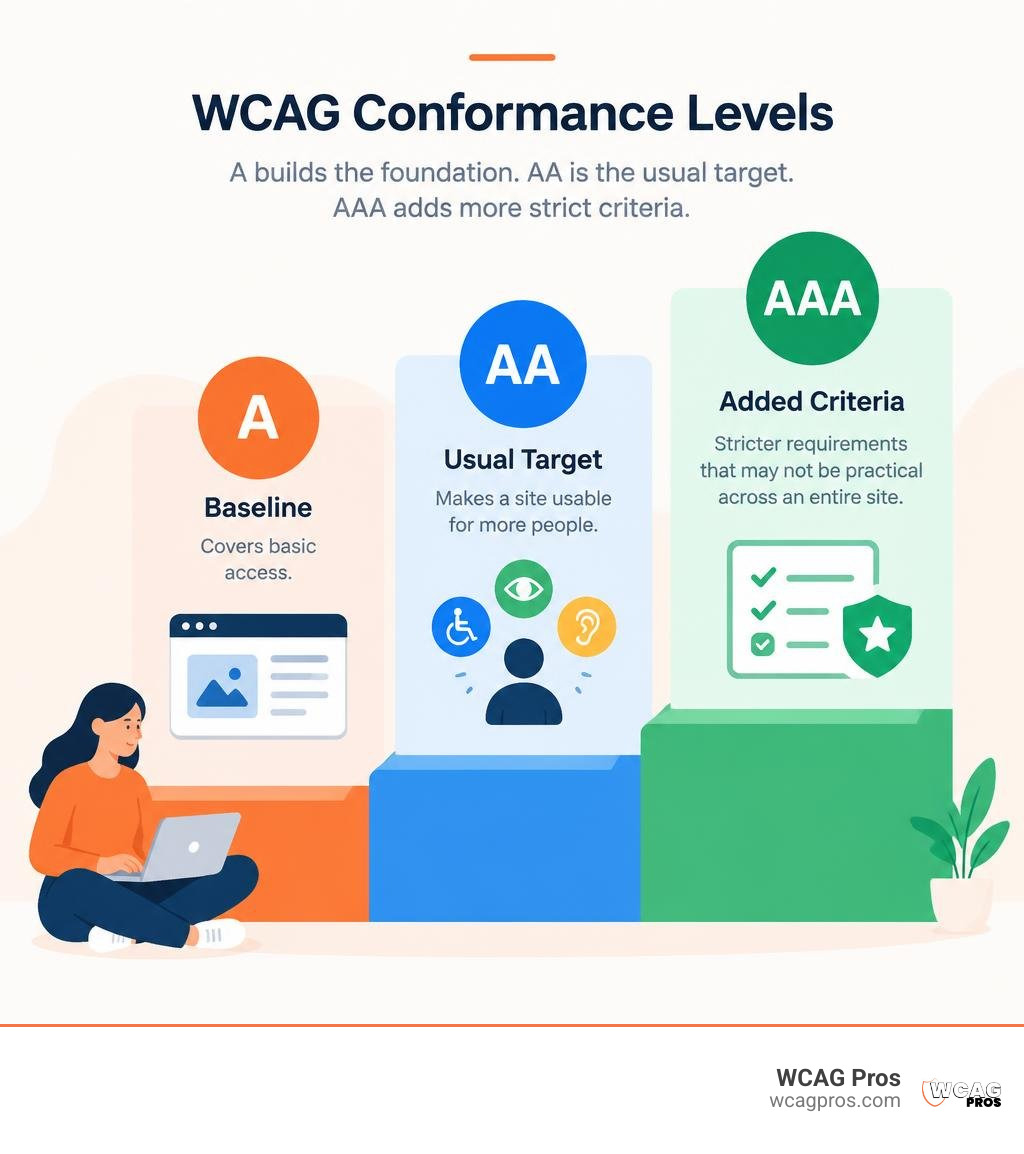
WCAG conformance levels build on one another. Level A covers basic access. Level AA adds requirements that make a site usable for more people and is the usual testing target. Level AAA adds stricter criteria that may not be practical across an entire site. For a commercial website, start by testing against WCAG 2.2 Level AA, which includes every Level A requirement. Use automated scans to find common issues, then test key tasks with a keyboard and screen reader. A clean scan alone does not prove conformance.
I’m Matthew Post, cofounder of WCAG Pros. I’ve spent more than 20 years in web development and now oversee audits and fixes that include WCAG A, AA, and AAA testing.
For related WCAG A AA AAA testing topics, review guides on accessibility testing companies, digital accessibility solutions, and common mistakes made by accessibility companies.
Understanding the Three Conformance Levels in WCAG A AA AAA Testing
Navigating web accessibility can sometimes feel like alphabet soup. At its heart, the Web Content Accessibility Guidelines establish clear rules based on four core principles: content must be Perceivable, Operable, Understandable, and Robust.
These principles translate into individual checkpoints divided into three tiers: Level A, Level AA, and Level AAA. Knowing the core differences between AA and AAA conformance allows your team to budget engineering hours properly without overcomplicating technical debt.
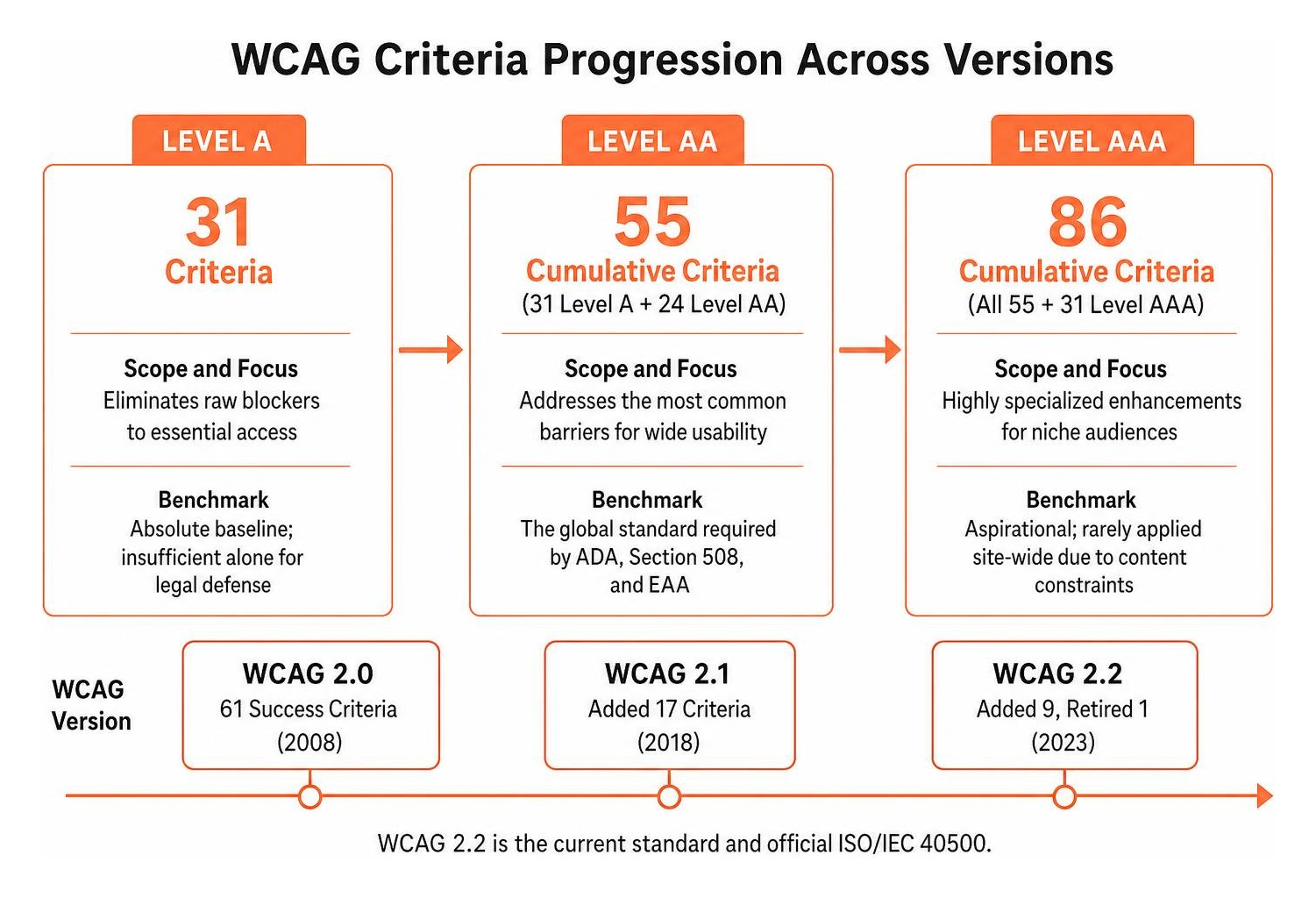
- Level A: 31 criteria. It eliminates raw blockers to essential access. It is the absolute baseline, but it is insufficient alone for legal defense.
- Level AA: 55 cumulative criteria, including 31 Level A and 24 Level AA requirements. It addresses the most common barriers for wide usability and is the global standard required by ADA, Section 508, and EAA.
- Level AAA: 86 cumulative criteria, including all Level A and Level AA requirements plus 31 Level AAA requirements. It adds highly specialized enhancements for niche audiences and is aspirational because it is rarely applied across an entire site due to content constraints.
Level A: Establishing Minimum Accessibility Baselines
Level A sets the floor for digital accessibility. Without Level A conformance, users with assistive devices cannot navigate your core pages. These 31 criteria address severe barriers such as total keyboard traps, unlabelled primary form buttons, and missing text alternatives for non-text graphics.
If an image conveying key pricing data lacks descriptive alt text, a screen reader user simply misses that content. While achieving Level A is a critical first milestone, it does not provide an adequate experience for users with low vision or cognitive differences.
Level AA: Meeting Global Legal and Usability Standards
Level AA is the recognized legal and commercial benchmark worldwide. It incorporates all 31 Level A criteria and adds 24 additional criteria to reach 55 cumulative requirements. Conducting practical verification across Level AA checkpoints ensures that standard user journeys work seamlessly across devices.
Level AA introduces requirements for color contrast ratios of at least 4.5:1 for normal body copy and 3:1 for large text. It also mandates text resizing up to 200 percent without loss of content, visual focus indicators, and responsive layouts that reflow down to 320 CSS pixels without horizontal scrollbars.
Level AAA: Specialized Enhancements vs. Broad Practicality
Level AAA represents the highest tier of web accessibility, bringing the total to 86 success criteria. It demands advanced accommodations such as sign language interpretation for all pre-recorded audio, live audio descriptions, enhanced contrast ratios of 7:1, and specialized cognitive assistance.
The W3C explicitly notes that full Level AAA conformance across an entire enterprise website is generally not practical. Certain criteria, such as providing sign language video tracks for all content uploaded by users, can be too expensive for broad application. Teams should implement Level AAA criteria selectively on highest priority flows rather than attempting coverage across the entire site.
Modern Standards: Why WCAG 2.2 Level AA Governs Web Compliance
Web standards evolve alongside modern front-end technologies. WCAG 2.0 originally launched in 2008 with 61 success criteria. WCAG 2.2 builds upon earlier iterations and serves as the official ISO/IEC 40500 standard. Adopting the complete technical standards for WCAG 2.2 AA ensures full backward compatibility with older requirements.
New Success Criteria Impacting WCAG A AA AAA Testing
The release of WCAG 2.2 added nine new criteria and retired one, with six directly impacting Level AA testing. Following a structured guide for practical WCAG 2.2 test implementation helps development teams address these modern user experience requirements:
- Focus Not Obscured (Minimum) (2.4.11, Level AA): Ensures sticky navigation bars, floating banners, or cookie notices do not completely cover interactive components when focused.
- Dragging Movements (2.5.7, Level AA): Requires a single-pointer alternative, such as directional buttons, for any drag-and-drop feature.
- Target Size (Minimum) (2.5.8, Level AA): Mandates that interactive targets measure at least 24 by 24 CSS pixels, or provide adequate spacing around smaller elements.
- Consistent Help (3.2.6, Level A): Dictates that help mechanisms, such as chat boxes or support links, appear in the same relative order across repeated pages.
- Redundant Entry (3.3.7, Level A): Requires previously entered data in multi-step flows to auto-populate or remain selectable to reduce cognitive fatigue.
- Accessible Authentication (Minimum) (3.3.8, Level AA): Prohibits reliance solely on cognitive function tests, such as memorizing passwords or solving puzzles, during login workflows.
Handling Deprecated Criteria: The Retirement of 4.1.1 Parsing
One of the biggest practical changes in modern compliance is the deprecation of Success Criterion 4.1.1 (Parsing). Decades ago, assistive technologies relied on native browser parsers that broke when encountering duplicate IDs or unclosed tags.
Modern browser rendering engines repair broken markup automatically. The W3C retired 4.1.1 because duplicate element IDs or malformed attributes are now caught under Criterion 4.1.2 (Name, Role, Value). Automated scanners that still flag 4.1.1 parsing errors often create unnecessary noise, and your engineers can safely treat these as obsolete items.
Automated vs. Manual Methodologies in Accessibility Audits
A common mistake in digital development is relying entirely on automated scanning suites. Automated tools catch roughly 30 to 40 percent of WCAG violations. The remaining 60 to 70 percent require human inspection and context validation.

A comprehensive quality process blends fast automated tools with manual testing techniques for WCAG 2.2 to confirm that websites are both functionally compliant and genuinely usable.
Automated vs Manual Workflows in WCAG A AA AAA Testing
Automated accessibility tools like axe-core, Pa11y, and Lighthouse are valuable for rapid analysis. They scan thousands of lines of markup instantly to verify color contrast formulas, confirm image alt attributes, and validate form label IDs.
However, automated checkers cannot evaluate the contextual accuracy of an image description or determine if dynamic modal focus traps a user. Integrating conformance testing strategies for agile teams prevents regressions while keeping sprint cycles efficient.
Manual Keyboard and Assistive Technology Protocols
Manual testing requires navigating your web application without a mouse. Using standard keyboard interactions, testers press Tab, Shift+Tab, Enter, Space, and arrow keys to verify that focus indicators remain visible and that interactive modals do not lock keyboard focus.
Assistive technology sweeps should incorporate industry-standard screen readers:
- NVDA and JAWS on Windows paired with Chrome or Firefox
- VoiceOver on macOS and iOS paired with Safari
- TalkBack on Android devices
Testers must listen to how custom JavaScript widgets announce state changes, verify that ARIA live regions alert users to shopping cart updates, and ensure interactive menus open smoothly.
Step-by-Step 4-Week Rollout Plan for Level AA Conformance
Transforming an accessibility program from ground zero to solid WCAG 2.2 Level AA compliance requires structured execution. Utilizing downloadable audit checklists and templates keeps cross-functional teams aligned during remediation sprints.
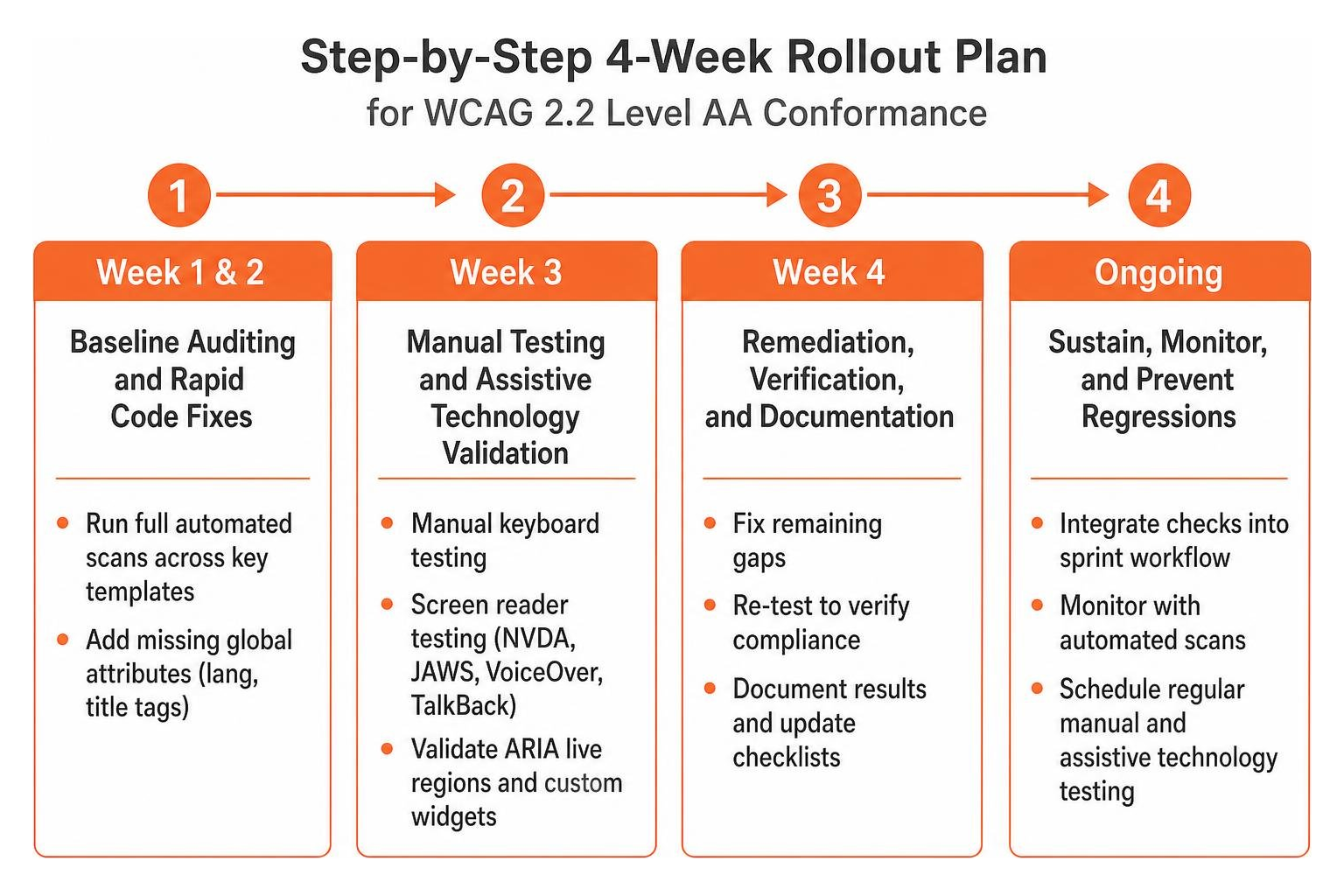
Week 1 & 2: Baseline Auditing and Rapid Code Fixes
The first two weeks focus on establishing baselines and fixing high-volume structural issues:
- Run full automated scans across key templates, including homepages, search results, product catalogs, and checkout funnels.
- Add missing global attributes, ensuring every template has a correct
langattribute and descriptivetitletags. - Resolve empty text alternatives on decorative icons and provide contextual descriptions for informative product graphics.
- Audit keyboard focus styling, immediately replacing any
outline: noneCSS rules with visible focus outlines using:focus-visible. - Enable autocomplete on standard form fields to streamline user input.
These targeted quick wins frequently resolve 30 to 50 percent of the total flagged issues across your digital properties.
Week 3 & 4: Contrast, ARIA Architecture, and CI/CD Gating
The final two weeks focus on complex visual and functional remediations:
- Refactor low-contrast UI elements, updating secondary text and placeholder colors to meet the minimum 4.5:1 ratio.
- Remediate custom ARIA components, ensuring dropdowns, modals, and tabbed panels announce appropriate roles, names, and states to assistive tools.
- Verify touch targets, ensuring all mobile links and buttons meet the 24 by 24 pixel minimum requirement.
- Integrate axe-core and Playwright into pull request pipelines to block new high-impact accessibility violations automatically.
- Perform manual regression passes with screen readers on primary transaction flows.
Global Legal Frameworks: ADA, EAA, and Section 508 Compliance
Modern accessibility testing is both an engineering best practice and a legal necessity. Around the world, statutory frameworks look to WCAG Level AA as the technical benchmark for digital inclusion.
In the United States, Title II and Title III of the Americans with Disabilities Act (ADA) require businesses and state agencies to provide accessible web experiences. Federal agencies and their contractors must also satisfy Section 508 standards.
In Europe, the European Accessibility Act (EAA) enforces digital accessibility requirements across commercial websites, banking systems, and online retail platforms, linking directly to the harmonized standard EN 301 549. Teams auditing international platforms can review an European Accessibility Act and EN 301 549 technical stack to align their testing logs, VPAT documentation, and formal accessibility statements.
Frequently Asked Questions About WCAG Conformance
Why is Level AA universally chosen over Level AAA for enterprise compliance?
Level AA offers wide, functional usability improvements for individuals with visual, auditory, motor, and cognitive impairments without imposing restrictive design limitations. Level AAA contains specialized requirements, such as uninterrupted sign language video interpretation and strict 7:1 contrast ratios, that are difficult to implement consistently across dynamic, user-driven applications.
What percentage of WCAG success criteria can be checked automatically?
Automated testing tools reliably catch about 30 to 40 percent of total WCAG success criteria. While automation instantly identifies raw syntax errors, missing attributes, and mathematical contrast failures, it cannot evaluate semantic quality, keyboard flow logic, or screen reader performance. Comprehensive validation always requires manual verification.
How does WCAG 2.2 impact existing mobile and touch target testing?
WCAG 2.2 introduces Success Criterion 2.5.8, which requires interactive touch targets to measure at least 24 by 24 CSS pixels or feature sufficient spacing. It also introduces Success Criterion 2.5.7, requiring single-pointer tap alternatives for complex drag-and-drop actions. Mobile quality assurance teams must incorporate physical touch and gesture checks alongside traditional desktop testing.
Conclusion
Mastering WCAG 2.2 Level AA conformance protects your organization against legal risk while expanding your digital reach to millions of users who rely on assistive technologies. Modern web development moves quickly, and combining automated CI/CD gating with structured manual reviews ensures your digital experience remains accessible release after release.
At WCAG Pros, our specialists deliver thorough evaluations across all 54 WCAG points. We provide actionable code fixes and free re-audits so you can display an official compliance badge with confidence. You can schedule a professional WCAG compliance audit with our team to protect your business and build a more accessible web for all.
Read more website accessibility articles
Get Help With Your Website
We'll follow up with info about:
- The process
- Cost
- Timeline
We promise to respect your privacy, and never abuse the information you provide. We will not sell or rent your information to any third party.
By submitting this form, you consent to receive SMS messages and/or emails from SEM Dynamics LLC, dba WCAG Pros. To unsubscribe, follow the instructions provided in our communications. Msg & data rates may apply for SMS. Your information is secure and will not be sold to third parties.