
A Practical Guide to WCAG 2.2 Accessibility Solutions
A Practical Guide to WCAG 2.2 Accessibility Solutions
Choose an Accessibility Solution That Fixes Real Barriers
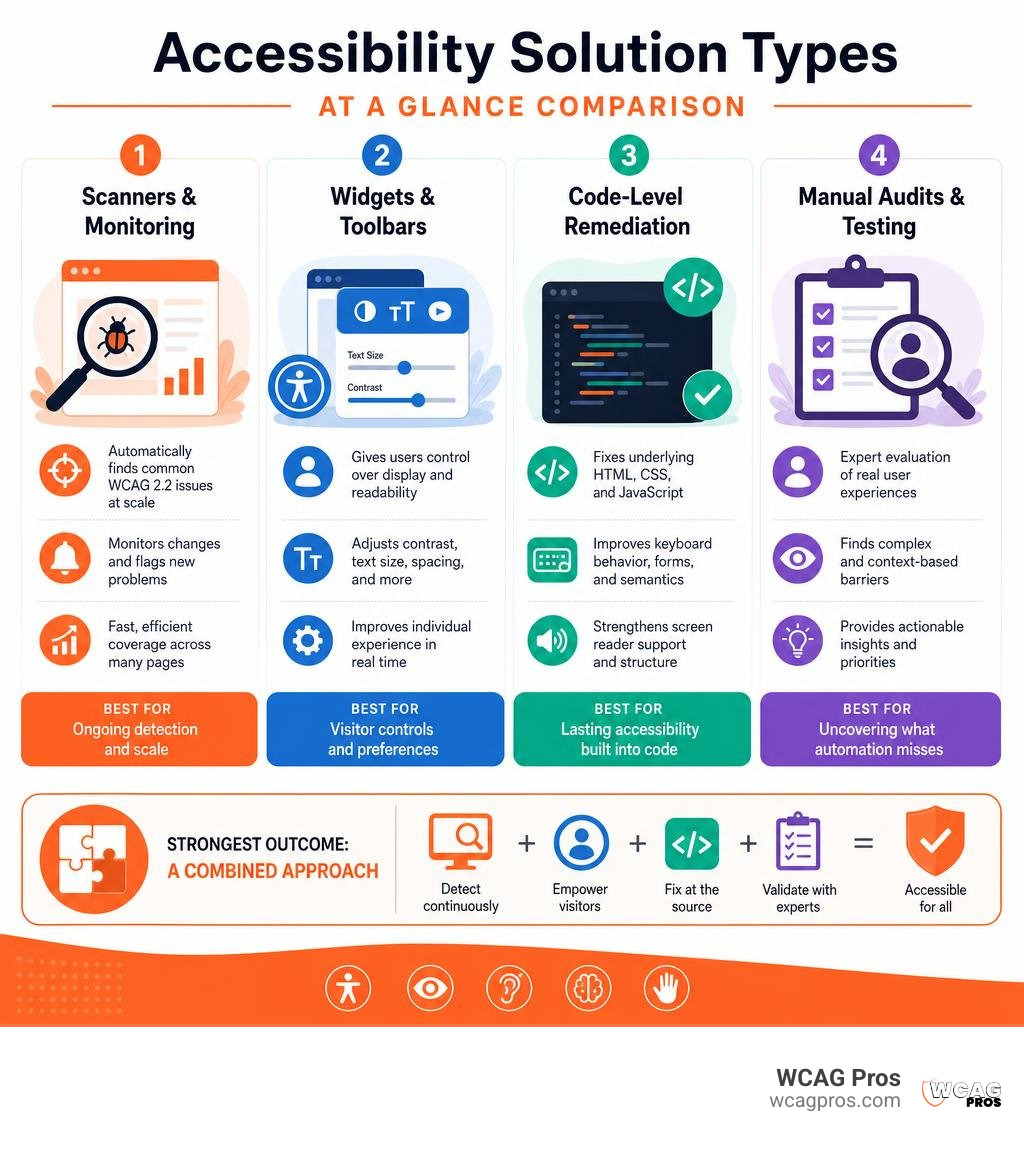
The right accessibility solution depends on what your website needs most:
- Automated scanners and monitoring find common WCAG 2.2 issues at scale and flag new problems after updates.
- Visitor-facing toolbars and widgets let users adjust contrast, text size, motion, and other display settings.
- Code-level remediation fixes the underlying HTML, keyboard behavior, forms, and screen reader support.
- Expert-led audits and testing uncover usability barriers that automation cannot reliably judge.
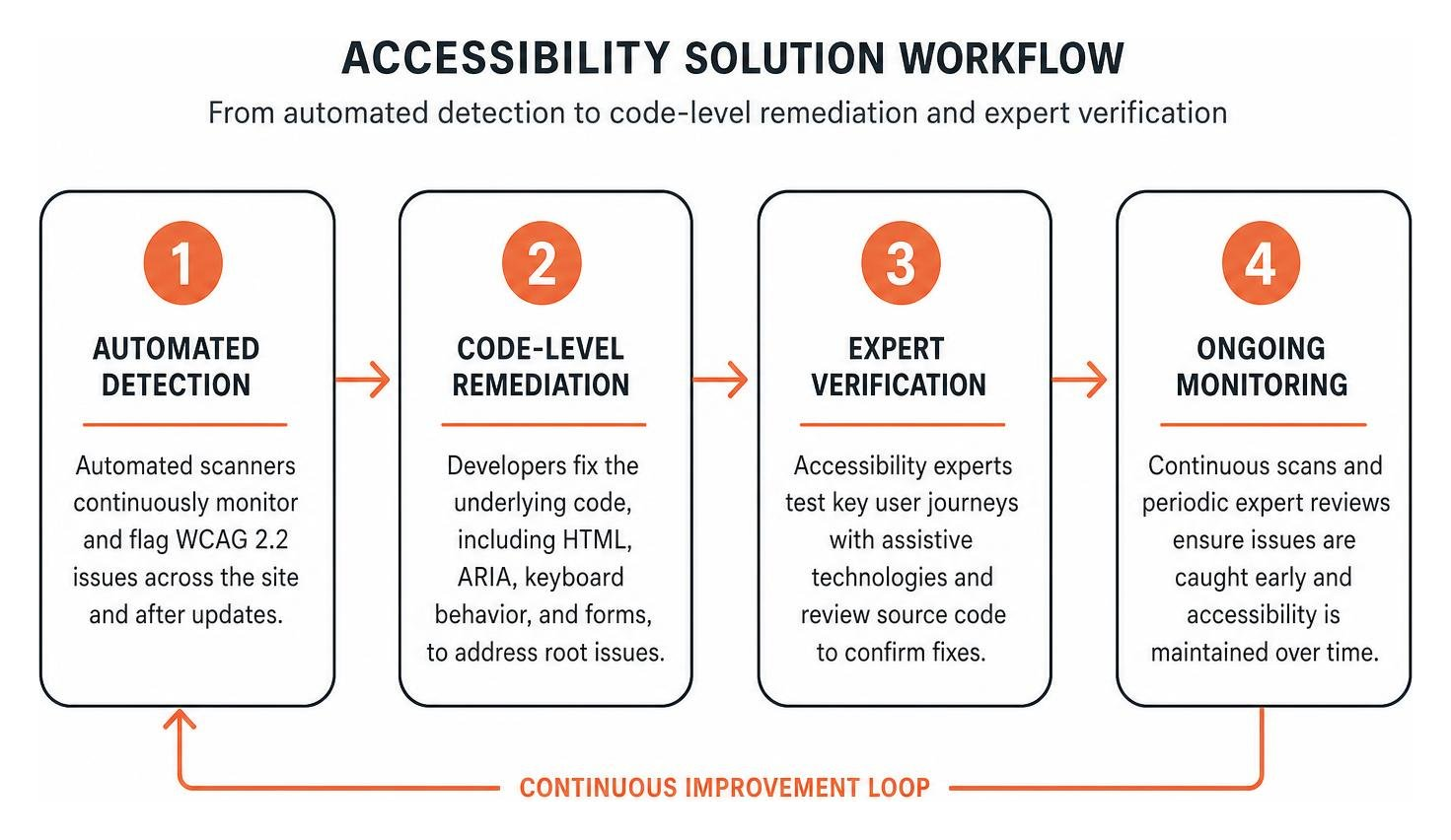
For most commercial websites, the strongest option is a combined approach: use automated tools for ongoing detection, then have accessibility experts test key user journeys and verify source-code fixes. A widget can improve visitor controls, but it does not replace accessible design, semantic code, or human testing.
This matters because 96% of leading websites have detectable accessibility issues, and 95.9% fail basic accessibility checks. With 1 in 4 Americans living with a disability and 67% of disabled users leaving websites they cannot use, accessibility affects both ADA risk and revenue opportunity.
I am Matthew Post, co-founder of WCAG Pros and a web development professional with more than 20 years of experience resolving complex digital issues. Since helping launch WCAG Pros in 2021, I have supervised accessibility solution audits and remediation projects focused on practical WCAG 2.2 improvements, better usability, and reduced legal risk.
Comparing Every Major Web Accessibility Solution by Category
Navigating the market for digital inclusion requires a clear understanding of what each tool can and cannot do. Digital accessibility tools fall into distinct categories ranging from automated browser overlays to native source remediation and expert testing.
To help you choose the right approach, we have compared the core categories below.
| Solution Category | Primary Mechanism | Implementation Layer | WCAG 2.2 Coverage | Best For |
|---|---|---|---|---|
| Automated Scanners | Continuous site crawls and algorithm analysis | External monitoring and CI/CD pipelines | 30% to 40% of success criteria | Catching syntax regressions and missing tags |
| Frontend Overlays & Widgets | JavaScript DOM manipulation on page load | Client-side presentation layer | Visual tweaks and basic user preferences | Rapid frontend adjustments for visual styling |
| Backend Code Remediation | Native HTML, CSS, and ARIA engineering | Core codebase and CMS templates | Up to 100% when guided by audits | Permanent structural fixes and system stability |
| Expert-Led Manual Audits | Human testing with assistive technologies | Source review and functional user testing | 100% of applicable WCAG 2.2 criteria | Comprehensive legal defense and real usability |
Selecting an Automated Accessibility Solution for Continuous Monitoring
Automated scanning platforms provide continuous oversight across thousands of web pages. These tools run scheduled crawls to detect syntax errors, low contrast ratios, broken links, and missing structural tags. Platforms like Siteimprove and Level Access help enterprise organizations maintain visibility over sprawling websites.
By integrating automated scanners directly into your continuous integration and deployment pipelines, your engineering team can identify accessibility regressions before code reaches production. However, because automated scanners only catch rules that algorithms can test deterministically, they serve as an early warning system rather than a complete compliance program. You can explore these foundational monitoring concepts further in A Comprehensive Guide to Digital Accessibility Solutions.
Backend Code-Level and Developer-First Platforms
Backend and source-level remediation platforms focus on fixing code at the root. Rather than masking barriers on the surface, these developer-centric tools empower engineers to implement clean semantic HTML, correct ARIA attributes, and manage dynamic keyboard focus within modern frameworks.
Adopting a shift-left development model ensures accessibility is built into your design systems and code repositories from the start. Tools integrated into environments like Visual Studio Code provide developers with real-time feedback on focus traps, missing form labels, and improper heading hierarchies. To understand how to execute these technical adjustments systematically, review The Definitive Guide to WCAG 22 Website Remediation Steps.
Frontend Overlays, AI Widgets, and Assistive Toolbars
Frontend overlays and AI widgets such as accessWidget, UserWay, and EnableAll Assist-Bar modify the Document Object Model in real time when a visitor loads a page. These tools offer visitor-facing toolbars that allow individuals to increase font sizes, adjust color contrast, highlight links, and pause moving animations.
While these toolbars offer convenient customization options for some visitors, they do not modify the underlying source code. Screen reader users and individuals with severe motor impairments often find that third-party overlays conflict with their personal assistive software. Using an overlay alone does not provide a robust defense against ADA legal challenges. You can read more about sustainable coding practices in The Ultimate Guide to ADA Web Development.
Expert-Led Manual Auditing and Hybrid Verification Services
Expert-led auditing remains the gold standard for digital inclusion. Human accessibility specialists use native assistive technologies including JAWS, NVDA, VoiceOver, and ZoomText to navigate complex user journeys such as checkout funnels, dynamic menus, and interactive forms.
Human evaluators evaluate context, logical reading order, cognitive clarity, and error recovery in ways that automated crawlers cannot replicate. Combining automated tracking with deep manual audits delivers full conformance with WCAG 2.2 criteria. For an in-depth breakdown of how manual verification integrates with remediation, consult our Website Accessibility Remediation Complete Guide.
Legal Frameworks and Compliance Mandates
Digital accessibility is a legal obligation enforced across global jurisdictions. In the United States, Title III of the Americans with Disabilities Act requires public accommodations to provide accessible digital services. Federal agencies and recipients of federal funding must comply with Section 508, which aligns closely with international standards.
Globally, the European Accessibility Act and the EN 301 549 standard mandate strict digital inclusion criteria for commercial websites and public sector bodies. Public institutions and school districts actively enforce these benchmarks through formal guidelines, such as local school district electronic accessibility policies and published website accessibility standards for municipal portals.
Failing to maintain digital accessibility exposes organizations to costly legal demand letters and lawsuits. To learn how proactive code remediation protects your business, consult The No Lawsuit Guide to Website Remediation.
Key Evaluation Criteria for Tool Selection
Selecting the best digital inclusion platform requires evaluating several technical and business factors:
- Core Web Vitals Impact: Heavy third-party scripts can degrade page speed, increasing Largest Contentful Paint and Cumulative Layout Shift metrics.
- Search Engine Optimization: Clean semantic HTML, logical heading structures, and descriptive alternative text enhance search indexing and organic visibility.
- Conversion Rate Optimization: Accessible websites capture more market share. Organizations frequently experience a +20% conversion lift after removing friction for users with disabilities.
- Engineering Efficiency: Integrated testing platforms can save engineering teams more than 200 developer hours annually on bug fixes.
- Vendor Lock-In: Prioritize solutions that deliver permanent source code remediation over proprietary systems that remove your fixes if you cancel your subscription.
Implementing an Enterprise Accessibility Solution for WCAG 2.2 Conformance
Enterprise organizations require centralized governance features to manage compliance across multiple business units. Key capabilities include generating Voluntary Product Accessibility Templates and Accessibility Conformance Reports, as well as enforcing Single Sign-On and strict data privacy standards like SOC2 and ISO 27001. Learn more about formal verification in The Complete Guide to Website Accessibility Certification Services.
Balancing Automation With Manual Human Verification
Automated testing tools reliably detect about 30% to 40% of accessibility issues. Complex criteria such as meaningful alternative text, keyboard focus trapping, interactive modal states, and accessible PDF documents require human review. A mature compliance program pairs continuous automated scans with regular human audits.
Multi-Site Governance and Agency Portfolio Management
Digital agencies and enterprise networks managing broad website portfolios benefit from platforms like Pluro and CivicPlus. These multi-tenant architectures provide centralized policy enforcement, portfolio-wide dashboards, and white-label reporting to track progress across every digital property from a single dashboard.
Frequently Asked Questions About WCAG 2.2 Compliance
Can an automated accessibility widget make a website fully compliant?
No. Automated widgets and overlays cannot rewrite underlying server templates or resolve complex interactive barriers. They only alter the browser presentation layer and cannot fix deeper structural issues like keyboard navigation traps, custom form validation, or inaccessible multimedia. True WCAG 2.2 Level AA compliance requires clean source code and manual testing.
What is the difference between a visitor toolbar and code-level remediation?
A visitor toolbar is a client-side interface that allows individual users to adjust visual styles such as text size and contrast. In contrast, code-level remediation updates the actual HTML, CSS, JavaScript, and ARIA markup on your web server. Code-level remediation permanently fixes digital barriers for all assistive technology users without requiring external scripts.
How does web accessibility impact website performance and SEO?
Web accessibility and search engine optimization share the same core foundation: clean, well-structured, semantic code. Adding descriptive alternative text, logical heading structures, and accessible navigation helps search engine spiders index content accurately. Accessible designs also lower bounce rates and improve overall user engagement.
Conclusion
Building an accessible digital presence is a continuous journey that safeguards your business from legal risk while welcoming every visitor. Automated scanners and visitor toolbars offer useful starting points, but sustainable compliance requires fixing barriers directly in your source code.
At WCAG Pros, based in Norco CA, our team conducts comprehensive page-by-page audits evaluating all 54 WCAG 2.2 A and AAA success points. We provide verified code-level remediation and free re-audits to grant official compliance badges for your business. Visit WCAG Pros today to schedule your comprehensive accessibility assessment and build an inclusive digital experience.
Read more website accessibility articles
Get Help With Your Website
We'll follow up with info about:
- The process
- Cost
- Timeline
We promise to respect your privacy, and never abuse the information you provide. We will not sell or rent your information to any third party.
By submitting this form, you consent to receive SMS messages and/or emails from SEM Dynamics LLC, dba WCAG Pros. To unsubscribe, follow the instructions provided in our communications. Msg & data rates may apply for SMS. Your information is secure and will not be sold to third parties.