
Make Your Documents Universally Usable with Proven PDF Accessibility Services
Make Your Documents Universally Usable with Proven PDF Accessibility Services
How to Choose PDF Accessibility Companies for Compliance
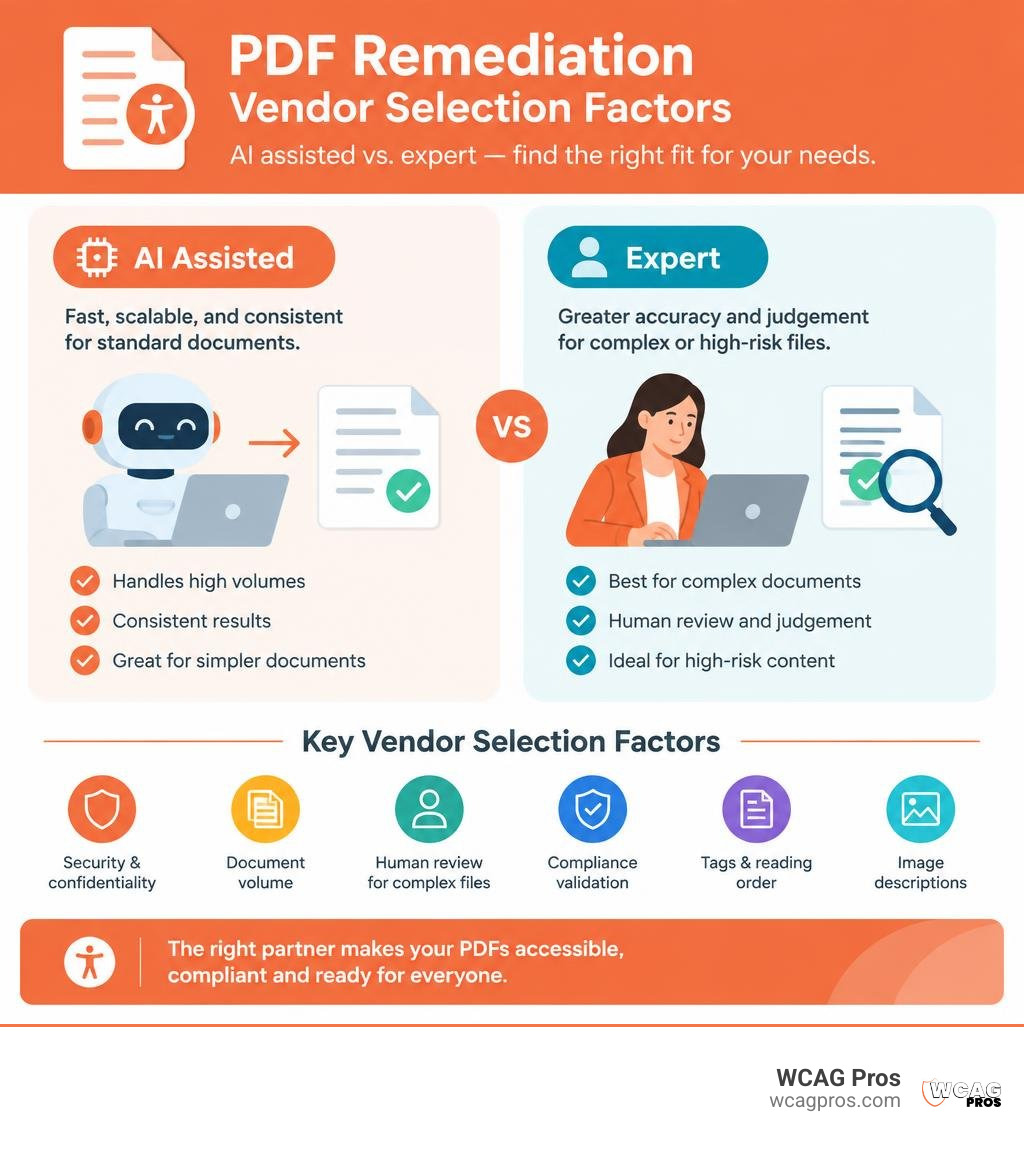
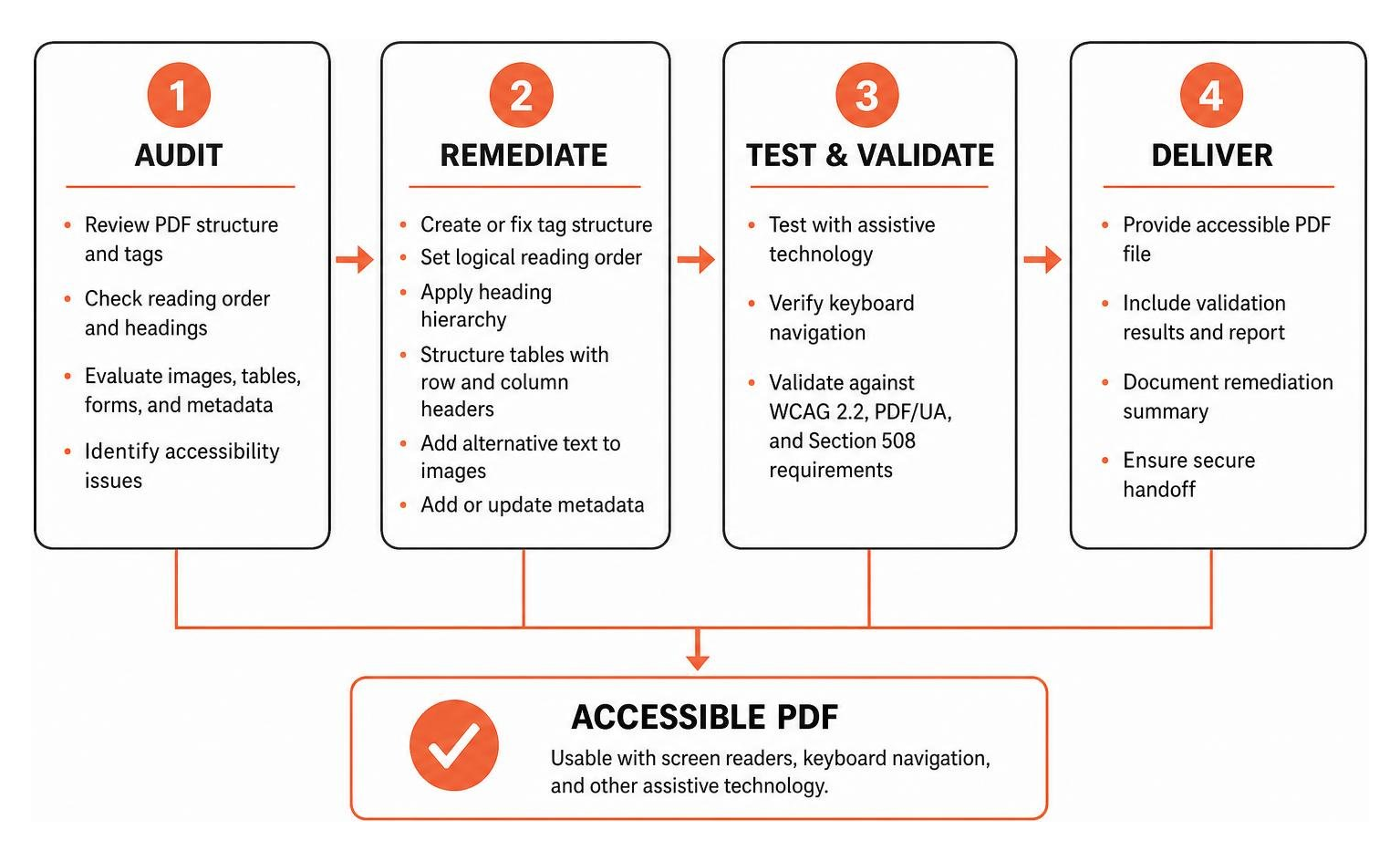
The best pdf accessibility companies audit your files, repair tags and reading order, add useful image descriptions, and test the result against WCAG 2.2, PDF/UA, and Section 508 requirements. Choose a provider that can handle your document volume, protect sensitive files, offer human review for complex forms and tables, and provide clear validation records.
PDF remediation makes documents usable with screen readers, keyboard navigation, and other assistive technology. It also helps organizations reduce ADA compliance risk when publishing public facing reports, forms, policies, menus, course materials, and financial documents.
Some vendors focus on fast AI assisted remediation at scale. Others provide expert led work for complex, high risk documents. This comparison explains where each approach fits and what to ask before you send a file.
I am Matthew Post, co founder of WCAG Pros, with more than 20 years of web development and digital accessibility experience. I oversee accessibility audits and remediation work, helping businesses evaluate pdf accessibility companies and make practical choices that improve access and lower risk.
Easy pdf accessibility companies glossary:
Introduction
Documents connect people to vital services, educational materials, medical instructions, and commercial transactions. Yet across the web, millions of published PDFs remain completely inaccessible to people who use assistive technologies. When a screen reader encounters an untagged document, it reads the content as an unorganized block of text or treats the entire page as a blank image.
PDF remediation is the technical process of restructuring a digital document so assistive tools can interpret its content accurately. This work involves creating a clean tag tree, defining a logical reading order, establishing proper heading hierarchies, structuring complex data tables with row and column headers, adding descriptive alternative text to figures, and embedding essential metadata.
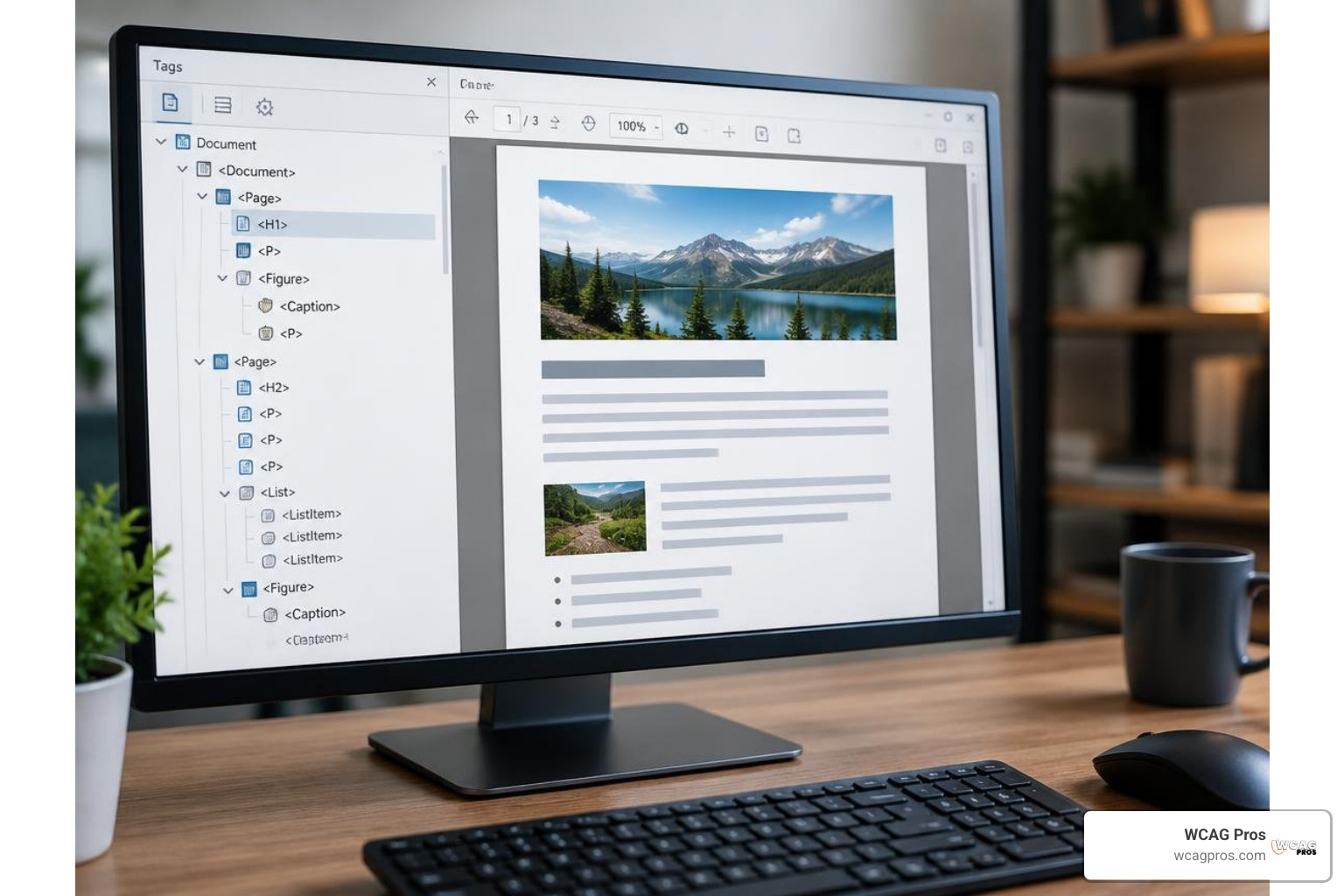
Without proper remediation, documents exclude individuals who are blind, have low vision, or rely on specialized switch devices. Inaccessible files also create massive legal exposure. When planning your digital compliance strategy, our complete guide to website WCAG full audit demonstrates how document accessibility integrates directly into broader organizational compliance.
Understanding PDF Remediation Standards and Legal Mandates
Ensuring document accessibility requires adhering to internationally recognized standards and specific legal statutes. The baseline benchmark for digital content is WCAG 2.2 Level AA. This standard requires text alternatives, meaningful sequences, clear contrast ratios, accessible form inputs, and predictable navigation.
Alongside WCAG 2.2 sits PDF/UA, formally known as ISO 14289. While WCAG applies broadly to web content, PDF/UA focuses exclusively on the technical requirements of the PDF file format itself. It specifies how tagging structures, font encodings, and interactive elements must be implemented within the document code.
Legally, the regulatory landscape has tightened significantly. In the United States, Section 508 of the Rehabilitation Act mandates that federal agencies and their vendors deliver accessible electronic documents. Under the ADA Title II regulations, state and local government entities face strict technical standards. Public entities serving populations of 50,000 or more must achieve full WCAG 2.2 compliance by April 26, 2027. Smaller public bodies serving populations under 50,000 have until April 26, 2028.
Non-compliance carries severe financial and operational repercussions. Initial penalties for ADA Title II violations start at $75,000, rising to $150,000 for subsequent violations, not including legal defense fees and mandatory remediation agreements. Similar requirements apply across healthcare via HHS Section 504 and across financial sectors via regulations like SEBI digital publishing rules. Industry platforms such as DigitalA11y provide ongoing documentation on these technical benchmarks. Organizations must treat document accessibility as an urgent operational priority. For a broader view of how document accessibility fits into your overall compliance strategy, see our complete guide to website WCAG full audit.
Top PDF Accessibility Companies and Remediation Platforms Compared
Selecting the right partner depends on your document volume, complexity, security requirements, and internal bandwidth.
| Provider | Primary Focus | Key Features | Deployment Model | Validation Method |
|---|---|---|---|---|
| AoD (Accessibility On Demand) | High-volume AI automation | REST API, bulk upload, automated OCR, live tag preview | Cloud SaaS | Axes4 PAC Checker |
| CASO Comply | Scalable hybrid remediation | Automated tagging, on-prem agents, compliance certs | Cloud, Docker Agent | PAC and WCAG 2.2 audit |
| RemeDocs | Automated pipeline | Three-phase pipeline, PyMuPDF engine, auto-alt text | Cloud SaaS | PAC 2024, VeraPDF |
| PDFxt | Collaborative AI platform | Browser tag editor, zero per-seat fees, ePUB export | Cloud SaaS | PDF/UA and WCAG validation |
| EqualWeb | Automated checks and tools | 80+ automated rules, in-browser viewer, batch jobs | Cloud SaaS | Built-in compliance scoring |
| Vispero | Full-service enterprise remediation | 30+ years assistive tech leadership, screen reader testing | Enterprise service | Human expert certification |
| Documenta11y | End-to-end document services | Over 1 million documents remediated, 99.9% accuracy | Managed service portal | Multi-tier expert review |
| LevelDocs | Authoring stage accessibility | Microsoft Word integration, real-time guidance | Client add-in | Built-in PDF/UA checkers |
| EcomBack | Multi-industry manual remediation | Custom tagging, form field repair, multi-format export | Professional service | Manual assistive tech audit |
Reviewing our comprehensive guide to digital accessibility solutions provides additional context on how document vendors fit into an overarching accessibility roadmap.

AI-Powered PDF Accessibility Companies for Automated Scaling
Organizations managing thousands of legacy PDFs or dynamic document pipelines often turn to automated, AI-driven platforms. These systems use optical character recognition, machine vision, and natural language models to process vast archives rapidly.
Accessibility On Demand provides an API-driven environment that processes standard documents in minutes, delivering PAC compliance scores with every run. CASO Comply delivers rapid automated processing while allowing organizations to deploy Docker containers within their own private networks. RemeDocs uses spatial heuristics and layout analysis to parse complex multi-column reports, while PDFxt offers an interactive editor without charging per-seat licensing fees. EqualWeb features automated batch processing capable of running 80 distinct checks across 8 categories for up to 1,000 files in a single run.
For teams building an automated toolchain, our definitive guide to accessibility testing tools online details how automated verification engines integrate with content repositories.
Full-Service PDF Accessibility Companies for Manual and Enterprise Remediation
While artificial intelligence offers impressive speed, complex documents with nested tables, scientific formulas, interactive form controls, and detailed infographics require human expertise. Full-service providers deliver thorough, expert-led remediation backed by rigorous quality assurance.
Vispero brings decades of assistive technology leadership, validating remediated files directly with screen readers such as JAWS to ensure real-world usability. Documenta11y has remediated over 1 million documents with a 99.9% accuracy rate through multi-tier human review. EcomBack specializes in tailoring manual remediation across diverse industries, from healthcare intake forms to municipal zoning maps. LevelDocs takes a preventative approach by embedding remediation guidance directly into authoring applications like Microsoft Word, helping teams produce compliant source documents from the start.
Consulting our accessibility testing companies guide offers further insight into how specialized human testing teams validate complex digital assets.
Automated AI vs. Manual Human-Led Remediation: Choosing the Right Approach
Choosing between automated AI systems and manual human remediation requires understanding the strengths and trade-offs of each method.
Manual tagging in software like Adobe Acrobat is precise but labor intensive. Remediating a complex 300-page document manually can take approximately 25 hours, with industry studies showing an average manual error rate around 30% when technicians work under tight deadlines. In contrast, AI-assisted review workflows can reduce the time required for that same 300-page document to roughly 4.8 hours.
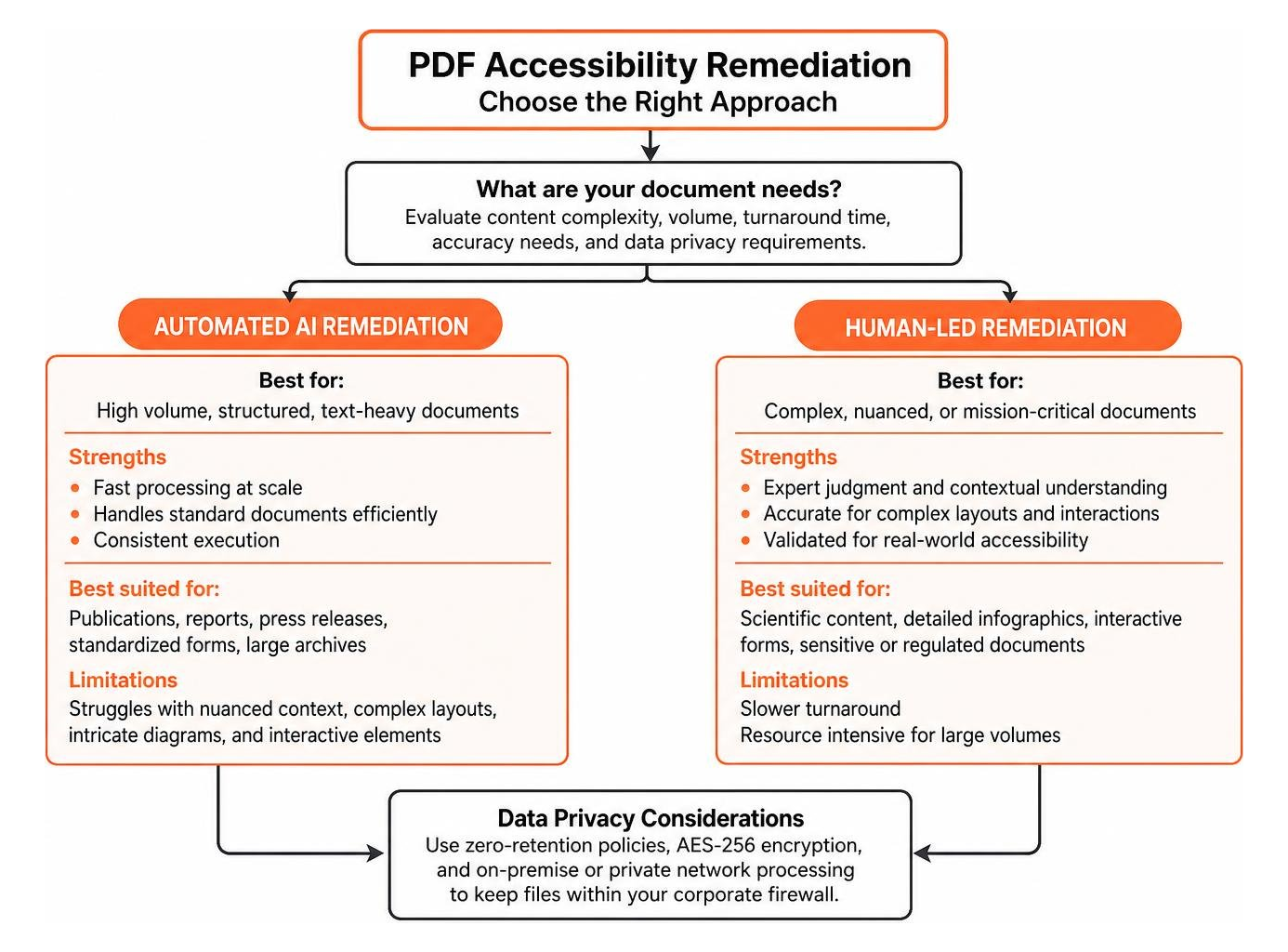
Automated AI tools excel at processing structured, text-heavy publications, archived annual reports, press releases, and standardized forms. However, AI often struggles with nuanced context, such as writing accurate alternative text for intricate medical diagrams or establishing tab orders for interactive tax documents.
Data privacy is another decisive factor. Organizations handling sensitive financial records, student files, or protected health information subject to HIPAA must ensure documents are not exposed to public machine learning models. Leading vendors address this by using zero-retention policies, AES-256 encryption, and local on-premise Docker agents that keep files entirely within your corporate firewall.
To understand how validation methodologies differ between automated scanners and manual inspections, explore our website accessibility testing services definitive guide.
Frequently Asked Questions About PDF Accessibility
What is the typical turnaround time and cost for PDF remediation?
Turnaround times depend on document volume, page count, and structural complexity. Automated AI platforms can process standard documents in a matter of seconds or minutes. Full-service human remediation typically requires 24 to 72 hours for standard business documents, while large enterprise archives are delivered in phased milestones over several weeks.
How do organizations ensure data security when outsourcing PDF remediation?
Reputable remediation companies employ strict data governance protocols. These include end-to-end AES-256 encryption for files in transit and at rest, standard non-disclosure agreements, and automated deletion schedules that purge processed files after 7 to 30 days. For highly regulated sectors like defense, finance, and healthcare, several vendors provide on-premise Docker agents so sensitive files never leave internal servers.
Can teams handle PDF accessibility in-house or should they outsource?
Organizations can create accessible documents internally if authors use structured templates and native accessibility tools within applications like Microsoft Word or InDesign. However, fixing legacy PDF backlogs and remediating complex untagged files in Adobe Acrobat requires specialized training. Most organizations adopt a hybrid approach: they train internal staff to author clean files moving forward, while partnering with external remediation vendors to clear extensive backlogs.
Conclusion
Publishing accessible PDFs is both a legal requirement and an essential standard for digital equity. With strict deadlines approaching under ADA Title II and related global mandates, leaving digital documents untagged introduces unacceptable legal and organizational risks.
At WCAG Pros, we help organizations navigate digital accessibility with confidence. We deliver comprehensive audits across all WCAG 2.2 success criteria, provide practical remediation guidance, and perform free re-audits to ensure your digital ecosystem remains compliant.
Ensure your digital content and public documents are universally usable by scheduling our comprehensive digital accessibility and WCAG audit services today.
Read more website accessibility articles
Get Help With Your Website
We'll follow up with info about:
- The process
- Cost
- Timeline
We promise to respect your privacy, and never abuse the information you provide. We will not sell or rent your information to any third party.
By submitting this form, you consent to receive SMS messages and/or emails from SEM Dynamics LLC, dba WCAG Pros. To unsubscribe, follow the instructions provided in our communications. Msg & data rates may apply for SMS. Your information is secure and will not be sold to third parties.