
Finding the Best WCAG Audit Consultant for Seamless Digital Remediation
Finding the Best WCAG Audit Consultant for Seamless Digital Remediation
How to Choose a WCAG Audit Consultant
Hire a WCAG audit consultant who tests real user tasks, not just pages with a scanner. Ask for manual keyboard and screen reader testing against WCAG 2.2 AA, a report that ranks issues by user impact, clear guidance for your developers, and a plan to retest fixes. Confirm which pages, forms, and key tasks the audit will cover before you sign.
This matters if your business is concerned about ADA risk. An audit can show where people face barriers and give your team a path to fix them. It cannot guarantee that your site will stay accessible or prevent a lawsuit.
I’m Matthew Post, co-founder of WCAG Pros and a programmer with more than 20 years of web development experience. As a WCAG audit consultant, I supervise audits and remediation work to help businesses find barriers and make practical fixes.
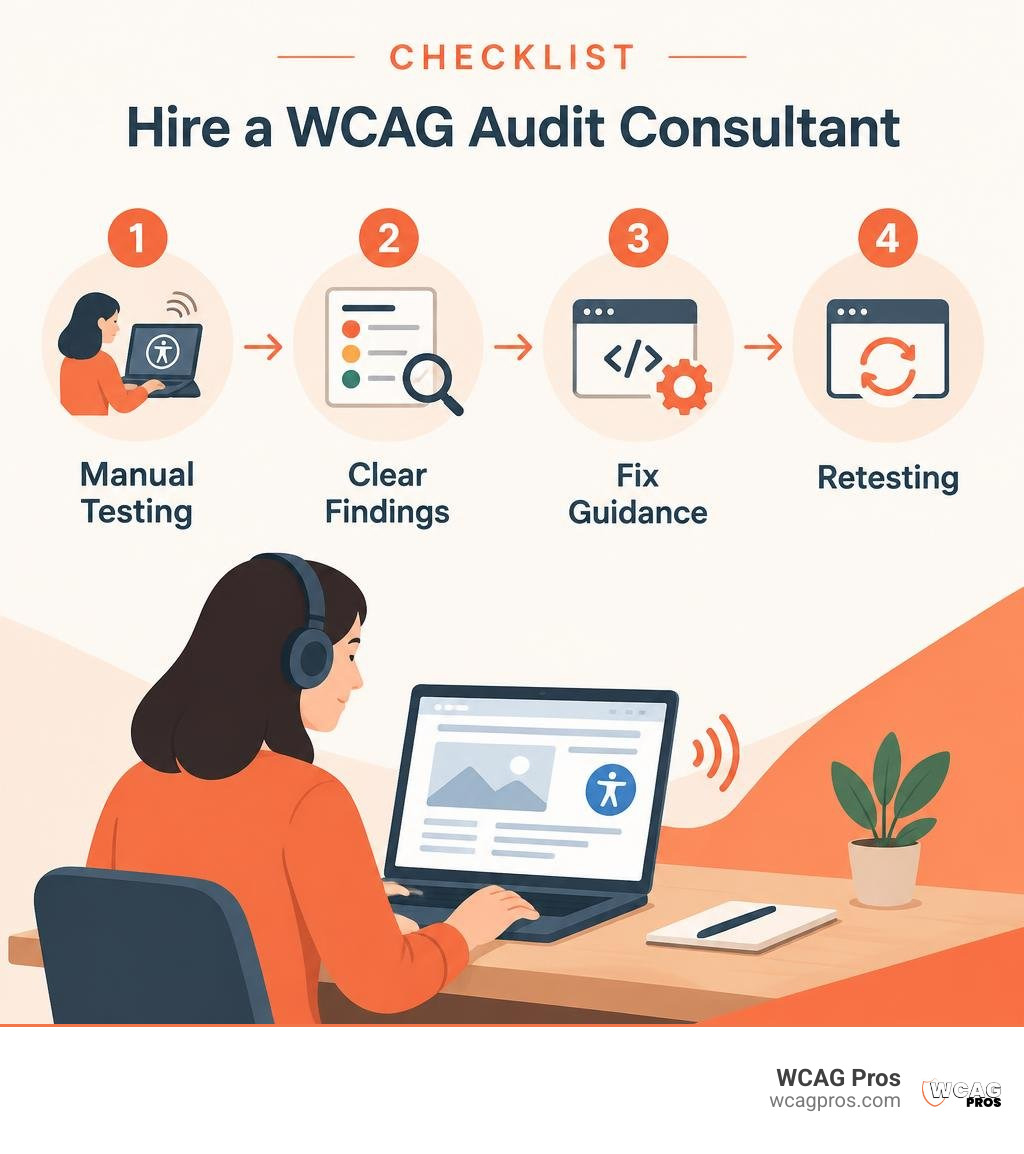
Quick WCAG audit consultant definitions:
Why You Need a Certified WCAG Audit Consultant Over Automated Tools
Relying solely on automated checkers to evaluate your website is like expecting a spellchecker to write a compelling novel. Automated scanners are fast, but according to W3C documentation, they detect only about 30% to 40% of actual accessibility barriers. These tools miss the contextual, structural, and interactive nuances that real people encounter every day.
When an automated tool scans your site, it looks for easily quantifiable attributes in your code. It checks whether an image tag has an alt attribute, but it cannot tell you if that text accurately describes the image or provides confusing gibberish. It verifies color hex codes against a mathematical contrast formula, yet it cannot evaluate text layered over dynamic background images or gradient buttons.
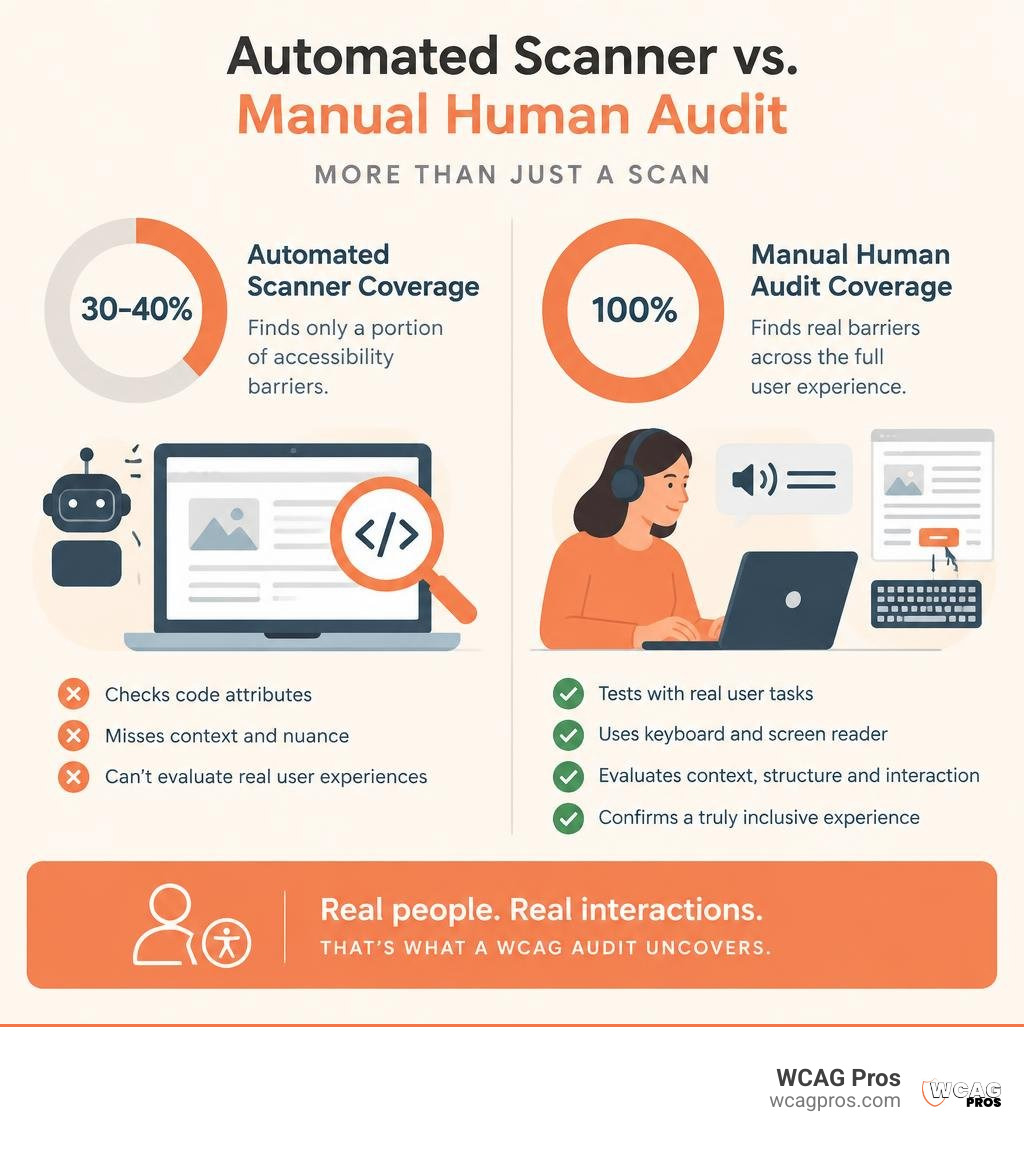
Human beings interact with digital experiences through intent, context, and assistive technology. That is precisely why hiring a web accessibility consulting firm is a genius move for modern organizations. An experienced consultant looks past basic syntax to evaluate whether a person who is blind, has low vision, relies on motor-control devices, or navigates exclusively with a keyboard can complete essential user journeys on your platform.
The Pitfalls of Automated Scanners
Automated scanners give organizations a false sense of security. Companies install an automated tool, run a batch scan, see a high score, and assume their ADA legal exposure is resolved. Months later, they receive a formal demand letter because a customer using a screen reader could not navigate past a broken checkout modal.
Automated scanners frequently trigger false positives that send developers down unproductive rabbit holes. Worse, they fail to catch catastrophic barriers such as keyboard traps, missing ARIA live region updates, and incorrect focus management.
| Audit Method | Issue Detection Rate | Assistive Tech Testing | Legal Defensibility | Actionable Code Guidance |
|---|---|---|---|---|
| Automated Scanner | 30% to 40% | None | Minimal | Generic rules only |
| Manual Consultant Audit | 100% of WCAG criteria | Real devices and tools | Highly defensible | Precise developer snippets |
Critical Barriers Only Manual Human Audits Can Uncover
Manual testing validates the exact user experience across leading assistive technologies such as NVDA, JAWS, and Apple VoiceOver. During an expert manual evaluation, your digital properties are thoroughly tested without a mouse, revealing critical barriers that no algorithmic tool can process:
- Keyboard navigation flow: Ensuring a logical tab order through menus, interactive accordions, and checkout steps without trapping the focus.
- Dynamic content announcements: Verifying that single-page application route changes, filter updates, and cart additions trigger clear ARIA live alerts for screen reader users.
- Custom UI widget operation: Checking whether custom carousels, expandable panels, and modal dialogs properly expose their states, roles, and values to assistive software.
- Form validation and error recovery: Confirming that error messages are explicitly tied to the relevant input fields and announced clearly when submission fails.
- Meaningful contrast in context: Testing hover states, active focus rings, and complex background media to guarantee readability across all visual conditions.
Key Criteria: What to Evaluate Before Hiring an Accessibility Partner
Selecting an accessibility partner is a high-stakes decision. The consultant you choose determines whether your remediation project succeeds or stalls out in technical confusion. To help you evaluate candidates, we recommend learning how to choose the right web accessibility consultant based on verified skills rather than marketing promises.
Begin by confirming their direct experience with relevant digital civil rights legislation. Your partner should possess deep familiarity with ADA Title III, Section 508 of the Rehabilitation Act, and international standards like the European Accessibility Act.
Essential Credentials to Look for in a WCAG Audit Consultant
Credentials prove that an auditor possesses comprehensive, tested knowledge of digital accessibility principles. The International Association of Accessibility Professionals is the premier global credentialing body. Look for consultants holding verified IAAP certifications:
- Certified Professional in Accessibility Core Competencies (CPACC): Demonstrates broad foundational knowledge of disabilities, accessibility principles, and global laws.
- Web Accessibility Specialist (WAS): Represents advanced technical mastery in evaluating digital content, writing accessible code, and identifying complex WCAG defects.
- Certified Professional in Web Accessibility (CPWA): The designation awarded to professionals who hold both the CPACC and WAS credentials.
Beyond certifications, ensure your partner understands how to work with modern development frameworks. You need qualified WCAG 2.2 accessibility auditors who supply developer-ready code fixes and understand shift-left QA practices to stop bugs from reaching production.
Evaluating Legal Expertise and Industry Experience
Legal defensibility is an essential factor for any digital enterprise. More than 4,200 ADA website lawsuits are filed in the United States every year. When dealing with digital accessibility complaints, having an established audit trail from a reputable specialist is critical.
A seasoned consultant understands how plaintiff law firms evaluate websites. They review your highest-risk customer touchpoints, such as authentication, checkout flows, and customer service channels. When reviewing legal experience, look for consultants who:
- Provide objective, transparent evidence that documents your current accessibility posture.
- Offer strategic support in interpreting digital civil rights obligations.
- Work closely with your legal counsel and development teams to create practical compliance roadmaps.
- Have experience aligning audit findings with legal and development stakeholders.
The Step-by-Step WCAG Audit and Remediation Lifecycle
A rigorous accessibility audit follows a structured, transparent lifecycle. At WCAG Pros, our certified WCAG audit process emphasizes clarity and thoroughness at every stage.
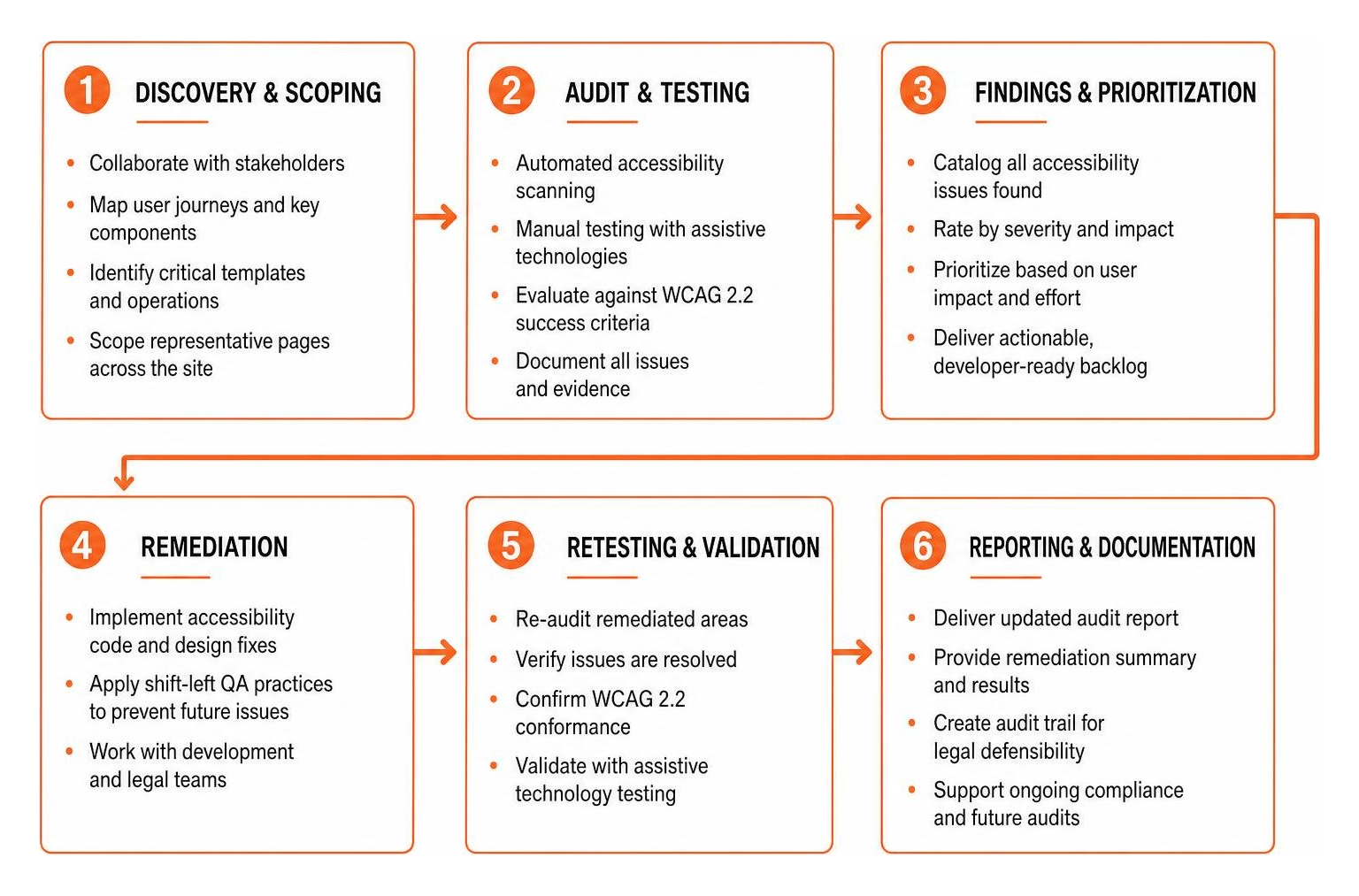
The process starts with thorough discovery. We collaborate with your product and engineering leadership to map essential user journeys, key design components, and critical operational templates. We scope representative pages that cover every unique layout, functional widget, and user task.
How a WCAG Audit Consultant Executes a Thorough Remediation Roadmap
Once the scope is finalized, the consultant performs a hybrid audit combining automated scanning with comprehensive manual assistive technology testing. Every discovered issue is cataloged into an actionable, prioritized backlog.
Rather than handing your team an overwhelming list of generic defects, the audit breaks issues down by business impact and severity. High-severity barriers that completely block user tasks receive top priority, followed by moderate issues and minor cosmetic defects.
Your engineering team receives a prioritized WCAG audit report complete with:
- Exact WCAG 2.2 success criteria references.
- Visual screenshots and code inspection notes.
- Specific remediation recommendations with copy-pasteable HTML, CSS, and ARIA code examples.
- Direct integration into project tracking platforms like Jira or Azure DevOps.
Essential Deliverables: From VPAT/ACR to Re-Testing
A complete audit package includes formal documentation to support both your internal teams and external compliance requirements. For detailed insight into compliance paperwork, review our comprehensive breakdown of ADA audit and certification standards.

Key deliverables you should expect include:
- Executive Summary: A high-level assessment of organizational risk, current accessibility health, and strategic recommendations for executive leadership.
- Technical Issue Backlog: Detailed developer tickets containing reproduction steps, assistive technology behavior notes, and code fixes.
- Accessibility Conformance Report (ACR): Created using the latest VPAT 2.5 template to document product conformance for institutional procurement and enterprise clients.
- Post-Remediation Verification: Dedicated re-testing of fixed items to ensure code updates resolved the original issue without introducing regressions.
- Compliance Certification Badge: A verified digital statement and badge confirming that your digital property meets WCAG 2.2 AA standards.
Cost and ROI of Professional Accessibility Consulting
Investing in a digital accessibility audit provides substantial, measurable returns across legal protection, brand reputation, and revenue expansion. Over 61 million adults in the United States live with a disability, representing immense purchasing power. When your website is fully usable for everyone, you immediately widen your total addressable market.
Pricing Models: Small Business vs. Enterprise Engagements
Accessibility consulting engagements are structured around project complexity, page volume, and the depth of ongoing engineering support required.
| Engagement Tier | Scope & Focus Areas | Typical Deliverables | Ongoing Support Level |
|---|---|---|---|
| Small Business | Core marketing site, contact forms, standard CMS templates | Technical findings report, executive summary, re-audit verification | Basic email guidance, final sign-off |
| Mid-Market | E-commerce flows, account dashboards, custom UI components | Prioritized Jira backlog, developer code fixes, ACR / VPAT, team Q&A | Sprint-level advisory, remediation reviews |
| Enterprise | Complex SaaS apps, multi-brand design systems, mobile apps | Full VPAT 2.5 suite, custom engineering workshops, governance strategy | Dedicated consulting retainer, continuous CI testing |
Measuring the Business Value and Risk Mitigation
The cost of defending a single ADA website lawsuit typically ranges from $15,000 to $50,000 in legal fees and settlement costs. That total does not include the internal resources and emergency developer time needed to remediate your site under strict court-mandated deadlines.
Proactive auditing with a trusted partner is far more cost-effective than reactive litigation defense. Beyond risk mitigation, accessible digital products deliver clear commercial advantages:
- Organic SEO Improvements: Clean semantic markup, proper heading hierarchies, descriptive text alternatives, and clear link anchors directly improve search engine indexing and rankings.
- Higher Conversion Rates: Streamlined keyboard flows, accessible forms, and unambiguous error recovery reduce checkout friction for all visitors.
- Brand Differentiation: Demonstrating a genuine commitment to digital inclusion builds lasting customer loyalty and strengthens public trust.
Frequently Asked Questions About WCAG Audit Consulting
How long does a comprehensive manual WCAG audit typically take?
A thorough accessibility audit for a standard business website or e-commerce store generally takes two to four weeks. Complex enterprise SaaS platforms or applications with extensive custom workflows may take longer, depending on the number of unique user journeys in scope.
What is the difference between a WCAG audit consultant and an automated scanner?
An automated scanner checks code syntax against basic rules, catching only a fraction of potential barriers. A human consultant performs hands-on testing using real assistive technologies, analyzes user workflows, evaluates usability context, and delivers custom code fixes to resolve underlying source-code issues.
How often should our organization engage a consultant for accessibility audits?
We recommend completing a comprehensive manual audit annually, along with targeted regression testing after every major redesign, feature release, or design system update. Fast-moving development teams often benefit from quarterly mini-audits to catch accessibility defects early in their release cycle.
Conclusion: Securing Long-Term Digital Compliance
Achieving digital accessibility is an ongoing practice of operational excellence, not a one-time project. As your digital products evolve with new features, content updates, and design enhancements, keeping your codebase aligned with WCAG 2.2 standards protects your organization from unnecessary ADA risk while ensuring equitable access for every user.
Partnering with an experienced accessibility specialist bridges the gap between regulatory mandates and practical engineering execution. Through rigorous manual testing, clear code-level remediation guidance, and structured team enablement, we empower your developers and designers to build inclusive digital experiences with confidence.
Take the first step toward building an accessible, legally defensible digital presence. Contact our team today to schedule a professional WCAG audit and secure a clear remediation roadmap for your business.
Read more website accessibility articles
Get Help With Your Website
We'll follow up with info about:
- The process
- Cost
- Timeline
We promise to respect your privacy, and never abuse the information you provide. We will not sell or rent your information to any third party.
By submitting this form, you consent to receive SMS messages and/or emails from SEM Dynamics LLC, dba WCAG Pros. To unsubscribe, follow the instructions provided in our communications. Msg & data rates may apply for SMS. Your information is secure and will not be sold to third parties.