
Speed Up Your Compliance Workflow with the Right Accessibility Audit Tool
Speed Up Your Compliance Workflow with the Right Accessibility Audit Tool
What Makes an Effective Accessibility Audit Tool in 2026?
Modern digital experiences rely heavily on dynamic scripts, component libraries, and complex user flows. Evaluating these websites requires an engine built on current standards. In 2026, the baseline benchmark for digital inclusion is WCAG 2.2 Level AA. An effective scanner must parse live Document Object Model (DOM) trees rather than raw, unrendered HTML so it can evaluate single-page applications accurately. This matters because many modern frameworks inject content after the initial page load, and a scanner that only reads static source code will miss the interactive elements that users actually encounter.
When reading our practical guide to choosing an automated accessibility testing tool, you will find that accuracy is paramount. A high rate of false positives slows down engineering teams, while false negatives create a false sense of security. Reliable tools run proven rule engines that flag verified code violations, provide precise code snippets for remediation, and output clear reports in formats like JSON, CSV, or executive PDF summaries. The best tools also explain why each violation matters, which helps developers understand the user impact behind a missing label or a broken heading structure.
Key Features to Prioritize for Enterprise Workflows
Enterprise environments require specialized testing capabilities to keep pace with continuous deployments. A tool that works for a small marketing site may not scale to a large product team with hundreds of pages and multiple contributors.
- Authenticated and dynamic page scanning: Many critical interactions happen behind a login screen. Scanners should evaluate staging environments, checkout flows, and account portals via headless Chrome rendering or browser extensions. Without this capability, teams miss the exact pages where paying customers and registered users spend most of their time.
- Smart deduplication and issue grouping: When a shared navigation component contains a missing label, a smart tool groups those instances together so engineers solve the problem once across thousands of pages. This prevents issue queues from becoming flooded with duplicate tickets for the same underlying template defect.
- Issue tracking synchronization: Integration with platforms like Jira or GitHub Issues ensures identified bugs turn into actionable engineering tickets. This keeps accessibility work inside the same workflow that developers already use for feature development and bug fixes.
- Role-based reporting: UX designers, frontend developers, and legal compliance officers need different levels of detail, from raw selector paths to executive health summaries. A designer may want to see visual screenshots of contrast failures, while a compliance officer needs a high-level trend report showing progress over time.
Teams looking to modernize their QA pipeline can compare WCAG 2.2 testing options to match these features to their specific development stack. The right tool should fit into existing workflows rather than forcing teams to adopt a separate, parallel process.
Essential Checks: Contrast, Semantics, and Focus Visibility
Automated engines excel at inspecting structured elements that follow clear programmatic rules. For example, text elements must satisfy color contrast thresholds of at least 4.5 to 1 for normal text and 3 to 1 for large text. Learning how to use a color contrast checker to save your design allows design teams to catch contrast issues during the mockup phase before code is written. This early detection prevents expensive redesigns later in the project lifecycle.
Beyond color, automated tools verify semantic markup. They check that heading structures follow a logical order, form inputs have programmatic labels, interactive controls meet minimum target size requirements, and ARIA roles match their expected parent-child relationships. They can also flag basic keyboard focus traps and missing focus indicators on active elements. These checks are valuable because they catch the most common accessibility failures that affect keyboard users and screen reader users alike.
Top Automated and Hybrid Accessibility Testing Tools
The testing ecosystem offers a variety of tools, ranging from lightweight browser extensions to enterprise scanning platforms. The official W3C Web Accessibility Evaluation Tools List documents dozens of specialized engines, each with different strengths for different team sizes and project types.
| Tool Name | Engine Type | WCAG 2.2 Support | Primary Deployment | Best Use Case |
|---|---|---|---|---|
| axe DevTools | axe-core | Full (A, AA, AAA) | Extension, CLI, API | Developer unit tests and rapid in-browser diagnostics |
| WAVE | WebAIM Engine | Full (A, AA) | Extension, API | Visual on-page audits and content contributor reviews |
| IBM Equal Access | Rule Engine | Full (A, AA) | Extension, NPM, CI/CD | Open-source CI pipelines and automated build checks |
| Siteimprove | Proprietary Crawler | Full (A, AA, AAA) | Enterprise Cloud Platform | Whole-domain governance, PDF scans, and executive monitoring |
| Look-see | Headless Pixel/DOM | Full (A, AA) | Open Source, Cloud Run | Journey-aware rendering and pixel-level contrast analysis |
Selecting a Browser-Based Accessibility Audit Tool for Rapid Inspection
Browser extensions are the fastest way for developers and content creators to audit live pages. Running directly inside Google Chrome, Microsoft Edge, or Mozilla Firefox, these tools inspect the fully rendered DOM after JavaScript executes. This means they see the same page that a real user sees, including dynamic content that appears after user interaction.
Our complete guide to the WAVE accessibility tool highlights how visual overlays help non-technical users spot missing alt text, contrast failures, and structural anomalies directly on the screen. Similarly, axe DevTools embeds into native developer tool panels to deliver instant, code-level feedback. For teams getting started on a budget, exploring 5 free ADA compliance tools to check your website instantly provides practical options without upfront software costs.
Deploying an Open-Source Accessibility Audit Tool in CI/CD Pipelines
Catching accessibility regressions before code merges into production prevents costly remediation later. Developers can integrate packages like the IBM Equal Access open-source repository or axe-core CLI directly into GitHub Actions, GitLab CI, or Jenkins. This shifts accessibility testing left in the development lifecycle, so issues are caught when they are cheapest to fix.
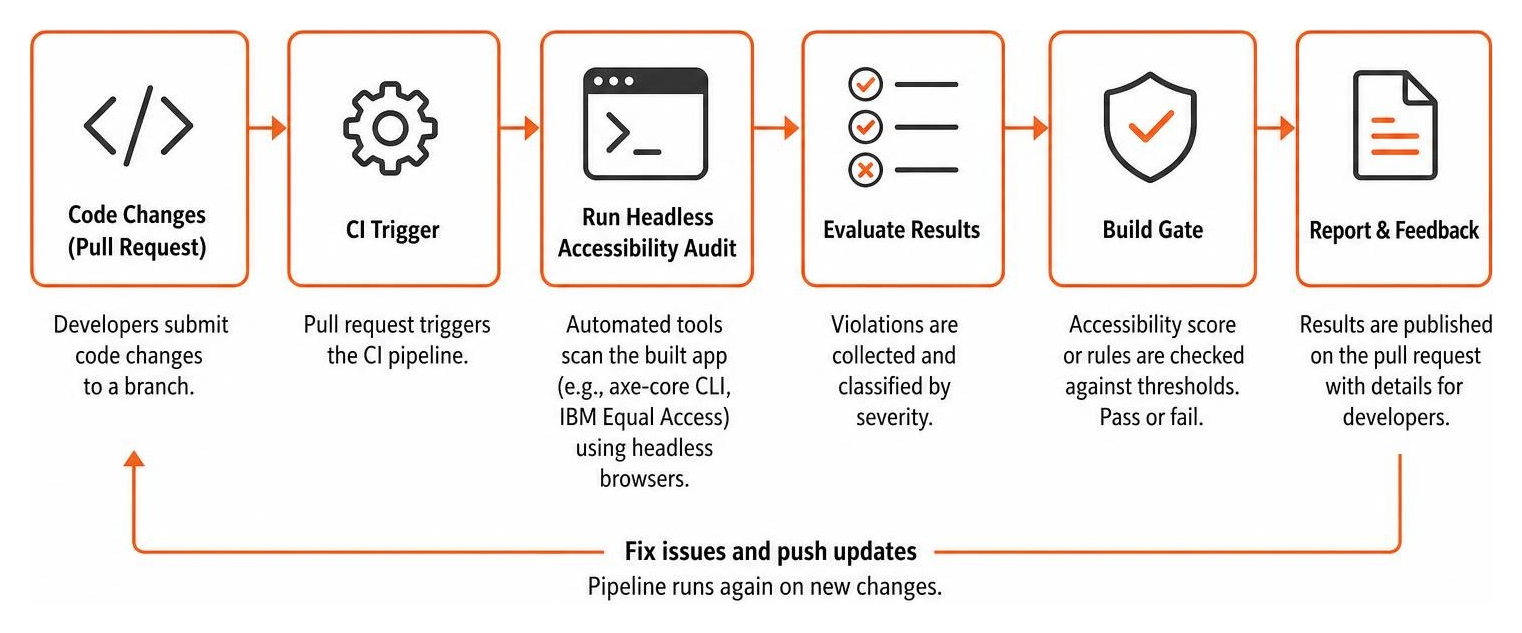
When teams discover how automated web accessibility testing made easy can be with automated linting and test assertions, accessibility becomes a standard metric in everyday quality assurance. Teams can set build gates that fail a pull request if new critical accessibility violations appear. This creates a culture where accessibility is treated as a core quality requirement rather than an afterthought.
Site-Wide Crawlers and Enterprise Governance Platforms
While extensions evaluate one page at a time, large organizations with thousands of URLs require automated crawlers. Platforms like Siteimprove crawl entire domains on scheduled intervals, mapping site architecture, flagging regressions, and scanning downloadable assets like PDF documents. This gives compliance teams a high-level view of accessibility health across the entire digital estate.
Reviewing a comprehensive web accessibility testing tools guide 2026 helps compliance leaders balance single-page diagnostic tools with site-wide governance platforms that track digital progress over time. For enterprise procurement, some platforms can also compile recorded scan findings into draft Voluntary Product Accessibility Template (VPAT) formats, which streamlines the vendor assessment process.
The Critical Gap: Automated Scanners vs. Manual Expert Audits
Automated scanning is a foundational first step, but relying exclusively on software leaves massive compliance blind spots. Industry research consistently shows that automated tools can only evaluate roughly 30% to 50% of all WCAG success criteria. The remaining requirements depend entirely on human context and assistive technology testing.

An automated tool can verify that an image contains an alt attribute, but it cannot tell if the description “blue-banner-final-v2.jpg” provides meaningful context to a blind visitor. Scanners cannot judge whether complex modal dialogs trap keyboard users, whether custom widgets announce their state changes correctly in screen readers like NVDA, JAWS, or VoiceOver, or whether multi-step checkout forms are easy to understand. These are the exact issues that lead to user frustration and legal complaints.
Our survival guide for ADA website accessibility checkers explains why manual verification is essential for genuine digital usability and legal risk protection. Real compliance requires combining fast automated scans with hands-on manual reviews conducted by trained accessibility professionals. A hybrid approach gives you both speed and depth, catching programmatic errors quickly while ensuring that the human experience is genuinely accessible.
Frequently Asked Questions About Accessibility Testing
What are the main limitations of an automated accessibility audit tool?
Automated tools cannot evaluate human context, reading order logic, or the usability of assistive technology interactions. They verify programmatic syntax, but they cannot determine if error messages are helpful, if dynamic content changes are properly announced, or if keyboard tab sequences match visual intent. For example, a scanner can confirm that a form field has a label, but it cannot tell you whether that label makes sense to a user who is filling out the form. This is why automated testing must be paired with manual review.
Can automated tools scan password-protected and staging environments?
Yes. Browser extensions run inside an active user session, allowing you to audit password-protected, staging, or intranet pages without sharing credentials. For automated continuous integration pipelines, headless testing frameworks like Playwright, Puppeteer, and Cypress can authenticate programmatically to audit secure environments before release. This means you can test your most important user flows, such as account dashboards and checkout pages, without exposing sensitive data.
How often should an organization run web accessibility audits?
We recommend a tiered testing cadence:
- Continuous: Run automated linters and unit tests on every pull request during development.
- Weekly or Monthly: Run automated site-wide crawls to detect regressions introduced by content updates.
- Annually or Post-Redesign: Conduct comprehensive manual expert audits across key user flows to maintain verified compliance and update legal documentation.
This layered approach ensures that accessibility issues are caught early and often, while still providing the deep human insight that only a manual audit can deliver.
Conclusion: Building a Sustainable Compliance Strategy
Achieving digital accessibility is an ongoing practice rather than a one-time project. Automated testing tools deliver the speed and continuous monitoring needed to catch programmatic errors early in the development lifecycle. When paired with human expertise, your team creates digital experiences that are welcoming to everyone while satisfying global standards like the ADA, Section 508, and the European Accessibility Act.
At WCAG Pros, we help organizations bridge the gap between automated scans and complete compliance. Our team provides comprehensive page-by-page evaluations covering all 54 WCAG A and AAA success criteria under WCAG 2.2. We deliver ready-to-ship code fixes and include free re-audits to verify your fixes and award compliance badges. This means you get both the technical remediation and the documentation you need to demonstrate compliance.
Take the next step in securing your digital presence and schedule a comprehensive expert WCAG audit with our consulting team today.
Read more website accessibility articles
Get Help With Your Website
We'll follow up with info about:
- The process
- Cost
- Timeline
We promise to respect your privacy, and never abuse the information you provide. We will not sell or rent your information to any third party.
By submitting this form, you consent to receive SMS messages and/or emails from SEM Dynamics LLC, dba WCAG Pros. To unsubscribe, follow the instructions provided in our communications. Msg & data rates may apply for SMS. Your information is secure and will not be sold to third parties.