
The Practical Guide to Professional WCAG Website Testing
Why Your Business Needs a Professional WCAG Website Audit
Digital accessibility is a fundamental requirement for modern digital commerce, public communication, and brand credibility. People with disabilities are 50% more likely to face barriers when using online services compared with those without disabilities. When critical pathways such as product catalogs, registration forms, or customer support channels contain accessibility defects, businesses unintentionally lock out a significant portion of their potential audience.
Investing in a website WCAG full audit delivers substantial commercial benefits. It improves general usability across all devices, enhances technical search engine optimization performance through clean semantic code, and expands your market reach. Most importantly, a comprehensive audit establishes the exact blueprint needed to eliminate civil liability and ensure equal access across the web. A professional WCAG website audit is the most reliable way to identify and remove those barriers before they affect your users or your legal standing.
Understanding WCAG 2.2 Conformance Levels and Global Legal Mandates
The Web Content Accessibility Guidelines, established by the World Wide Web Consortium, serve as the globally recognized technical benchmark for digital inclusion. The latest standard, WCAG 2.2, organizes accessibility criteria into three distinct conformance levels:
- Level A: Addresses the most basic web accessibility requirements. Non-conformance at this level creates total barriers that make content impossible for assistive technology users to access.
- Level AA: Serves as the global standard for legal and commercial compliance. It covers major barriers including color contrast, keyboard focus visibility, form input error handling, and touch target sizing.
- Level AAA: Encompasses enhanced, specialized requirements such as advanced contrast thresholds and sign language interpretation, typically applied to specialized public environments.
These technical levels directly underpin global digital civil rights enforcement. In the United States, Title III of the Americans with Disabilities Act mandates accessible public accommodations, with federal case law consistently adopting WCAG 2.2 Level AA as the legal standard. In the public sector, Section 508 requires federal agencies and their funded partners to maintain strict conformance. Internationally, regulations such as the European Accessibility Act via EN 301 549 standards and Ontario’s AODA enforce similar baselines. Conducting a comprehensive website compliance audit is the primary method to ensure your digital properties satisfy these statutory requirements.
The Hidden Costs of Digital Inaccessibility and Litigation Risks
Failing to maintain an accessible website creates severe financial and legal liabilities. In the United States, ADA accessibility lawsuits increased by 320% from 2013 to 2021, and thousands of new claims are filed each year in federal and state courts. Repeat filings are also prevalent, with more than 40% of federal digital lawsuits targeting organizations that failed to fix their underlying codebase after initial legal notices.
Beyond litigation defense and settlement expenses, regulatory bodies enforce strict daily penalties for ongoing violations. Under frameworks such as the AODA, non-compliance fines can reach $50,000 per day for individuals and up to $100,000 per day for corporations.
Furthermore, modern consumer browsing habits present new technical risks. E-commerce, media, and travel absorb 98% of agent traffic today. AI-driven visits to online stores grew 8x recently, and orders from AI search grew almost 13x. Autonomous AI browsing agents interpret websites using the underlying accessibility tree. When a website lacks semantic markup, proper button definitions, or logical form labeling, both assistive technology users and automated commercial agents encounter complete checkout failures.
Automated Testing Versus Manual Accessibility Evaluation
A common misconception among business leaders is that running an automated scanning tool or installing a third-party script satisfies compliance requirements. While automated tools provide value for rapid surface testing, they cannot evaluate the vast majority of real-world user interactions.
| Evaluation Metric | Automated Testing Tools | Professional Manual WCAG Audit |
|---|---|---|
| Criterion Coverage | Approximately 30% to 40% of WCAG criteria | 100% of applicable WCAG 2.2 Level A, AA, and AAA criteria |
| Contextual Analysis | Ineffective (flags missing code but cannot judge descriptive quality) | Complete human evaluation of intent, clarity, and UX context |
| Keyboard Interaction | Extremely limited (cannot detect focus traps or tab sequences reliably) | Exhaustive verification of visual focus states, focus order, and bypass blocks |
| Assistive Tech Testing | None (simulates rule sets without true screen reader engine execution) | Direct testing using JAWS, NVDA, VoiceOver, and TalkBack |
| Legal Defensibility | Inadequate for formal legal defense or VPAT documentation | Produces auditable conformance statements and code-ready evidence |
Why Automated Tools Detect Only a Fraction of Accessibility Barriers
Automated tools only catch about 30% to 40% of accessibility issues. Software scanners evaluate websites by parsing static DOM structures against programmatic rules. While an automated tool can instantly detect low color contrast ratios or identify missing alternative text attributes, it cannot determine whether existing alternative text accurately describes the image context.
An automated scanner will mark an image as passing if its alt tag contains a file name like image123.jpg, even though that text is useless to a blind user. Similarly, automated scanners cannot assess whether dynamic error alerts are communicated clearly, whether interactive modals trap keyboard focus, or whether custom interactive widgets function smoothly without mouse input. Relying exclusively on an automated tools audit leaves 60% or more of all accessibility barriers undiscovered.
The Critical Role of Assistive Technology and Human Code Inspection
True digital accessibility requires human expertise and manual code inspection. Professional auditors manually navigate every template and dynamic interaction using assistive technologies, including JAWS, NVDA, and VoiceOver on desktop, alongside TalkBack and VoiceOver on mobile devices.
Manual testing verifies essential interactive behaviors:
- Keyboard Navigation: Confirming that all interactive elements can be operated using only the Tab, Enter, Space, and Arrow keys without encountering keyboard focus traps.
- Focus Visibility: Ensuring that active elements display a distinct, high-contrast visual outline conforming to WCAG 2.2 criteria.
- Dynamic Announcements: Validating that live DOM updates, dynamic search filtering, and form submission errors are announced accurately by screen readers.
- Responsive Reflow: Checking that content scales up to 400% zoom and reflows seamlessly on a 320-pixel viewport without loss of text or functionality.
Key Phases of a Rigorous Website Accessibility Evaluation
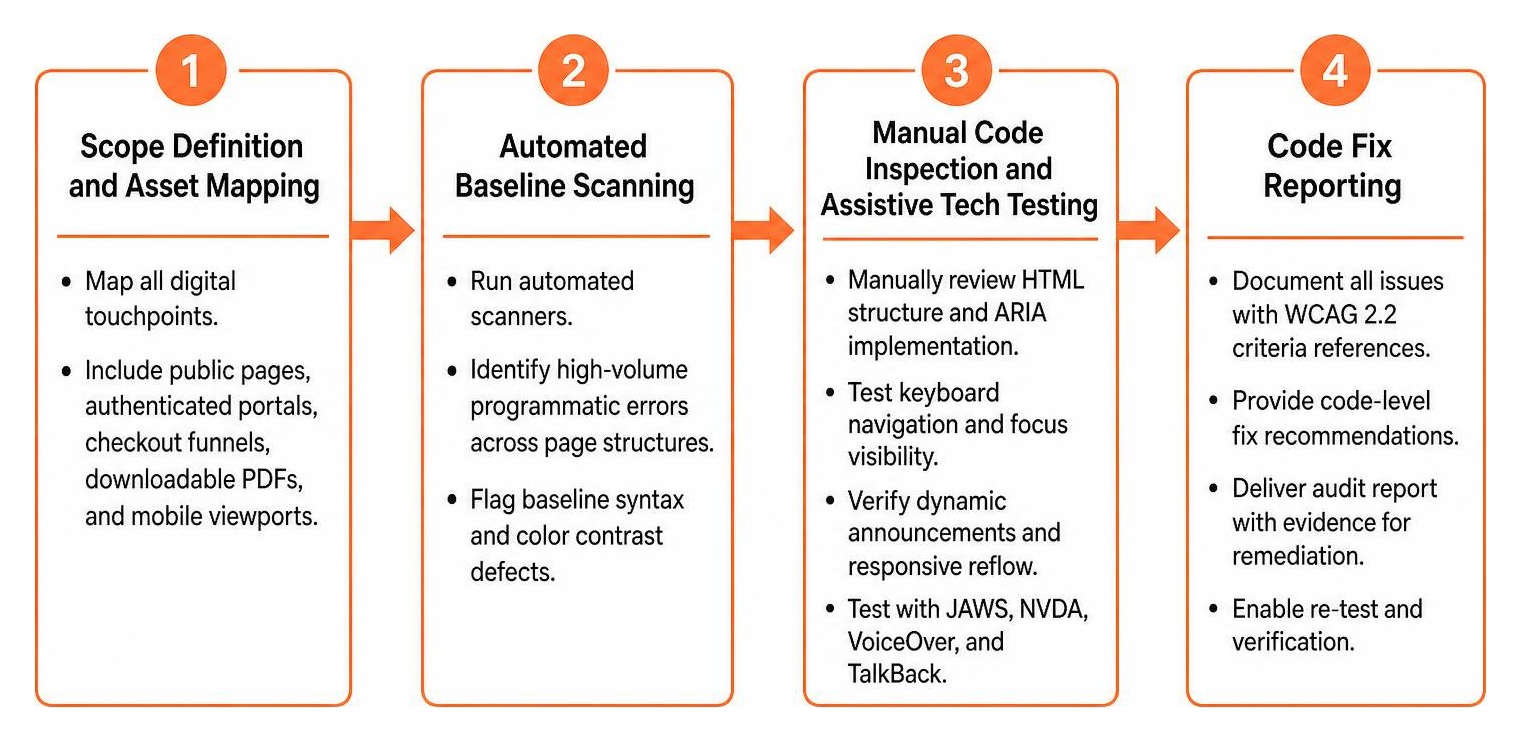
A comprehensive evaluation follows a structured engineering methodology to uncover and resolve every barrier. Following a certified WCAG audit process ensures that every digital asset undergoes rigorous multi-layer testing.
- Scope Definition and Asset Mapping: The audit team maps all digital touchpoints, including public pages, authenticated customer portals, checkout funnels, downloadable PDFs, and mobile viewports.
- Automated Baseline Scanning: Rule-based scanners quickly identify high-volume programmatic errors across page structures, flagging baseline syntax and color contrast defects.
- Manual Code Inspection and Assistive Tech Testing: Experienced engineers manually review HTML structure, ARIA implementation, keyboard mechanics, and assistive technology behavior across all interactive states.
- Defect Validation and Prioritization: Discovered issues are filtered to remove false positives and mapped to specific WCAG 2.2 success criteria with associated severity ratings.
- Remediation Reporting: Auditors deliver a comprehensive technical roadmap complete with code snippets, visual evidence, and implementation guidance for developers.
Core Deliverables of a Professional WCAG Website Audit

A professional audit must provide development teams with actionable technical documentation rather than generic checklists. When evaluating audit results using a WCAG audit report guide, you should expect the following deliverables:
- Executive Summary: A clear breakdown of the organization’s current compliance posture, legal risk profile, and overall barrier severity.
- Prioritized Issue Register: A granular inventory of every identified defect, categorized by WCAG 2.2 criterion, technical complexity, and user impact.
- Code-Level Remediation Snippets: Ready-to-implement HTML, CSS, JavaScript, and ARIA code corrections tailored to your underlying codebase.
- VPAT and Conformance Documentation: An Accessibility Conformance Report built on the Voluntary Product Accessibility Template framework for enterprise procurement and regulatory verification.
Prioritizing Remediation and Implementing Code-Level Fixes
Once the audit is delivered, remediation must be triaged efficiently within existing sprint cycles. Our detailed accessibility field manual for dev teams outlines how to resolve complex accessibility defects without disrupting core roadmaps.
Remediation efforts should always prioritize Critical and Serious barriers first:
- Critical Blockers: Focus traps, missing keyboard operability on forms or checkout flows, and inaccessible authentication steps under WCAG 2.2 criteria 3.3.8.
- Serious Barriers: Low-contrast typography, unannounced dynamic alerts, missing form field labels, and missing alt text on essential infographics.
- Moderate Defects: Suboptimal landmark structure, minor focus order inconsistencies, or non-standard touch target spacing.
After development teams deploy code fixes, conducting formal validation re-testing is essential. This confirms that all identified issues have been resolved correctly without introducing new secondary barriers.
Avoiding Common Pitfalls and Selecting the Right Audit Partner
Maintaining digital accessibility is an ongoing operational commitment. Digital products constantly evolve with new marketing content, CMS updates, and third-party plugin integrations. Without established governance, websites experience code decay that reintroduces compliance risks.
Common Mistakes in Internal and In-House Audits
Organizations often attempt to manage accessibility internally without specialized resources. Common mistakes include:
- Over-Reliance on Free Browser Extensions: Assuming a green score on an automated browser tool equates to full legal compliance.
- Deploying JavaScript Overlay Widgets: Installing third-party automated overlays that attempt to adjust page styling on the fly. These widgets do not fix underlying source code, frequently interfere with native screen readers, and have been subject to federal regulatory enforcement actions and widespread legal rejection.
- Testing Only the Homepage: Failing to evaluate authenticated areas, interactive web applications, checkout flows, and downloadable documents.
- Skipping Post-Remediation Verification: Assuming developer code changes resolved the barrier without performing follow-up assistive technology testing.
How to Choose the Right Team for a Professional WCAG Website Audit
Selecting the right partner is vital to ensure comprehensive digital accessibility and legal protection. When evaluating qualified WCAG 2.2 accessibility auditors, look for credentials and capabilities that guarantee thorough evaluation:
- Certified Professionals: Auditors holding International Association of Accessibility Professionals credentials, such as CPACC and WAS certifications.
- Comprehensive Page-by-Page Testing: Partners who inspect all 54 WCAG Level A through AAA criteria across your digital properties rather than testing a narrow sample.
- Direct Developer Support: Delivery of exact, production-ready code examples and direct technical consultation to assist your engineering staff during implementation.
- Post-Remediation Re-Audits: Inclusion of validation testing rounds to certify your resolved codebase and issue verifiable compliance badges.
Connect with our team at WCAG Pros to review your digital accessibility requirements with certified specialists.
Frequently Asked Questions About WCAG Audits
How long does a full accessibility audit take to complete?
An initial automated scan takes just minutes, but a comprehensive manual audit by experienced engineers typically takes between one and three weeks. The exact timeline depends on the overall number of unique templates, the complexity of interactive user flows, and the variety of dynamic authenticated states.
Can automated testing tools replace a professional audit?
No. Automated testing tools evaluate only 30% to 40% of WCAG criteria. Automated scanners cannot assess context, meaningful screen reader output, complex keyboard workflows, or cognitive usability. Genuine legal protection and barrier-free access require human expert inspection and native assistive technology testing.
How often should an organization conduct an accessibility audit?
Organizations should schedule a comprehensive manual accessibility audit at least once per year. In addition, targeted audits should be conducted before launching significant site redesigns, deploying major CMS architectural changes, or releasing new digital products. Continuous automated monitoring should run alongside scheduled manual audits to catch code regressions between sprint cycles.
Conclusion
Achieving and maintaining digital accessibility protects your business from costly litigation, expands your market reach, and ensures every customer enjoys equal access to your digital products. While automated scanners provide a useful starting point, they leave major compliance and usability gaps that only expert manual testing can solve.
At WCAG Pros, our team in Norco, CA provides comprehensive page-by-page audits evaluating all 54 WCAG Level A through AAA criteria. We deliver actionable, code-level remediation solutions and provide free re-audits to verify your fixes and award official compliance badges. Explore our professional WCAG audit solutions today to build an inclusive, fully compliant digital experience.
Read more website accessibility articles
Get Help With Your Website
We'll follow up with info about:
- The process
- Cost
- Timeline
We promise to respect your privacy, and never abuse the information you provide. We will not sell or rent your information to any third party.
By submitting this form, you consent to receive SMS messages and/or emails from SEM Dynamics LLC, dba WCAG Pros. To unsubscribe, follow the instructions provided in our communications. Msg & data rates may apply for SMS. Your information is secure and will not be sold to third parties.