
WCAG 2.0 AA Requirements Explained With WCAG 2.2 in Mind
What WCAG 2.0 AA requirements mean for your website
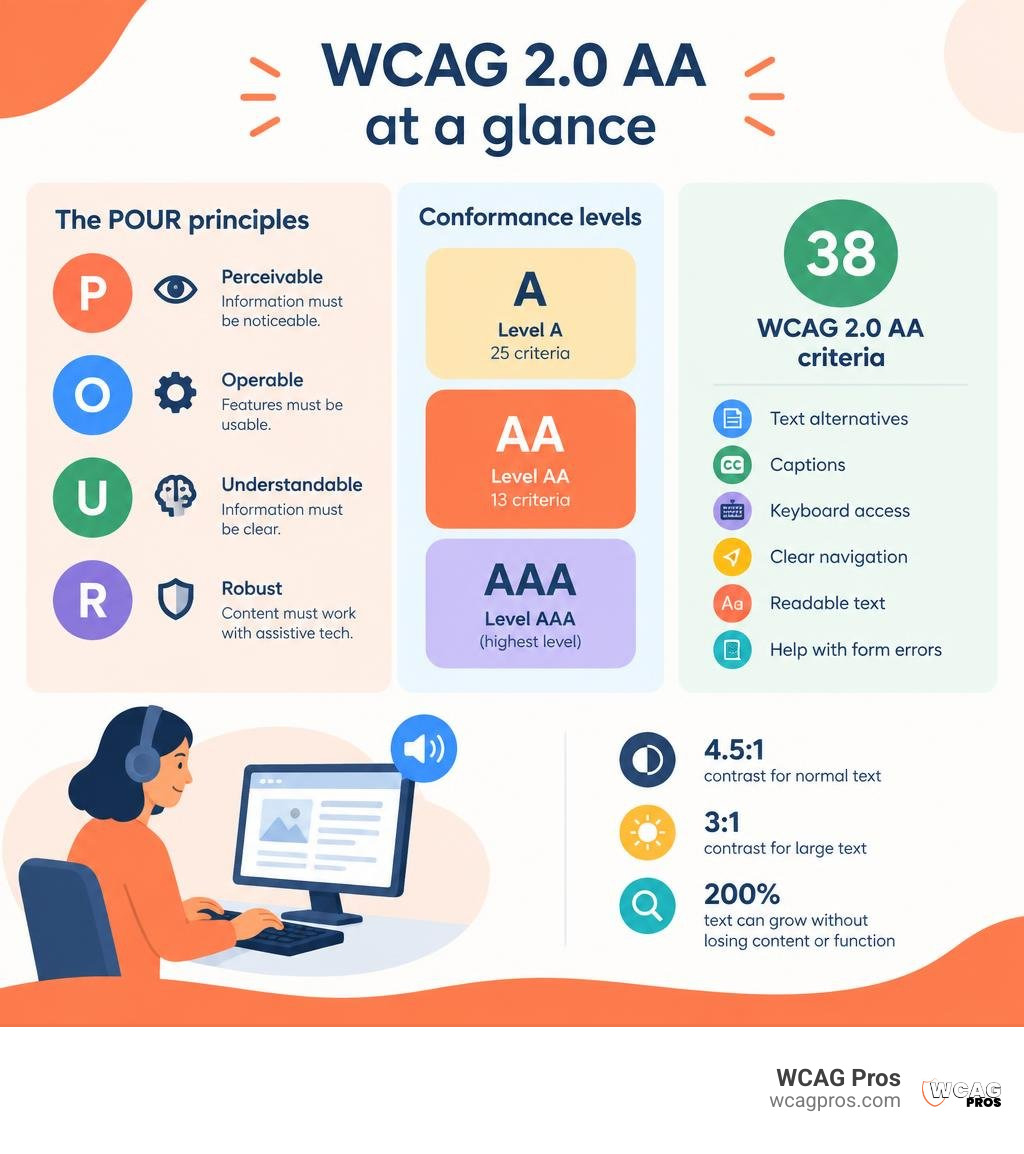
WCAG 2.0 AA requirements mean meeting all 25 Level A and 13 Level AA success criteria. Together, these 38 criteria cover text alternatives, captions, keyboard access, clear navigation, readable text, and help with form errors. Level AA also requires at least 4.5:1 contrast for normal text, 3:1 for large text, and text that can grow to 200% without losing content or function.
For a website to claim conformance, these requirements must hold across full pages and every step of a task, such as checkout. WCAG 2.0 AA remains an important benchmark, but WCAG 2.2 adds requirements worth considering when you plan updates. The WCAG 2.0 standard is the source for the exact criteria.
I’m Matthew Post, co-founder of WCAG Pros and a web developer with more than 20 years of experience. I oversee audits and fixes that help businesses understand and meet WCAG 2.0 AA requirements.
Glossary for WCAG 2.0 AA requirements:
- WCAG 2 Compliance: Demystifying Levels A, AA, and AAA
- WCAG 2.2 AA Requirements
- WCAG Compliant Websites: Practical Takeaways from Accessible Brands
WCAG 2.0 AA requirements: what they mean and which criteria apply
The Web Content Accessibility Guidelines establish technical standards to make digital experiences usable for people with diverse abilities. Conformance to WCAG 2.0 Level AA requires satisfying all 25 Level A success criteria alongside all 13 Level AA success criteria, creating a total baseline of 38 testable requirements.
Level A addresses foundational digital barriers. Without Level A conformance, users relying on assistive technology may find content completely unreachable. Level AA expands upon that foundation by establishing broader accessibility across common interactions, visual design elements, and interface navigation. Meeting both tiers ensures that web pages work reliably for individuals with visual, auditory, motor, and cognitive limitations.
Organizations seeking to understand the full framework can explore WCAG 2 compliance demystifying levels A, AA, and AAA to see how the tiers interact.
WCAG 2.0 AA requirements beyond Level A
Achieving Level AA requires meeting 13 specific success criteria that build upon the baseline Level A rules:
- 1.2.4 Captions (Live): Synchronized captions are provided for all live audio content in multimedia streams.
- 1.2.5 Audio Description (Prerecorded): Spoken narration describes key visual elements in prerecorded video content.
- 1.4.3 Contrast (Minimum): Foreground text maintains sufficient visual separation from its background.
- 1.4.4 Resize Text: Text scales cleanly up to 200 percent without assistive technology and without loss of content or functionality.
- 1.4.5 Images of Text: Visual presentations use real text rather than raster images of text, except for logos or essential branding.
- 2.4.5 Multiple Ways: More than one path exists to find a web page within a collection of pages, such as search bars or site maps.
- 2.4.6 Headings and Labels: Visual and programmatic headings and input labels clearly describe their topic or purpose.
- 2.4.7 Focus Visible: Any keyboard-operable interface features a clearly visible focus indicator during navigation.
- 3.1.2 Language of Parts: Specific phrases or passages written in a different language from the main page are marked in the code.
- 3.2.3 Consistent Navigation: Repeated navigation menus appear in the same relative order across different pages.
- 3.2.4 Consistent Identification: Components that perform the same function are identified consistently across the website.
- 3.3.3 Error Suggestion: When an input error is detected, text suggestions are provided to help the user correct it.
- 3.3.4 Error Prevention (Legal, Financial, Data): Critical submissions allow users to check, confirm, or reverse transactions before final commitment.
How WCAG 2.0 AA requirements address text, media, and contrast
Content creators must ensure non-text elements serve an equivalent purpose through text alternatives. Decorative graphics need null alt attributes so screen readers ignore them, while informative illustrations, charts, and icons require concise descriptions.
Time-based media demands structured support across both tiers. Level A requires text captions and basic alternatives for prerecorded audio and video. Level AA adds two strict requirements: live captions for real-time broadcasts under 1.2.4 and audio descriptions for prerecorded video under 1.2.5. Audio descriptions provide spoken explanations of visual changes, character actions, and scene shifts during dialogue gaps.
Visual readability relies on strict contrast ratios. Criterion 1.4.3 mandates a minimum color contrast ratio of 4.5:1 for standard body text. Large text, defined as at least 18 point normal font or 14 point bold font, requires a minimum ratio of 3:1. Criterion 1.4.4 requires the layout to accommodate 200 percent text magnification using standard browser zoom controls without breaking usability or clipping text. Under 1.4.5, text must be rendered with actual web typography rather than embedded inside graphic files.
How WCAG 2.0 AA requirements support keyboard access and navigation
A fully accessible interface does not require a mouse or touch screen. Level A establishes that all interactive elements must be operable using standard keyboard strokes like Tab, Shift Tab, Enter, Space, and arrow keys under 2.1.1, without trapping focus under 2.1.2. Criterion 2.4.1 requires bypass blocks, commonly implemented as skip-to-content links, allowing keyboard users to jump past repetitive header navigation.
Level AA enhances navigation through clear orientation and predictable structure. Criterion 2.4.7 requires a visible focus outline so users can track their active position on the screen. Criterion 2.4.5 requires providing multiple discovery mechanisms, such as combining global navigation with an HTML sitemap or site-wide search. Criterion 2.4.6 ensures that heading levels and form labels describe the actual content that follows, enabling screen reader users to scan pages efficiently.
How POUR organizes WCAG and how conformance works
WCAG standards are structured around four core principles known as POUR. These principles encompass 12 underlying guidelines in WCAG 2.0:
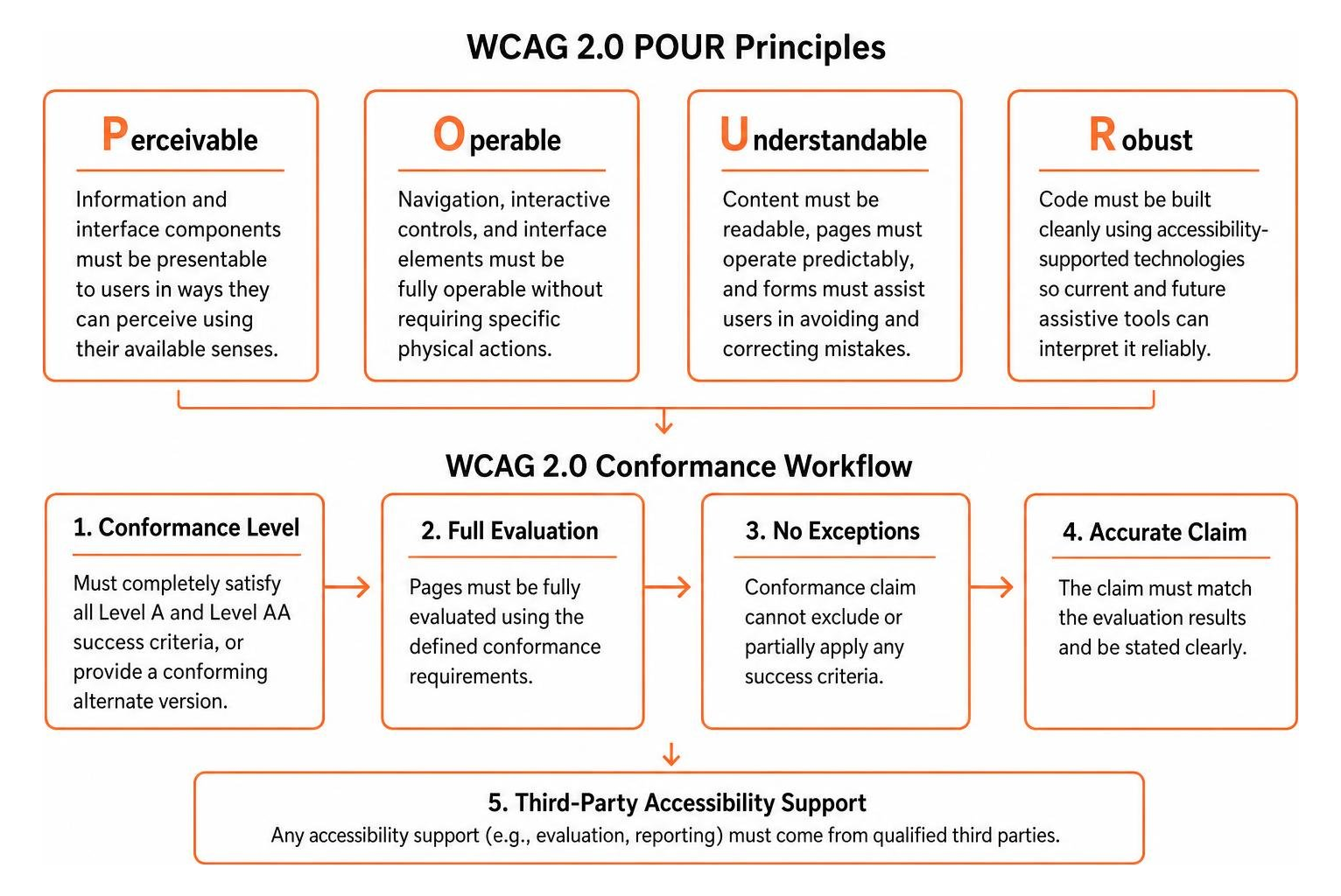
- Perceivable: Information and interface components must be presentable to users in ways they can perceive using their available senses.
- Operable: Navigation, interactive controls, and interface elements must be fully operable without requiring specific physical actions.
- Understandable: Content must be readable, pages must operate predictably, and forms must assist users in avoiding and correcting mistakes.
- Robust: Code must be built cleanly using accessibility-supported technologies so current and future assistive tools can interpret it reliably.
Reviewing the official WCAG 2 overview illustrates how these layers combine into actionable criteria. Conformance is strictly cumulative. Meeting Level AA requires passing all Level A criteria alongside all Level AA criteria. To understand the trade-offs of targeting higher tiers, see our analysis in the great debate WCAG AA vs AAA explained.
The five requirements for a WCAG 2.0 AA conformance claim
To claim formal conformance with WCAG 2.0 Level AA, a website must satisfy five explicit W3C conditions:
- Conformance Level: The web page or set of pages must completely satisfy all Level A and Level AA success criteria, or provide a conforming alternate version.
- Full Pages: Conformance applies only to entire web pages. A claim cannot exclude specific sections, sidebars, or scripts on an individual page.
- Complete Processes: When a page is part of a multi-step user flow, such as selecting a service, entering payment details, and confirming an order, every single page in that sequence must fully conform.
- Accessibility-Supported Technologies: The website must rely only on technologies that are supported by users’ assistive software and standard web browsers.
- Non-Interference: If unsupported or decorative technologies are used on the page, they must not block keyboard operation, trap user focus, or interfere with assistive tools.
W3C does not audit, endorse, or verify conformance claims made by website owners. The publishing organization bears sole legal and practical responsibility for its claims. Government resources like the applicability and conformance requirements guidance outline how these standards are enforced in public procurement.
Why Level AA is a common organizational target
Level A is universally recognized as insufficient on its own because it leaves major usability and readability barriers unaddressed. Conversely, Level AAA represents an aspirational tier that W3C acknowledges cannot be achieved across entire websites due to diverse content types and conflicting presentation requirements.
Level AA strikes the practical balance between broad human inclusion and technical feasibility. It serves as the referenced technical standard for major digital accessibility regulations worldwide. In the United States, federal agencies adhere to Section 508 of the Rehabilitation Act, which incorporates WCAG 2.0 Level AA.
Although WCAG is a voluntary technical specification rather than a statute, legal frameworks use it as the recognized standard to evaluate ADA digital compliance. While WCAG 2.0 AA established this legal baseline, teams planning long-term digital strategies often consult a comprehensive guide to WCAG 2.2 Level AA standards to ensure their digital assets remain modern and protected against emerging risks.
How to apply and assess the requirements across a website
Achieving and maintaining compliance requires systematic evaluation across all digital assets. Teams must inspect unique page layouts, interactive templates, dynamic web applications, and customer support channels.

A thorough assessment methodology combines automated tools with rigorous manual inspection:
- Automated Scanners: Fast rule-based scanners check code syntax, find missing alt text, and measure color contrast across large page volumes.
- Manual Keyboard Testing: Auditors navigate every interactive element using only standard keys, checking for logical focus order, visible indicator styling, and the absence of keyboard traps.
- Screen Reader Evaluation: Specialists test critical user journeys using tools like NVDA, JAWS, and VoiceOver to confirm that programmatic names, roles, and live dynamic updates are announced accurately.
- Form and Media Inspection: Content teams verify that every video contains synchronized captions, audio descriptions are available where needed, and form validation provides descriptive error text.
When modernizing older websites, teams can refer to how to update your website from WCAG 1.0 to WCAG 2.0 for historical perspective on updating legacy code. To structure everyday audits, our team recommends using the WCAG accessibility checklist guide as a practical reference.
What to check for errors, consistency, and assistive technology support
Input error handling is critical for complex digital services. Under 3.3.1, detected input errors must be described to the user in text rather than solely highlighted with red borders. Under 3.3.3, forms must offer concrete text suggestions for fixing mistakes, such as showing the expected date format.
For transactions involving legal commitments, financial transactions, or user profile modifications, criterion 3.3.4 requires error prevention mechanisms. The application must either allow the user to reverse the submission, provide an intermediate screen to verify and correct entered data, or require explicit confirmation before processing.
Consistency and semantic clarity must remain uniform across all page templates:
- Page Language: Declare the default language using the HTML lang attribute under 3.1.1, and use inline lang attributes for passages in other languages under 3.1.2.
- Predictable Navigation: Keep global menus, search boxes, and footer links in the same relative position and tab order across pages under 3.2.3.
- Consistent Identification: Use identical icons, labels, and text descriptions for shared functions like shopping carts, account settings, and print buttons under 3.2.4.
- Robust UI Components: Build custom controls with valid semantic markup and appropriate ARIA attributes so name, role, and value are programmatically clear under 4.1.2.
How WCAG 2.0 AA compares with WCAG 2.2
WCAG standards are designed with full backwards compatibility. Digital content that satisfies the requirements of WCAG 2.2 automatically satisfies WCAG 2.0 AA. WCAG 2.2 retains the core foundation of WCAG 2.0 while introducing modern success criteria addressing touchscreens, low-vision reflow, motor dexterity, and cognitive load.
The following table summarizes the primary differences in scope between the two versions at Level AA:
| Category | WCAG 2.0 Level AA | WCAG 2.2 Level AA |
|---|---|---|
| Total Success Criteria | 38 criteria (25 Level A, 13 Level AA) | 55 active criteria (31 Level A, 24 Level AA) |
| Mobile and Touch Interfaces | Basic device support via keyboard equivalence | Explicit rules for target size, drag gestures, and pointer cancellation |
| Responsive Layouts | 200 percent text magnification | 400 percent responsive reflow at 320 CSS pixels without horizontal scrolling |
| Visual Contrast | 4.5:1 text, 3:1 large text | Adds 3:1 minimum contrast for non-text UI components and graphical objects |
| Authentication | Standard credential forms allowed | Prohibits inaccessible cognitive tests like puzzle solving for authentication |
| Parsing Validation | Required valid HTML parsing under 4.1.1 | 4.1.1 Parsing removed as obsolete due to modern browser error handling |
While specific contracts or statutes like Section 508 reference WCAG 2.0, designing digital experiences against WCAG 2.2 provides broader real-world accessibility for end users.
Frequently asked questions about WCAG 2.0 AA requirements
What is the difference between Level A, AA, and AAA?
Level A addresses essential baseline accessibility, removing absolute barriers to basic navigation and screen reader consumption. Level AA adds requirements for visual contrast, readable typography, live captions, consistent navigation, and input error guidance, making content accessible to the vast majority of users. Level AAA represents the highest tier of technical perfection, including enhanced 7:1 contrast ratios and full sign language translation. AAA criteria are typically adopted selectively for critical tasks rather than across an entire digital presence.
Does WCAG 2.0 AA require alt text, captions, and audio descriptions?
Yes. Criterion 1.1.1 requires meaningful text alternatives for all informative images, icons, and non-text user interface components. Level A criterion 1.2.2 requires synchronized captions for all prerecorded multimedia. Level AA expands these obligations by requiring synchronized captions for live multimedia broadcasts under 1.2.4, as well as descriptive audio narration for prerecorded video content under 1.2.5.
What contrast ratio and text resizing does WCAG 2.0 AA require?
Criterion 1.4.3 mandates a visual contrast ratio of at least 4.5:1 between foreground text and its background. For large text, defined as font sizes of 18 point normal or 14 point bold and above, the required minimum ratio is 3:1. Additionally, criterion 1.4.4 requires that text can be resized up to 200 percent using standard browser magnification tools without loss of content, clipped layouts, or broken functionality.
Conclusion
Understanding and implementing the 38 success criteria of WCAG 2.0 Level AA ensures that digital platforms deliver equitable access to all users while satisfying key regulatory benchmarks. Because conformance requires meeting every single criterion across entire pages and complete user workflows, organizations must maintain rigorous testing and documentation practices.
At WCAG Pros, we support businesses and institutions by providing comprehensive page-by-page audits evaluating all 54 WCAG A and AAA checkpoints. Our accessibility engineers deliver concrete code-level remediation guidance alongside free re-audits to help your team secure verified compliance badges. Explore our full suite of WCAG guidelines and accessibility services to evaluate your digital properties and protect your organization today.
Read more website accessibility articles
Get Help With Your Website
We'll follow up with info about:
- The process
- Cost
- Timeline
We promise to respect your privacy, and never abuse the information you provide. We will not sell or rent your information to any third party.
By submitting this form, you consent to receive SMS messages and/or emails from SEM Dynamics LLC, dba WCAG Pros. To unsubscribe, follow the instructions provided in our communications. Msg & data rates may apply for SMS. Your information is secure and will not be sold to third parties.