
Stop Accessibility Lawsuits by Meeting WCAG 2.2 Level AA Requirements
What WCAG 2.2 Level AA Requires
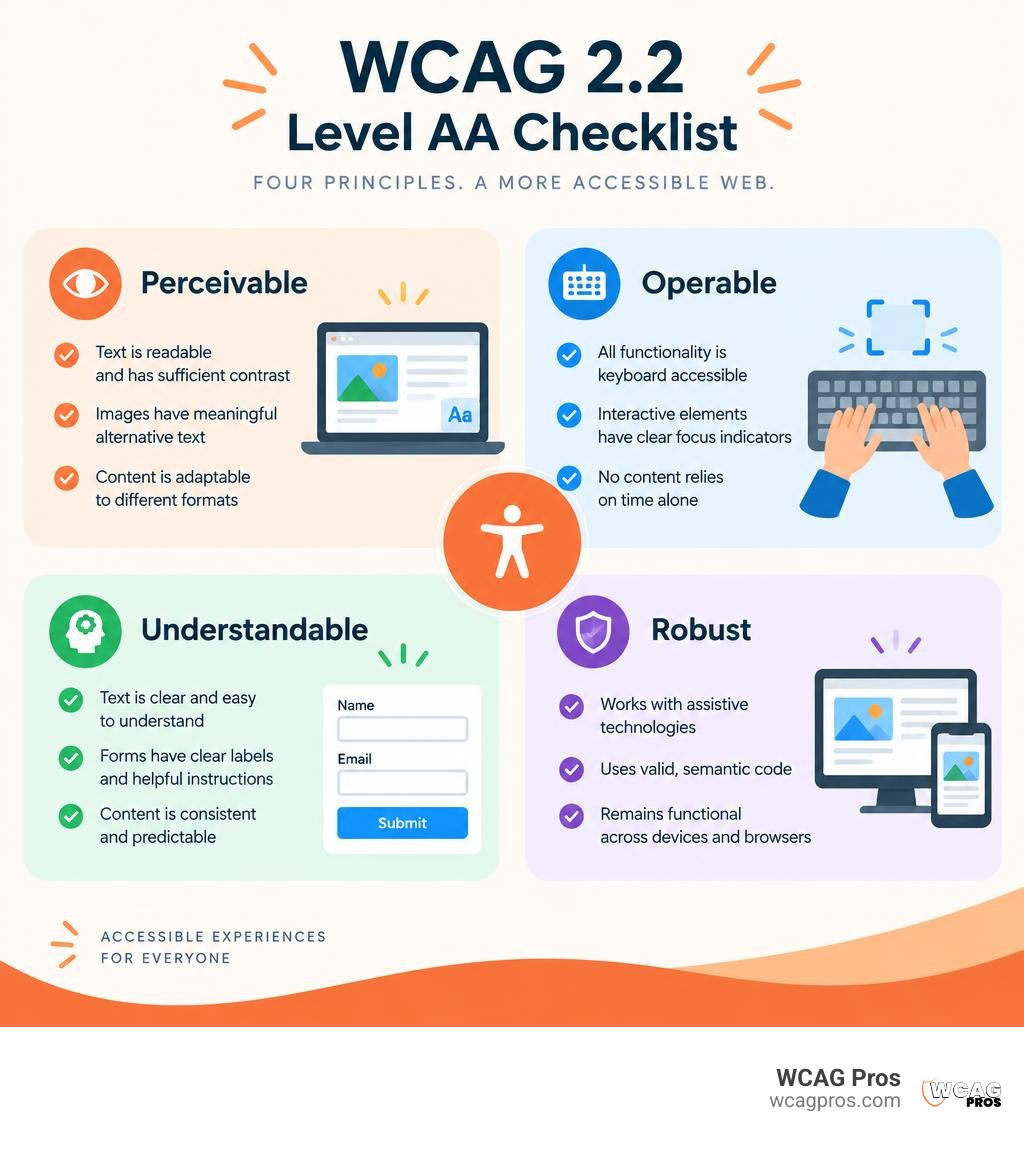
WCAG 2.2 Level AA requires a web page to meet all applicable Level A and Level AA success criteria. Start with the barriers people are most likely to face: text that is hard to read, controls that cannot be used with a keyboard, forms without clear labels, and content that breaks when enlarged. Then test the full page, including mobile views and interactive features, against the official WCAG 2.2 standard.
The requirements follow four principles: content must be Perceivable, Operable, Understandable, and Robust. For a business, an audit and code fixes can reduce accessibility barriers and help manage ADA lawsuit risk. A quick scan alone cannot confirm conformance.
I’m Matthew Post, co-founder of WCAG Pros, and I’ve spent more than 20 years working in web development and digital technology. I supervise WCAG audits and remediation, and this guide will show you how to turn WCAG 2.2 AA requirements into a practical plan.
WCAG 2.2 AA requirements terms to learn:
- WCAG 2 Compliance: Demystifying Levels A, AA, and AAA
- A Comprehensive Guide to WCAG 22 Level AA Standards
- WCAG Compliant Websites: Practical Takeaways from Accessible Brands
Understanding the Core WCAG 2.2 AA Requirements and POUR Principles
The Web Content Accessibility Guidelines establish how digital content should function for everyone, including individuals with visual, auditory, motor, or cognitive disabilities. Every guideline is organized under four fundamental pillars known as the POUR principles: Perceivable, Operable, Understandable, and Robust.
When teams begin demystifying WCAG A, AA, and AAA conformance testing for modern teams, they quickly discover that accessibility levels build cumulatively on top of one another. Level A represents the essential baseline, Level AA serves as the global regulatory benchmark, and Level AAA provides specialized enhancements for niche contexts.
| Conformance Level | Total Scope | Target Audience & Practical Intent | Legal Significance |
|---|---|---|---|
| Level A | Basic accessibility features | Prevents total blockers like missing keyboard access or absent alt text | Minimal starting baseline |
| Level AA | Comprehensive practical access | Removes significant barriers like low contrast, poor reflow, and unannounced status updates | Mandatory standard for ADA Title II, Title III, and international regulations |
| Level AAA | Specialized, advanced enhancements | Tailored enhancements for specialized contexts like sign language interpretation | Voluntary standard rarely required across entire sites |
Key Perceivable and Operable WCAG 2.2 AA Requirements
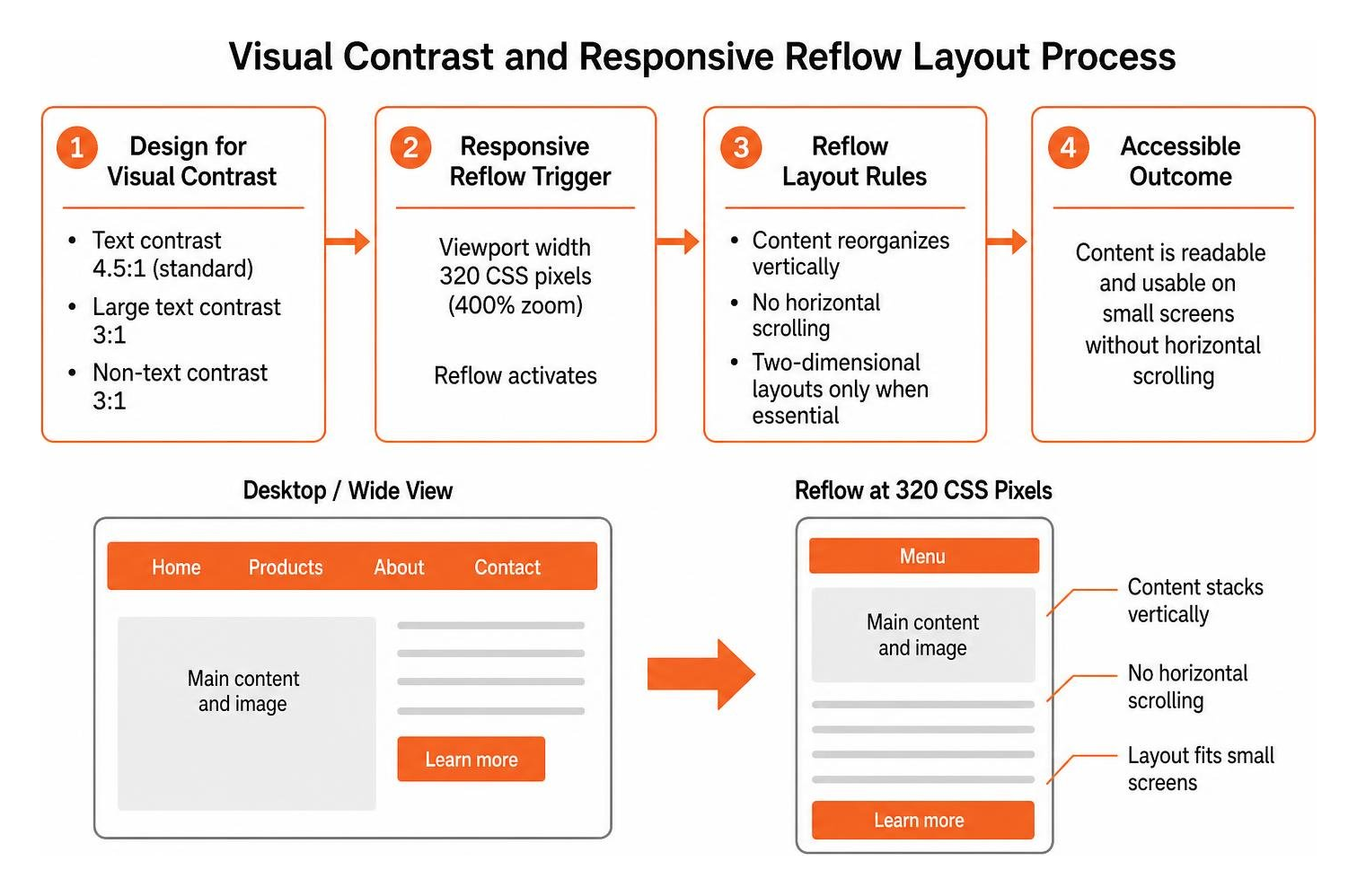
To satisfy the Perceivable principle, web elements must present information in ways users can sense through sight, hearing, or touch. The standard mandates a contrast ratio of at least 4.5 to 1 for standard text and 3 to 1 for large text. It also requires non-text contrast of 3 to 1 for user interface boundaries and meaningful icons. Content must reflow smoothly down to a 320 CSS pixel width without horizontal scrolling, and custom text spacing must not clip or overlap words.
Operability ensures that users can interact with every interface component. Everything must work smoothly via a standard keyboard, visible focus indicators must highlight the active control clearly, and users must have sufficient time to read or interact without disruptive session timeouts. You can explore the full technical specifications in the Web Content Accessibility Guidelines (WCAG) 2.2 published by the W3C.
Essential Understandable and Robust WCAG 2.2 AA Requirements
Understandability demands that user interfaces operate predictably and provide clear assistance. Form fields must programmatically communicate their purpose so assistive tools can autofill personal information accurately. When users make a mistake in a form, the system must clearly identify the error and offer actionable correction suggestions.
Robustness guarantees that digital content remains compatible with current and future assistive technologies. Dynamic status messages, such as shopping cart updates or search result tallies, must announce their status to screen readers via appropriate live regions without stealing keyboard focus. For a detailed breakdown of these rules, explore The Complete Guide to WCAG AA Compliance Requirements.
Deep Dive into Essential Level AA Criteria for Modern Interfaces

Modern web design trends such as responsive layouts, interactive flyouts, and custom form controls require deliberate accessibility architecture. The modern guidelines introduced criteria specifically crafted for mobile devices, low-vision browsing, and complex interactive scripts, as outlined in A Comprehensive Guide to WCAG 2.2 Level AA Standards.
Visual Contrast, Reflow, and Content Presentation
Digital experiences must adapt gracefully to different screen dimensions and personal visual preferences. Success Criterion 1.4.10 Reflow requires responsive layouts to reorganize content vertically at a viewport width equivalent to 320 CSS pixels, which matches 400 percent zoom on a standard desktop monitor. Horizontal scrolling should only appear when two-dimensional layouts are strictly essential, such as in data tables or interactive maps.
Success Criterion 1.4.11 Non-Text Contrast extends contrast rules beyond typography. Interactive borders, custom checkboxes, radio buttons, and graphical icons must maintain a 3 to 1 contrast ratio against adjacent colors.
Success Criterion 1.4.13 Content on Hover or Focus protects users when tooltips or dropdowns trigger automatically. The added content must be dismissible without moving the mouse pointer, hoverable so users can move their cursor over the new content, and persistent until the user dismisses it or removes trigger focus. Additionally, Success Criterion 1.3.4 Orientation ensures that applications do not lock screen display to portrait or landscape unless essential to the core functionality.
Form Controls, Input Assistance, and Dynamic Feedback
Forms represent critical transaction pathways where accessibility barriers frequently trigger user frustration and legal disputes. Under Success Criterion 1.3.5 Identify Input Purpose, form controls collecting user data like names, email addresses, phone numbers, and billing details must use standard autocomplete attributes. This enables browsers and third-party tools to autofill information automatically, greatly assisting individuals with motor or cognitive impairments.
Success Criterion 3.3.3 Error Suggestion requires web applications to provide clear, actionable instructions when inputs fail validation. Rather than simply outlining a box in red, the system must explain how to resolve the issue, such as clarifying date formats.
Under Success Criterion 4.1.3 Status Messages, dynamic notifications must use ARIA live regions or status roles so assistive technologies can read updates aloud without forcing a disruptive page refresh or moving focus away from the user’s current task.
The Legal Landscape: ADA Title II, Title III, and International Mandates
Digital accessibility is a legal obligation enforced across federal, state, and international jurisdictions. In the United States, courts consistently treat Level AA as the legal measure for website accessibility under Title III of the Americans with Disabilities Act, which applies to public businesses.
State and local government entities must also align with federal mandates such as ADA Title II Compliance. Globally, public and private organizations serving European users must follow EN 301 549 and the European Accessibility Act, while educational organizations can reference guidance from Web Content Accessibility Guidelines (WCAG) | Accessibility @ FIU. To review credentialing steps, consult A Practical Guide to Website Accessibility Certification.
Public Sector and Private Business Legal Deadlines
The regulatory environment establishes strict timelines for digital accessibility compliance. The Department of Justice finalized formal rules clarifying technical standards for public entities:
- State and local government entities serving populations of 50,000 or more must meet Level AA standards by April 26, 2027.
- Public entities with populations under 50,000 and special-purpose districts must achieve full Level AA compliance by April 26, 2028.
- Higher education public institutions and local agencies must audit all public websites, mobile apps, and electronic documents to meet their respective statutory deadlines.
- Private commercial enterprises face active ADA Title III enforcement without formal grace periods, making immediate compliance essential.
Why Superficial Accessibility Fixes Fail Legal Scrutiny
Many organizations attempt to resolve compliance risks using superficial single-click fixes. These approaches do not alter the underlying source code and may create keyboard traps or disrupt screen reader software.
True compliance requires source-code remediation that repairs DOM structures, semantic markup, and responsive stylesheets. Following a structured WCAG accessibility checklist guide allows development teams to eliminate underlying barriers permanently rather than relying on unstable cosmetic patches.
How to Audit and Achieve Conformance for Web and Mobile Assets

Achieving reliable conformance requires combining automated scanning with expert human testing. Automated scanning tools can rapidly evaluate deterministic rules such as missing alt text attributes, basic color contrast, and invalid HTML syntax. However, automated scanners can only detect a fraction of real-world accessibility failures.
Human evaluators must verify subjective and interactive criteria. Human testing assesses whether alternative text accurately conveys the image’s context, confirms that keyboard focus flows in a logical sequence, and tests custom widgets with screen readers such as NVDA, JAWS, and VoiceOver.
Step-by-Step Remediation and Conformance Roadmap
To achieve sustainable compliance, teams should follow a structured remediation roadmap:
- Conduct a comprehensive baseline audit using automated tools and manual screen reader evaluations across all core user journeys.
- Triage and remediate critical blockers first, focusing on keyboard traps, missing form labels, severe contrast failures, and broken navigation.
- Update global design system components and templates to ensure all headers, footers, buttons, and form inputs meet Level AA standards natively.
- Perform thorough regression testing across mobile viewports, touch interfaces, and assistive devices to verify that all fixes hold up in production.
Maintaining Conformance with Ongoing Monitoring and Documentation
Accessibility is an ongoing operational standard rather than a single completed project. As content teams add blog posts, marketing campaigns, and new features, ongoing monitoring prevents compliance drift.
Organizations should document their conformance status using a Voluntary Product Accessibility Template to generate an Accessibility Conformance Report. Pairing documented testing with ongoing employee training ensures your digital assets remain accessible and legally defensible over time. Learn more about maintaining high standards through our how to pass WCAG 2.2 AA certification guidance.
Frequently Asked Questions About WCAG AA Conformance
How many success criteria must be met for Level AA conformance?
To achieve Level AA conformance under the modern standard, a web page must satisfy all Level A criteria and all Level AA criteria. This requires meeting 55 total success criteria across the POUR principles, ensuring comprehensive coverage for visual, motor, auditory, and cognitive user needs.
Can automated accessibility checkers guarantee complete compliance?
No automated scanner can guarantee full accessibility compliance. Automated checkers verify deterministic rules like color contrast ratios and missing HTML attributes, but they cannot evaluate whether alternative text makes sense, whether dynamic content announcements are clear, or whether complex keyboard interactions feel intuitive to an assistive tech user. Full compliance requires hands-on expert testing.
What changed in WCAG 2.2 Level AA?
The modern WCAG 2.2 standard maintains backward compatibility while introducing practical improvements for modern digital interfaces. It adds critical criteria such as minimum target sizes for touch screens, alternative inputs for dragging movements, and accessible authentication methods that eliminate complex cognitive function tests. It also officially removes the obsolete 4.1.1 Parsing criterion, focusing compliance efforts on practical user interactions.
Conclusion
Proactive accessibility protects your organization against costly legal claims while ensuring equal access for every customer. Meeting Level AA standards improves usability, enhances search visibility, and strengthens brand trust across all digital touchpoints.
At WCAG Pros, based in Norco CA, we deliver comprehensive page-by-page audits evaluating every applicable success criterion across your web and mobile platforms. We provide clear code fixes, detailed conformance documentation, and free re-audits to award your compliance badge. Explore our WCAG Guidelines and Compliance Consulting to secure your digital presence today.
Read more website accessibility articles
Get Help With Your Website
We'll follow up with info about:
- The process
- Cost
- Timeline
We promise to respect your privacy, and never abuse the information you provide. We will not sell or rent your information to any third party.
By submitting this form, you consent to receive SMS messages and/or emails from SEM Dynamics LLC, dba WCAG Pros. To unsubscribe, follow the instructions provided in our communications. Msg & data rates may apply for SMS. Your information is secure and will not be sold to third parties.