
Step-by-Step Guide to Compliance Web Basics
Step-by-Step Guide to Compliance Web Basics
Core Pillars of Compliance Web Frameworks
Building a trustworthy online presence starts with establishing a solid digital compliance framework. When we discuss compliance web standards, we are talking about aligning user interfaces with technical guidelines that make content usable for everyone. The fundamental benchmark for digital accessibility is the Web Content Accessibility Guidelines. You can read more about these standards in The Definitive Guide to WCAG Guidelines.
WCAG 2.2 defines success criteria across three distinct levels of conformance: Level A, Level AA, and Level AAA. Achieving Level A satisfies basic accessibility requirements by eliminating severe barriers that completely prevent user interaction. Level AA addresses broader usability barriers and serves as the standard target for legal requirements, including ADA Title II and Title III. Level AAA represents the highest achievable standard, offering specialized enhancements for complex interfaces and niche user needs.
| Conformance Level | Focus Area | Requirements Summary | Target Implementation |
|---|---|---|---|
| Level A | Basic Accessibility | Keyboard access, basic alt text, non reliance on color alone, unique page titles | Essential minimum for all web properties |
| Level AA | Standard Compliance | Minimum 4.5:1 text contrast, 320px reflow, visible focus, error prevention | Standard legal benchmark for commercial sites |
| Level AAA | Advanced Accessibility | Enhanced 7:1 text contrast, 44x44px target sizes, full sign language interpretation | Specialized public sector or accessible platforms |
Implementing Compliance Web Principles: POUR
To create truly inclusive experiences, we structure digital design and engineering around four core principles known as POUR. These four foundation stones ensure that web content remains adaptable across diverse user agents and assistive tools.
- Perceivable: Users must be able to comprehend the information presented. This means providing text alternatives for non text content, adding accurate captions to videos, and maintaining high visual contrast between text and background elements.
- Operable: Visitors must be capable of navigating user interface components easily. Web experiences must offer full keyboard functionality, eliminate content that could cause seizures, and give people enough time to read and interact with material.
- Understandable: Information and interface operations must be simple to process. Navigation layouts must remain predictable, language settings must be stated programmatically, and forms must offer clear guidance and error corrections.
- Robust: Source code must remain compatible with current and future technologies. Clean semantic HTML ensures that screen readers, braille displays, and custom assistive software interpret content accurately.
Navigating Compliance Web Regulations: ADA, Section 508, and EAA
Digital compliance intersects directly with regional and global legal obligations. In the United States, ADA Title III applies to private commercial businesses that operate as public accommodations. Courts and regulatory entities like the Department of Justice routinely enforce WCAG 2.2 Level AA as the legal measure for nondiscriminatory web access. Explore specific federal guidelines in A Comprehensive Guide to ADA Business Requirements.
For state and local governments covered under ADA Title II, regulatory expectations have intensified. Department of Justice rules mandate that public entities update their online portals, educational platforms, and digital services to meet explicit WCAG 2.2 standards. Additionally, Section 508 of the Rehabilitation Act enforces technical accessibility criteria for federal agencies and third party government vendors.
Organizations doing business internationally must also prepare for the European Accessibility Act. This legislation mandates digital compliance for commercial services operating within European markets. Municipalities, such as the Website Accessibility for the City of Norco Horsetown USA initiative, demonstrate how local entities actively incorporate accessible design into community services.
Technical Requirements for WCAG 2.2 Conformance

Meeting modern compliance web standards requires precision in frontend development and visual design. Visual presentation directly dictates whether low vision users can digest written information easily. Under WCAG 2.2 Level AA guidelines, standard body text must maintain a visual contrast ratio of at least 4.5:1 against its background. Large scale text, defined as 18 point or 14 point bold, requires a minimum contrast ratio of 3:1.
Level AAA standards elevate these visual requirements further, demanding an enhanced contrast ratio of 7:1 for normal text and 4.5:1 for large text blocks. Beyond typography, essential interface components such as custom form borders, button edges, and active visual icons must maintain a 3:1 non text contrast ratio against adjacent colors.
Responsive layouts must also conform to reflow mandates. Content must display without loss of information or functionality on narrow viewports down to 320 CSS pixels wide, which corresponds to 400 percent zoom on a standard desktop display. Modern web applications must also refrain from forcing fixed screen orientation unless a specific display orientation, such as a digital check scanning feature, is strictly required.
Designing Accessible UI Components and Forms
Interactive controls require thoughtful markup and clear focus states. Custom widgets like modal dialogs, tabbed panels, and expandable menus must be fully operable using keyboard navigation alone. When a user navigates via the Tab key, a prominent visible focus indicator must outline the active component so visitors never lose track of their position on the screen.
Forms represent a critical user conversion point and require robust error prevention mechanisms. Every input field needs a clear, visible label that is programmatically associated with the field element. When validation fails, the interface must present clear error text explaining the issue in plain language rather than relying on color indicators alone.
Time Based Media, CAPTCHA, and Alt Text
Managing non text assets requires tailored alternatives for various media types. Every informative image published on a website must feature descriptive alt text explaining the content and purpose of the visual. Conversely, purely decorative imagery must use an empty alt attribute or ARIA presentation role so screen readers skip over unnecessary noise.
Time based media demands synchronized closed captions for video content alongside detailed transcripts. Audio descriptions are necessary when visual actions on screen are not adequately communicated through existing dialogue. When implementing security mechanisms like CAPTCHA, organizations must supply accessible alternatives, such as audio verification or logic puzzles, to avoid blocking disabled visitors.
Step by Step Implementation and Audit Strategy

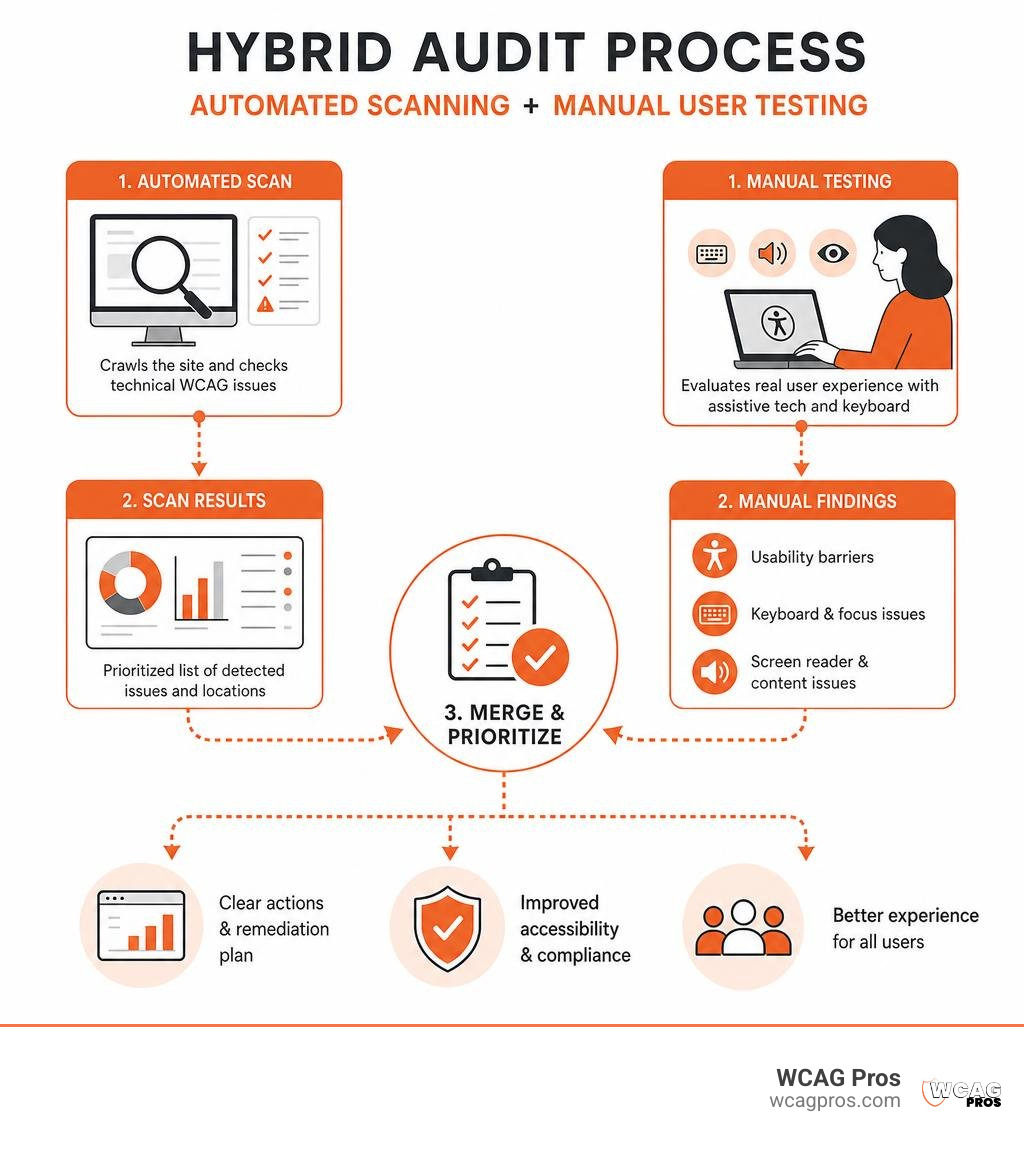
Achieving full accessibility requires a balance of systematic automated testing and human oversight. Organizations can kickstart their evaluation using open source tools like ComplyTest open source GDPR, WCAG 2.2 and security compliance scanner. Automated tools quickly catch structural markup gaps, missing alt attributes, and raw color contrast failures.
However, automated testing tools can only discover roughly 30 percent of potential WCAG failures. Evaluating screen reader compatibility, natural reading order, keyboard traps, and form context requires human testing expertise. Discover how to structure your review process by reading Website Compliance Audit 101.
Evaluating Conformance and Managing Third Party Risks
When assessing conformance, we must evaluate entire user journeys rather than isolated pages. WCAG rules mandate full page compliance, meaning an entire page fails if even a single embedded widget or dynamic footer breaches success criteria. Complete end to end processes, such as e-commerce checkout flows or account registration sequences, must remain completely accessible from start to finish.
Managing third party software risks is equally vital. Embedded widgets, payment gateways, live chat systems, and marketing scripts can introduce compliance violations into your site. When evaluating business acquisitions or software integrations, tools like Website Compliance Due Diligence | Plausity help teams audit public web footprints for compliance gaps.
Formulating Conformance Claims and Accessibility Statements
Publishing an explicit accessibility statement demonstrates your ongoing commitment to digital equity. A well constructed conformance claim communicates your compliance targets, details known limitations, and provides direct contact methods for visitors who encounter digital barriers.
Organizations working with government agencies or large enterprises often document technical accessibility through a Voluntary Product Accessibility Template, or VPAT. For step by step guidance on certifying your platform, refer to The No-Nonsense Guide to ADA Audit and Certification. Dynamic privacy and disclosure disclosures can also be reviewed through resources like Compliance Policies at Web Compliance.
Common WCAG Pitfalls and Maintenance Strategies
One of the most dangerous mistakes web teams make is relying on automated overlay widgets. These third party toolbars promise instant AI compliance through external scripts, but screen reader users frequently report that overlays interfere with native accessibility tools and break keyboard navigation.
Maintaining continuous digital compliance requires building accessibility directly into daily development workflows. To keep up with current requirements, check out our WCAG Compliance Guide 2026. Integrating automated compliance testing directly into CI/CD build pipelines ensures that code regressions are identified and resolved before code reaches live production environments.
Frequently Asked Questions About Digital Compliance
What is the difference between WCAG 2.0 and WCAG 2.2?
WCAG 2.2 builds upon previous standards by introducing critical success criteria tailored to modern web usage. While WCAG 2.0 established foundational digital guidelines, WCAG 2.2 adds targeted protections for mobile touch interfaces, low vision users needing flexible layouts, and individuals with cognitive or learning disabilities. Crucially, WCAG 2.2 maintains complete backward compatibility, meaning any web page that conforms to WCAG 2.2 automatically meets WCAG 2.0 requirements.
How can organizations determine their required WCAG conformance level?
For the vast majority of commercial businesses, state entities, and educational organizations, WCAG 2.2 Level AA serves as the recommended target standard. Level A leaves significant usability gaps, while Level AAA mandates visual and code constraints that are impractical for many standard web application layouts. Targeting Level AA satisfies major legal frameworks, including ADA Title II, ADA Title III, and Section 508.
Why are automated accessibility checkers alone insufficient for full compliance?
Automated accessibility tools operate using rigid programmatic rules. While they excel at highlighting missing code attributes or calculating color contrast ratios, they cannot evaluate subjective user experience. An automated scanner cannot tell if image alt text accurately describes a photo, whether a keyboard focus order feels logical to a user, or if a screen reader can successfully complete a complex checkout workflow. Complete compliance requires pairing automated scans with human manual audits.
Conclusion
Mastering compliance web standards is essential for creating digital products that serve every visitor while mitigating legal liabilities. Achieving true accessibility requires looking beyond automated fixes and building inclusive design principles directly into your source code. By following the WCAG 2.2 framework, aligning visual design with clear technical requirements, and conducting routine audits, your business can foster an open, usable digital environment for everyone.
At WCAG Pros, based in Norco CA, we deliver comprehensive, practical web accessibility consulting. Our expert team provides exhaustive page by page manual audits covering all 54 WCAG Level A through AAA criteria, offering detailed code remediation support and free reaudits to help you earn your official compliance badge. Visit WCAG Pros Digital Accessibility Consulting to schedule your website evaluation today.
Read more website accessibility articles
Get Help With Your Website
We'll follow up with info about:
- The process
- Cost
- Timeline
We promise to respect your privacy, and never abuse the information you provide. We will not sell or rent your information to any third party.
By submitting this form, you consent to receive SMS messages and/or emails from SEM Dynamics LLC, dba WCAG Pros. To unsubscribe, follow the instructions provided in our communications. Msg & data rates may apply for SMS. Your information is secure and will not be sold to third parties.