
Government Site ADA Audit Steps Every Public Agency Needs
How to Start a Government Site ADA Audit
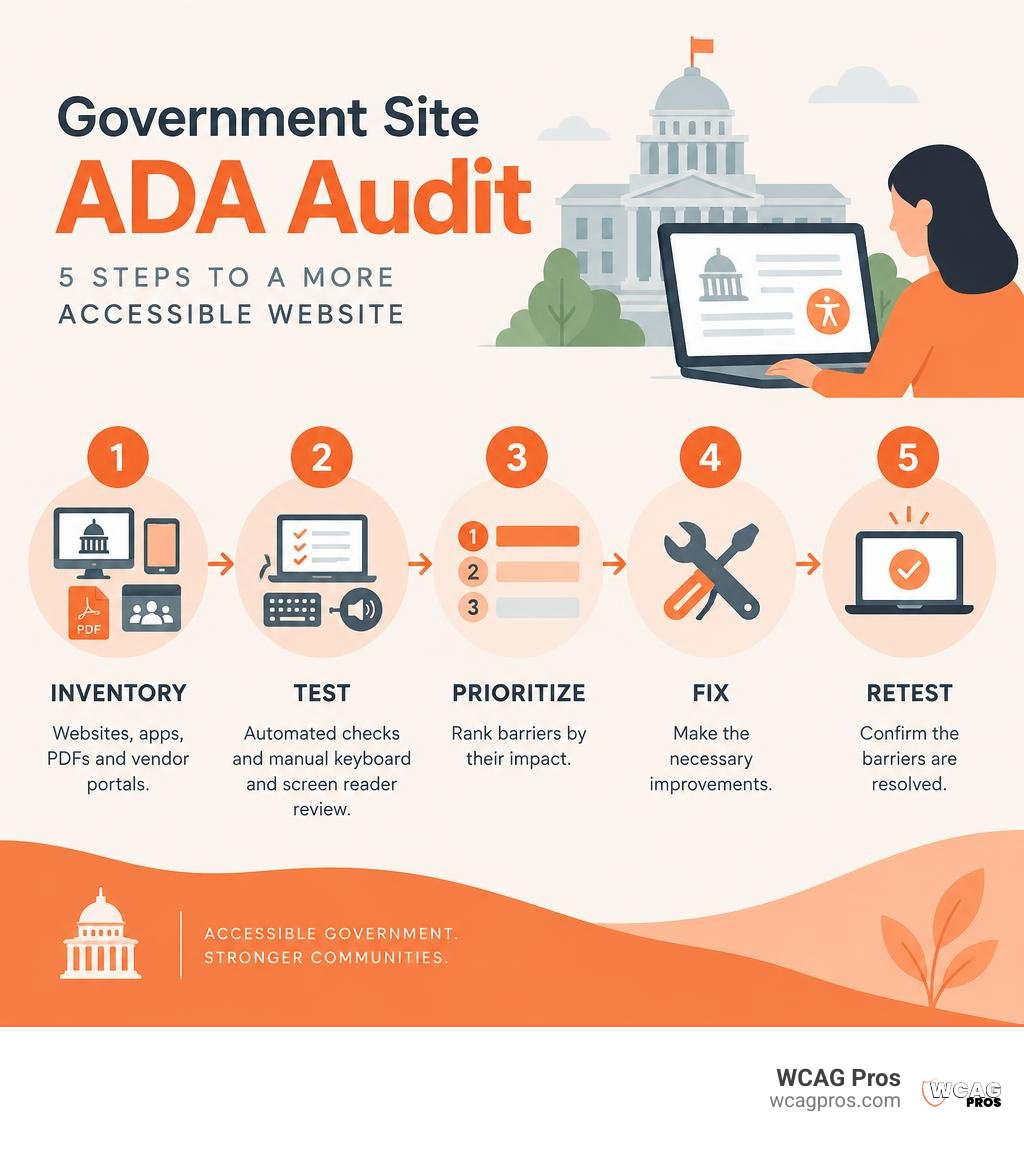
A government site ADA audit starts with an inventory of websites, apps, PDFs, and vendor portals. Test essential resident tasks with automated checks and manual keyboard and screen reader review. Then rank barriers by their impact, fix them, and retest. WCAG 2.2 Level AA is a useful audit target, though it is not the specific version named in the ADA Title II rule.
The audit helps public agencies find barriers that could prevent residents from using services such as permit forms and payment portals. It also gives teams a clear plan for fixing those barriers and checking that the fixes work.
I am Matthew Post, co-founder of WCAG Pros, with more than 20 years of experience in web development and accessibility work. I supervise audits and remediation projects, and this government site ADA audit guide explains how to turn findings into practical fixes using our ADA audit checklist and proven website accessibility remediation steps to understand what is an ADA compliant website.
Understanding Legal Mandates and Deadlines for Public Entities
Local and state public agencies face clear legal obligations to ensure equal access to digital public services under Title II of the Americans with Disabilities Act. The Department of Justice established technical standards that make web accessibility an explicit civil rights requirement for all state and municipal bodies. About one in four adults in the United States, roughly 28.7 percent of the population, lives with a disability. Digital barriers on public sites prevent these community members from paying utility bills, downloading civic council records, or applying for local programs.
Federal legal pressure continues to rise nationwide. Federal accessibility lawsuits hit 3,117 cases in 2025, representing an increase of 27 percent. In addition to federal oversight, state laws impose distinct penalties. For example, Colorado HB21-1110 allows penalties of $3,500 per violation for state and local government entities that fail to maintain accessible digital public systems. Title II requirements differ from Section 508 of the Rehabilitation Act, which applies to federal departments and federally funded entities. Title II covers every town, village, township, county, state agency, and special district across the nation.
To get started with official guidance, public agencies can review the State and local government digital accessibility first steps alongside our plain English overview of government website accessibility to establish clear baseline compliance goals.
| Public Entity Category | Population Threshold | Enforceable Compliance Deadline | Required Technical Target |
|---|---|---|---|
| Large Public Entities | 50,000 or more residents | April 26, 2027 | WCAG 2.2 Level AA |
| Small Public Entities | Fewer than 50,000 residents | April 26, 2028 | WCAG 2.2 Level AA |
| Special District Governments | Any population size | April 26, 2028 | WCAG 2.2 Level AA |
While federal regulations specify historical WCAG benchmarks, forward-thinking agencies adopt WCAG 2.2 Level AA during evaluations to prevent technical debt and ensure their platforms remain resilient against evolving legal standards.
Core Phases of a Comprehensive Government Site ADA Audit
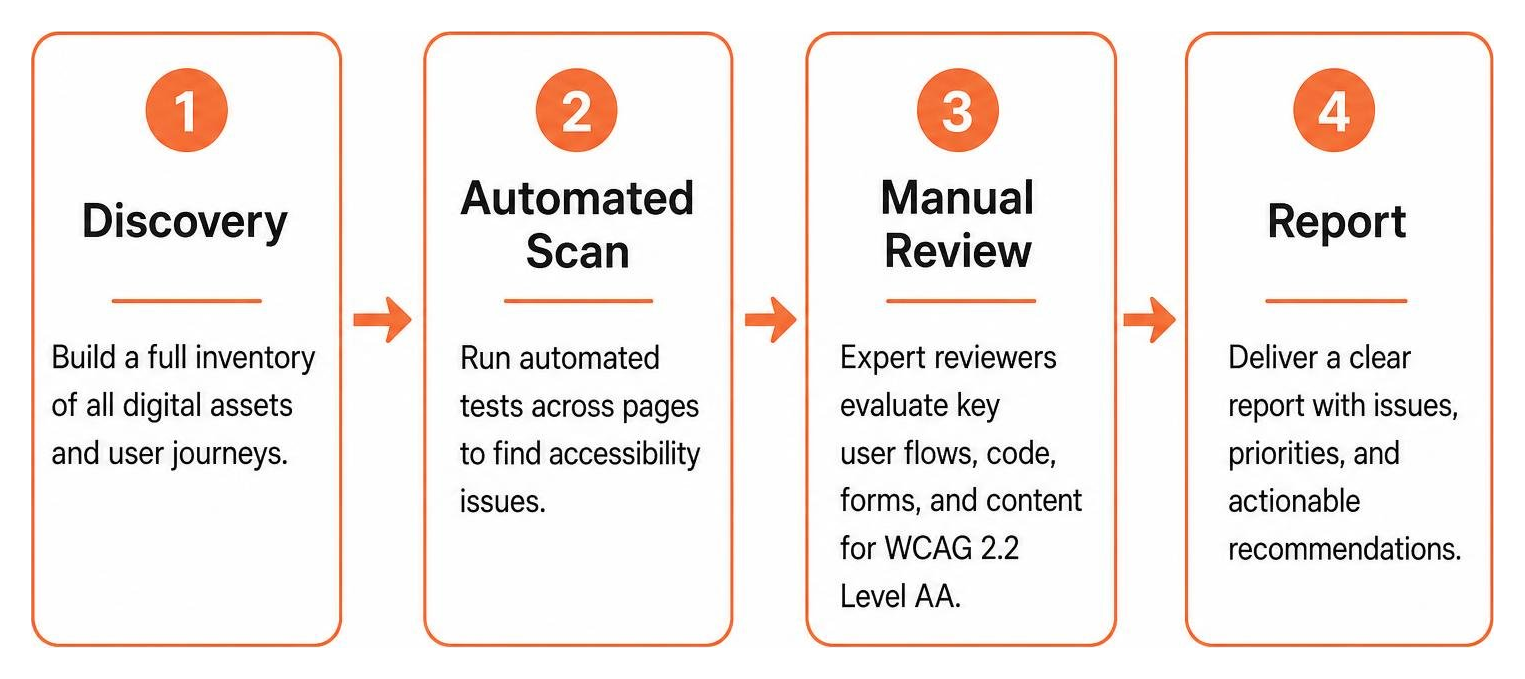
Evaluating a public sector platform requires an organized, multi-phase methodology. A successful audit does not stop at scanning a homepage. Instead, it systematically examines underlying code, user paths, digital forms, and public records across every digital communication channel.

When teams execute an audit, they test platforms against all criteria of WCAG 2.2 Level AA. This process maps every user journey from start to finish, ensuring that a resident relying on assistive tools can complete transactions independently. You can learn more about scoping your agency platforms by conducting a full website ADA review across your digital properties.
Preparing Your Digital Inventory for a Government Site ADA Audit
Public agency domains expand quickly over time. An agency often maintains subdomains, department micro-sites, third-party software tools, and vast document libraries. Before running technical tests, municipal teams must compile a full inventory of every asset within their digital footprint.
This inventory must account for:
- Core public websites and departmental micro-sites
- Utility billing systems and parking citation payment gateways
- Public records, meeting agendas, and downloadable civic PDF forms
- Parks and recreation scheduling systems
- Job application portals and civil service testing portals
- Interactive municipal GIS maps and council video streams
Identifying every online touchpoint prevents hidden compliance gaps from exposing your public agency to regulatory complaints.
Automated Tools vs Manual Testing in a Government Site ADA Audit
A dependable evaluation requires both automated scanning software and expert human review. Automated testing tools can scan thousands of URLs in a short time, catching syntax errors and missing image descriptions. However, automated testing tools only catch between 30 and 50 percent of digital accessibility violations.
Manual testing by accessibility experts is essential. Human auditors navigate public platforms using screen readers like NVDA and JAWS, voice recognition tools, and keyboard-only controls. They evaluate whether interactive dialogs trap keyboard users, check if error messages read out correctly, and determine whether form fields make sense without visual cues.
| Evaluation Method | Strengths | Limitations | Optimal Role in Public Audits |
|---|---|---|---|
| Automated Scanners | Rapid coverage across thousands of pages. Detects color contrast ratios, missing alt attributes, and basic HTML syntax bugs. | Misses contextual issues. Cannot verify logical reading order, complex widget operability, or dynamic ARIA states. | Ideal for high-volume baseline scanning and continuous regressions. |
| Expert Manual Auditing | Catches complex keyboard traps, verifies screen reader pronunciation, tests dynamic forms, and confirms workflow usability. | Requires specialized technical skill and takes more time per template. | Crucial for core templates, citizen portals, and transactional services. |
Relying on quick-fix software overlays will not protect public agencies. In 2025, the FTC required an overlay vendor to pay $1 million over deceptive claims that automated widgets make websites compliant. True accessibility requires authentic, code-level remediation.
Critical Accessibility Violations Found in Public Sector Portals
Our audits of public portals frequently uncover barriers that prevent residents from accessing vital civic services. For instance, an audit of a municipal platform scored just 41 out of 100, placing it firmly in the non-compliant category due to systemic keyboard and screen reader issues.

A comprehensive Colorado Attorney General accessibility findings review revealed 95 separate accessibility violations across state platforms, spanning 37 critical, 51 serious, and 7 moderate defects.
Common public sector violations include:
- Missing Text Alternatives: Quick-link icons and civic service buttons frequently lack descriptive alternative text, making them completely invisible to screen readers.
- Inaccessible Downloadable PDFs: Scanned meeting minutes, building permit applications, and zoning maps posted as untagged PDF files cannot be processed by assistive tools.
- Low Visual Color Contrast: Muted department themes, placeholder text, and error notifications often fall below the required 4.5 to 1 contrast ratio against their background.
- Keyboard Focus Failures: Users navigating by keyboard often encounter removed focus outlines, dropdown menus hidden from view that still catch focus, or interactive popups that trap navigation.
- Form Field and Error Notification Deficiencies: Missing explicit label associations and absent real-time error descriptions prevent blind residents from successfully completing municipal tax filings or permit requests.
Remediation Planning and Third-Party Vendor Governance
Once the audit team documents all barriers, the public agency must prioritize technical fixes using a structured impact matrix. Fixes should begin with critical barriers on core user paths, such as paying utility bills, renewing licenses, or viewing emergency public notices.
Public agencies remain legally liable for the accessibility of digital services delivered through external contractors and software vendors. When selecting municipal software, procurement teams should consult procurement best practices for public website accessibility to establish strict accessibility standards before signing agreements.
Agencies must require vendors to supply verifiable Voluntary Product Accessibility Templates (VPAT) that produce legitimate Accessibility Conformance Reports (ACR). Contracts must contain explicit terms requiring third-party software to satisfy WCAG 2.2 Level AA. Following the audit, development teams can implement an actionable website remediation roadmap to systematically resolve code-level errors in municipal templates.
Establishing Long-Term Compliance and Monitoring Workflows
Achieving compliance is not a single project that ends once code fixes go live. Public websites change every week as staff members publish press releases, upload departmental minutes, and update municipal calendars. Maintaining accessibility requires continuous governance and established internal publishing standards.
To maintain long-term compliance, public agencies should:
- Designate an official ADA Digital Coordinator with administrative authority over online publishing.
- Provide role-specific training for web developers, content creators, and document authors.
- Integrate accessibility checkpoints into content management workflows before pages go live.
- Maintain a clear, publicly visible Accessibility Statement providing contact methods for residents to report digital barriers.
- Schedule periodic evaluations to review findings, using our guide on analyzing a comprehensive WCAG audit report to measure ongoing progress.
Frequently Asked Questions About Public Agency Accessibility Audits
What technical standard must a public agency website meet under ADA Title II?
State and local government platforms must satisfy the success criteria established in WCAG 2.2 Level AA. This standard covers all three principles of digital accessibility, requiring public content to be perceivable, operable, understandable, and robust across modern browsers and assistive devices.
How often should a public agency conduct an accessibility audit?
Public bodies should perform comprehensive manual audits of their core templates, transactional workflows, and public record systems at least once a year. Automated scanning tools should run continuously or monthly to catch day-to-day regressions caused by routine content updates.
Are public agencies legally responsible for inaccessible third-party software?
Yes. Public entities have a non-delegable duty under ADA Title II to ensure that all civic programs, services, and activities offered online are accessible. Using an external software vendor for utility payments, public surveys, or parking management does not shield the agency from legal liability if that platform creates barriers for residents with disabilities.
Conclusion
Proactive digital inclusion is essential for civic equity and legal risk mitigation. Public sector websites function as modern town halls, and every resident deserves equal access to community programs, records, and digital transactions.
At WCAG Pros, our specialists provide comprehensive page-by-page audits evaluating all 54 WCAG A and AAA success criteria. We provide developers with actionable code-level fixes and deliver free re-audits to verify remediation so your agency can display a certified compliance badge. When your agency is ready to evaluate its public platforms and meet upcoming Title II requirements, schedule your certified public sector accessibility audit with our consulting team.
Read more website accessibility articles
Get Help With Your Website
We'll follow up with info about:
- The process
- Cost
- Timeline
We promise to respect your privacy, and never abuse the information you provide. We will not sell or rent your information to any third party.
By submitting this form, you consent to receive SMS messages and/or emails from SEM Dynamics LLC, dba WCAG Pros. To unsubscribe, follow the instructions provided in our communications. Msg & data rates may apply for SMS. Your information is secure and will not be sold to third parties.