
Transform Inaccessible PDFs into Compliant Digital Documents Today
Transform Inaccessible PDFs into Compliant Digital Documents Today
How to Choose PDF Accessibility Remediation Services
Choose a service that fixes more than what a PDF checker can flag. Ask whether it repairs tags, reading order, image descriptions, tables, and forms. Then confirm that it tests the finished file against PDF/UA and applicable WCAG 2.2 criteria using both validation tools and a screen reader. Request a report showing what was checked and fixed.
I’m Matthew Post, co-founder of WCAG Pros, with more than 20 years of web development experience and a background overseeing accessibility audits and WCAG remediation. I’ll use that experience to help you compare pdf accessibility remediation services and know what to ask before you hire.
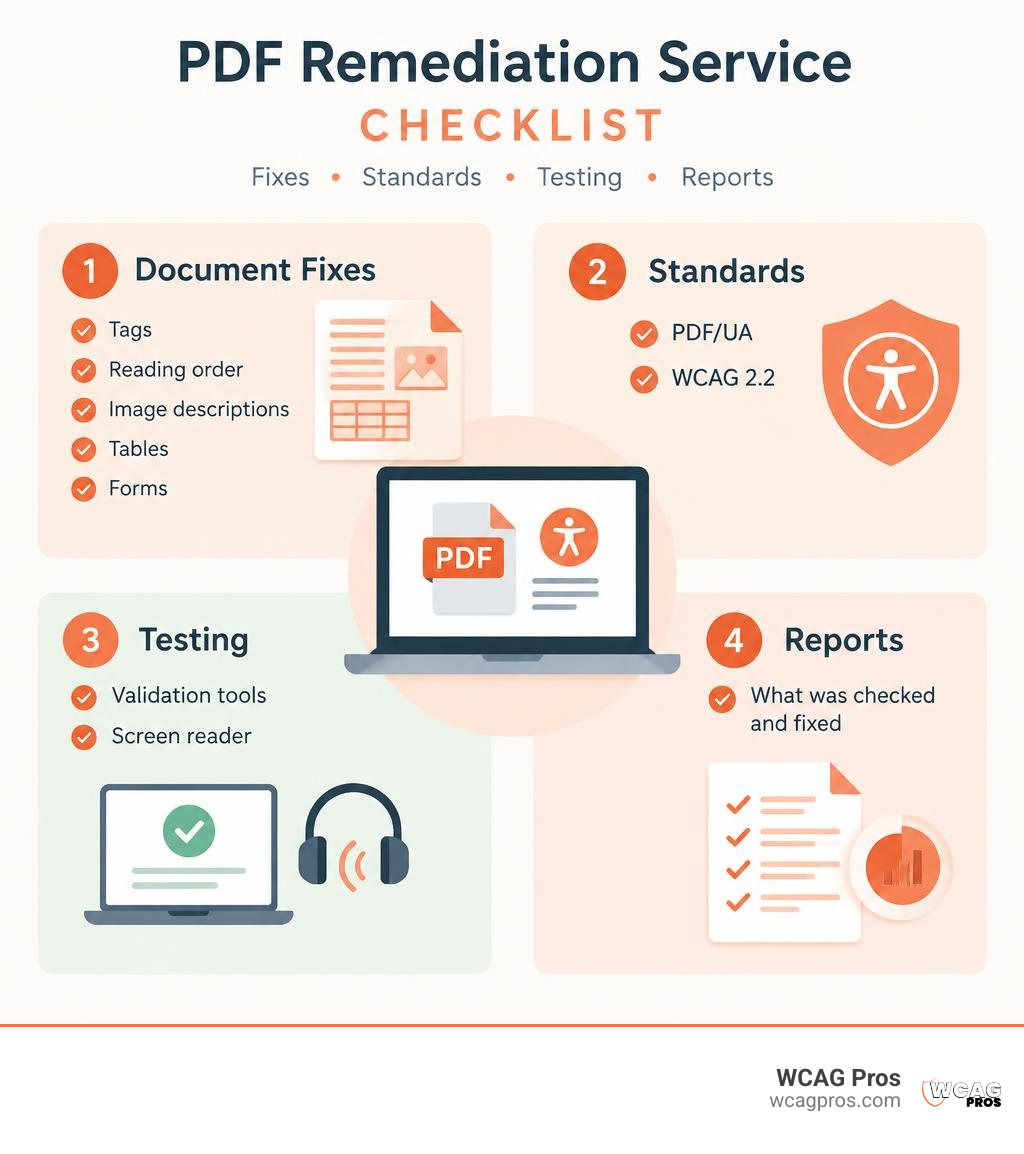
Quick look at pdf accessibility remediation services:
Why Organizations Need PDF Accessibility Remediation Services
A PDF document can look visually spotless while remaining completely unreadable to assistive technologies. Sighted readers easily scan headings, skip through multi-column layouts, and interpret embedded graphs. Screen readers, however, rely entirely on the underlying digital architecture. When that structure is missing, a fifty-page report turns into an incomprehensible wall of chaotic noise.
The formal definition of remediation centers on correcting a fault or reversing damage. In digital document management, remediation transforms an unstructured or broken file into a fully navigable asset. Working with proven PDF accessibility services ensures that vital information reaches every member of your audience, including individuals who are blind, have low vision, or navigate exclusively using keyboards and switch devices.
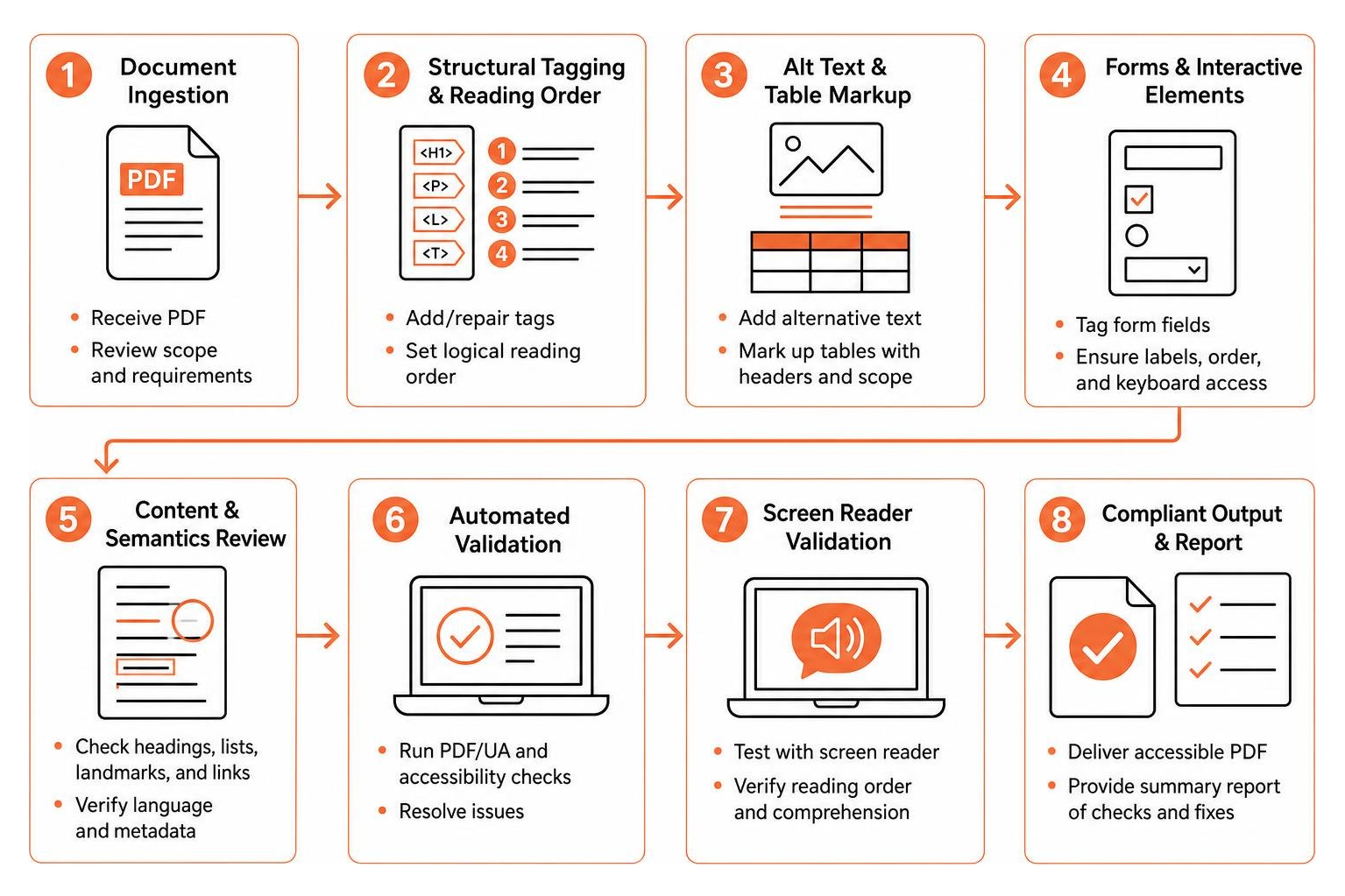
Without proper remediation, assistive technology users face significant barriers across multiple elements:
- Logical Reading Order: Multi-column newsletters, sidebars, and pull quotes often get read out of sequence, mixing unrelated sentences together.
- Alternative Text: Informative charts, process infographics, and logos are skipped entirely or announced as meaningless file names.
- Complex Data Tables: Tables lacking explicit header cells and scope associations leave users unable to determine which data belongs to which category.
- Interactive Form Fields: Digital applications missing accessible labels and tooltips prevent users from completing essential submissions independently.
Understanding PDF Tagging and Compliance Standards
At the heart of every accessible PDF is its tag tree. Tags act as hidden metadata that mirror HTML semantics, explicitly labeling headings, lists, paragraphs, figures, and tables.
To achieve full compliance, documents must align with established international benchmarks:
- PDF/UA (ISO 14289): The universal standard designed specifically for PDF accessibility, outlining strict technical specifications for tags, artifacts, fonts, and metadata.
- WCAG 2.2: The premier standard for digital accessibility. Level AA criteria establish rules for color contrast, meaningful structure, focus order, and text alternatives.
- Section 508: The federal mandate requiring United States government bodies and their contractors to deliver accessible electronic information.
A fully remediated file contains correct document titles, explicitly defined natural languages, logical heading hierarchies from H1 to H6, and decorative visual elements properly marked as background artifacts.
Key Legal Mandates and DOJ Title II Requirements
Document accessibility is a strict legal requirement across public and commercial spaces. Courts across the nation routinely interpret Title III of the ADA as applying to digital content, including web-hosted PDF files.
Organizations face increased regulatory scrutiny following recent updates from the Department of Justice. The DOJ Title II rule establishes that public entities serving populations of 50,000 or more must ensure all newly created digital documents and PDFs meet WCAG 2.2 AA standards by April 24, 2026. Smaller public entities must achieve full compliance by April 26, 2027. Engaging ADA remediation services for compliance protects your organization from costly litigation while guaranteeing equal access to public services.
Top Methodologies for Remediating Inaccessible Documents
Transforming large libraries of inaccessible documents requires selecting an operational approach that balances speed, scale, and accuracy. Just as businesses align with regulatory remediation models during operational reviews, digital compliance requires robust, repeatable workflows.

Organizations generally evaluate three main approaches:
| Feature / Metric | Automated AI Remediation | Expert Manual Remediation | Hybrid Workflow Model |
|---|---|---|---|
| Primary Strength | Rapid bulk processing speed | High contextual accuracy | Balanced speed and deep precision |
| Best Used For | Simple linear text files | Complex tables, forms, legal files | High-volume mixed document libraries |
| Tagging Precision | Good on standard layouts | Flawless human judgment | AI baseline refined by specialists |
| Validation Method | Automated rule checkers | Real screen reader testing | Automated scans plus human QA |
| Compliance Risk | Moderate on complex content | Very low | Very low |
Automated and AI-Powered Document Processing
Automated remediation systems leverage artificial intelligence and optical character recognition to ingest files, detect visual boundaries, and generate tags automatically. These tools quickly process standard single-column text documents and generate draft alternative text for images.
While automated processing offers high throughput, purely automated platforms cannot interpret nuanced context. An automated script cannot determine whether a complex flowchart is explained clearly in the surrounding text or requires extensive alt text. Relying solely on automation often leaves critical compliance gaps in complex documents.
Expert Manual Tagging and Screen Reader Validation
Manual remediation relies on certified accessibility professionals who inspect the tag tree directly inside specialized software. Specialists build custom table relationships, define reading order, and write accurate, context-aware descriptions for technical figures.
Following tagging, human experts test the files using actual assistive tools like JAWS, NVDA, and VoiceOver. This process mirrors comprehensive WCAG 2.2 website remediation steps, confirming that the document is not merely free of automated software warnings, but completely functional and pleasant to read.
Reviewing the Best PDF Accessibility Remediation Services on the Market
Selecting the right partner depends on your document complexity, volume, and required turnaround time. A thorough website accessibility remediation guide highlights that document remediation must always integrate smoothly with broader web accessibility programs.

Evaluating Enterprise PDF Accessibility Remediation Services
Enterprise operations require robust infrastructure capable of processing thousands of unique documents each month while maintaining ironclad data security.
- Documenta11y: Powered by an extensive team of over 100 accessibility experts, Documenta11y has remediated more than 1 million documents with a proven 99.9% accuracy rate. Their platform supports massive multi-language libraries and offers flexible workflows for high-volume enterprise backlogs.
- Apex: With over 100 dedicated accessibility specialists and more than 1 million remediated files, Apex combines proprietary AI acceleration with manual oversight. Holding Benetech Global Certified Accessible status, they excel in handling complex technical publications, university press collections, and government records.
- Vispero: Backed by more than 30 years of digital accessibility leadership, Vispero blends deep domain expertise with practical user testing. They deliver reliable remediation across PDF, Word, and PowerPoint formats, backed by structured corporate training programs.
Selecting On-Demand and Bulk PDF Accessibility Remediation Services
Organizations with specific batches or fast deadlines often benefit from agile, on-demand providers:
- Accessibility On Demand: Built for rapid processing and scalable intake, this service offers tiered processing levels designed to accommodate standard text files, enhanced multi-column documents, and expert-reviewed interactive forms.
- COLONFILM: Providing structured batch packages for up to 300 pages across 30 files, COLONFILM combines visual layout preservation with thorough PDF/UA and WCAG 2.2 validation, delivering comprehensive compliance logs within dependable 15-day timeframes.
- EqualWeb: Delivering end-to-end digital compliance, EqualWeb couples automated remediation tools with certified IAAP and CPWA specialists. Their standard remediation scopes typically complete in up to 30 business days, backed by comprehensive audit trails and conformance records.
Frequently Asked Questions About PDF Remediation
How much do professional remediation services typically cost per page?
Remediation pricing structures vary according to document layout complexity, overall volume, and whether manual screen reader validation is included. Standard linear text documents require less effort than multi-layered financial statements with merged data tables, mathematical equations, and interactive form fields. Most professional providers offer custom quotes based on sample evaluations or tiered batch packages.
Can scanned paper documents and legacy image PDFs be remediated?
Yes. Remediating scanned documents begins with high-resolution Optical Character Recognition to extract text into an authentic digital layer. Technicians then remove visual artifacts, verify spelling, construct a semantic tag tree, and validate the reading flow.
How do teams verify and validate PDF/UA and WCAG 2.2 conformance?
Verification requires a dual-track testing protocol. Technical syntax and tag integrity are checked using automated validators such as the PDF Accessibility Checker and VeraPDF. Certified technicians then perform functional screen reader testing using NVDA and JAWS to confirm clear navigation and accurate reading order.
Conclusion
Making digital documents accessible is an essential responsibility that expands your audience and protects your organization from compliance risks. Automated tools provide a helpful starting point, but genuine document usability requires precise structural tagging and thorough human validation.
At WCAG Pros, our Norco, CA team delivers comprehensive ADA website compliance consulting, including detailed audits across all 54 WCAG checkpoints, source-code repairs, and document accessibility strategies. You can evaluate your digital assets right away using reliable online accessibility checkers to begin building an inclusive digital presence.
Read more website accessibility articles
Get Help With Your Website
We'll follow up with info about:
- The process
- Cost
- Timeline
We promise to respect your privacy, and never abuse the information you provide. We will not sell or rent your information to any third party.
By submitting this form, you consent to receive SMS messages and/or emails from SEM Dynamics LLC, dba WCAG Pros. To unsubscribe, follow the instructions provided in our communications. Msg & data rates may apply for SMS. Your information is secure and will not be sold to third parties.