
The Ultimate Guide to Comparing Website Accessibility Widgets (WCAG 2.2)
The Ultimate Guide to Comparing Website Accessibility Widgets (WCAG 2.2)
How to Compare a Website Accessibility Widget
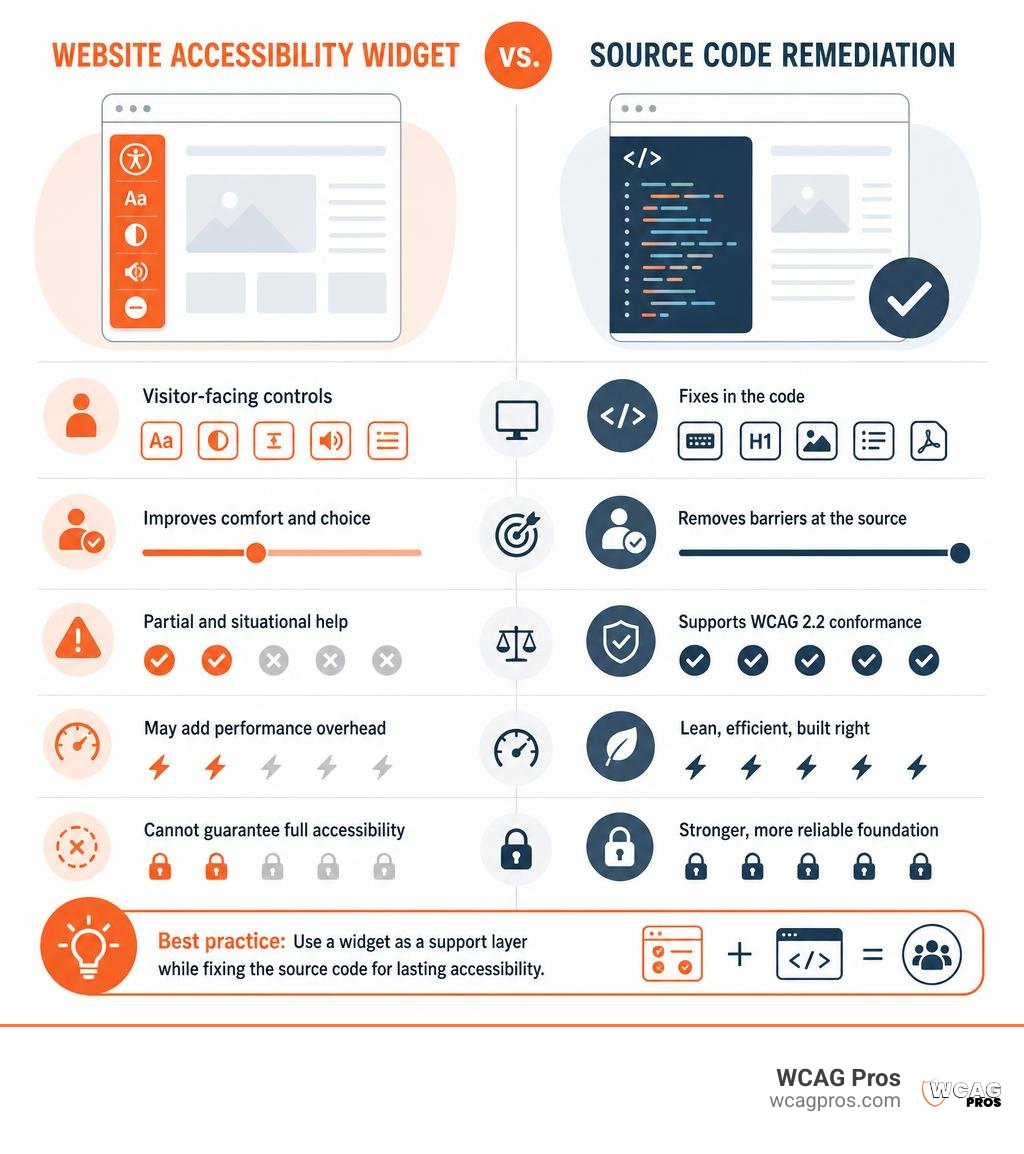
A website accessibility widget is a visitor-facing toolbar that can offer controls like text resizing, contrast modes, spacing changes, motion reduction, and text-to-speech. When comparing widgets, prioritize ones that are lightweight, keyboard accessible, privacy-conscious, and clear about their limits.
Most important: a widget cannot make a website fully conformant with WCAG 2.2 on its own. It may improve comfort and choice for some visitors, but it cannot reliably repair the source-code problems behind inaccessible forms, missing image descriptions, broken keyboard paths, poor heading structure, PDFs, or video captions.
With 96.3% of homepages failing basic accessibility checks and thousands of digital accessibility lawsuits filed in the United States each year, a quick overlay can feel appealing. But the better comparison is not simply “which widget has the most buttons?” It is “which tool helps users without creating new barriers, while our team fixes the real issues?”
In this guide, we compare common widget types, their features, performance and privacy tradeoffs, and where they fit in a durable ADA and WCAG 2.2 accessibility program.
I am Matthew Post, co-founder of WCAG Pros and a web developer with more than 20 years of experience. I have audited and overseen remediation for many sites where a website accessibility widget was useful as a support layer, but source-code fixes were still essential.
Website accessibility widget vocab to learn:
What Is a Website Accessibility Widget and How Does It Work?

At its core, a website accessibility widget is a client-side software script injected into a website template to offer an interactive user interface. When a visitor lands on your page, the script renders a floating launcher icon or custom trigger button. Clicking this button opens a menu packed with assistive display settings.
Understanding whether an overlay widget is ADA compliant begins with understanding DOM manipulation. When a visitor toggles a setting inside the panel, the widget modifies the Document Object Model (DOM) and applies dynamic CSS rules directly inside that individual user’s browser. It leaves your server files and database completely untouched.
Core Features in a Modern Website Accessibility Widget
Modern assistive toolbars package a wide variety of personalization settings to accommodate different user needs:
- Visual Adjustments: High contrast modes, inverted colors, dark and light presets, custom saturation, and monochrome styling.
- Typography Controls: Dynamic text scaling up to 200%, letter spacing, line height expansion, text alignment options, and specialized dyslexia-friendly typefaces such as OpenDyslexic or Lexend.
- Focus and Reading Aids: Bionic reading highlighting, reading rulers, reading masks, enlarged cursors scaled up to 400%, and persistent link highlighting.
- Motion and Cognitive Controls: Global animation pause controls to freeze auto-advancing carousels and moving graphics, alongside simplified reading layouts designed for neurodiverse individuals.
- Internationalization: User interface localization covering dozens of languages, including automatic language detection and right-to-left (RTL) script support.
Technical Mechanics: Overlay Scripts vs Source Code
Understanding the architecture of these tools reveals why they behave differently than native code. Most modern widgets load asynchronously via a content delivery network (CDN) to prevent blocking page rendering. Better solutions lazy-load the actual panel inside an isolated iframe, preventing external widget CSS rules from corrupting your existing site layout.
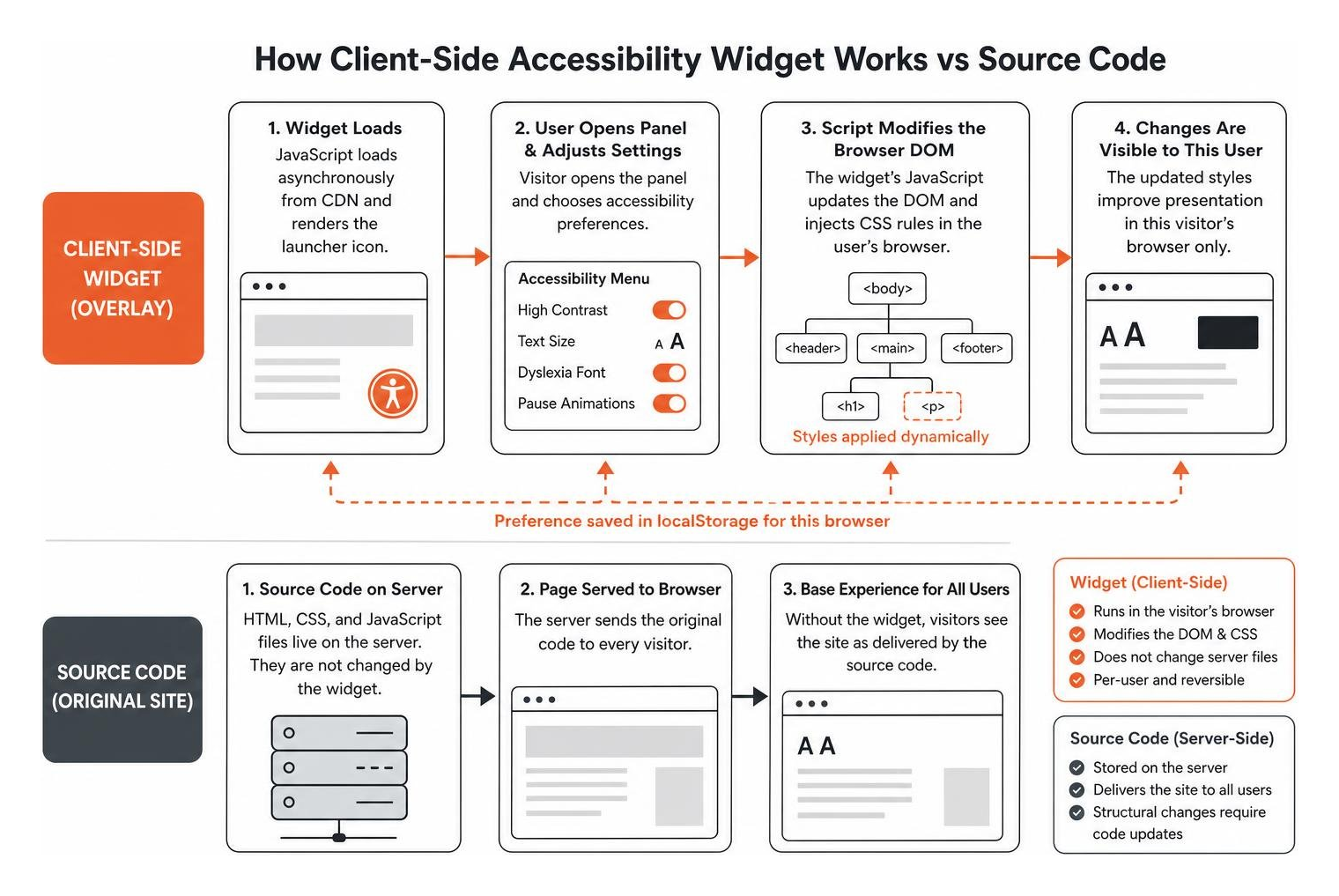
When a visitor adjusts a preference, the widget stores the choice in browser localStorage so the settings remain active as the visitor navigates across multiple pages.
However, visual manipulation of the DOM has hard limitations. An injected script cannot restructure broken HTML hierarchies, add missing table headers, or fix inaccessible server-rendered validation states. You can watch an interactive demonstration of overlay implementations to see how client-side scripts interact with frontend elements in real time.
Comparing the Top Accessibility Widgets and Overlay Solutions
Accessibility widgets generally fall into two categories: lightweight presentation toolbars that give visitors personal UI options, and AI-powered overlay systems that attempt automated code repair.
| Solution Category | Primary Mechanism | Script Footprint | Best Use Case |
|---|---|---|---|
| Open-Source & Privacy Toolbars | Client-side UI adjustments (contrast, text resizing, reading guides) | Ultra-lightweight (2.4 KB to 25 KB) | Visitor personalization on already-remediated codebases |
| Freemium Enhancement Panels | Visual presets, font scaling, contrast modes, basic statements | Lightweight (20 KB to 50 KB async loader) | Small business blogs and content sites needing simple controls |
| AI Automated Compliance Overlays | Dynamic ARIA injection, AI image descriptions, recurring scans | Moderate to heavy (varies with AI scan payloads) | Organizations seeking automated scanning and litigated assistance alongside manual fixes |
Standalone Frontend Toolbars and Open-Source Options
Several developers offer lightweight, privacy-first tools designed purely for user empowerment:
- Sienna: An open-source, zero-tracking widget with an ultra-compact 2.4 KB bundle size. It avoids cookies and tracking pixels, executing all adjustments entirely inside the browser to maintain strict privacy standards.
- Tabnav: A straightforward freemium widget that supports more than 40 languages, offering essential visual adjustments and auto-generated accessibility statements with rapid setup.
- Inclusense: A flexible panel offering 17 configurable tools that allows webmasters to replace floating launcher badges with custom HTML trigger IDs to preserve brand aesthetics.
- Poper Accessibility: A transparent presentation widget providing up to 200% font enlargement and reading guides, built around clear notices regarding the necessity of source-code remediation.
AI-Powered Automated Compliance Overlays
Automated overlays combine front-end display toolbars with background algorithms that scan page structure to inject code changes dynamically:
- UserWay Accessibility Widget: Provides an AI-driven engine with custom user profiles (such as ADHD and Motor Impaired), automated heading restructuring, and extensive platform integrations.
- accessiBe accessWidget: Installed on more than 100,000 websites, this tool pairs daily automated background scans with AI-generated alt text and dynamic ARIA attribute injections.
- AccessWay: Offers hundreds of automated functions, mapping user-triggered tools and AI fixes to WCAG success criteria while providing live site translation in over 40 languages.
- Enterprise Management Integrations: Platforms like YuJa Panorama blend toolbar controls with administrative dashboards to help institutions monitor digital assets across complex enterprise networks.
Limitations, Performance Risks, and Legal Realities of Using Widgets

Roughly 20% of global internet users live with some form of disability. Digital accessibility is an essential civil right and commercial requirement. However, relying entirely on a widget creates significant vulnerabilities.
Reviewing the complete guide to WCAG AA compliance requirements shows that compliance requires meeting dozens of detailed success criteria across the POUR principles (Perceivable, Operable, Understandable, and Robust), many of which require human context and clean semantic markup.
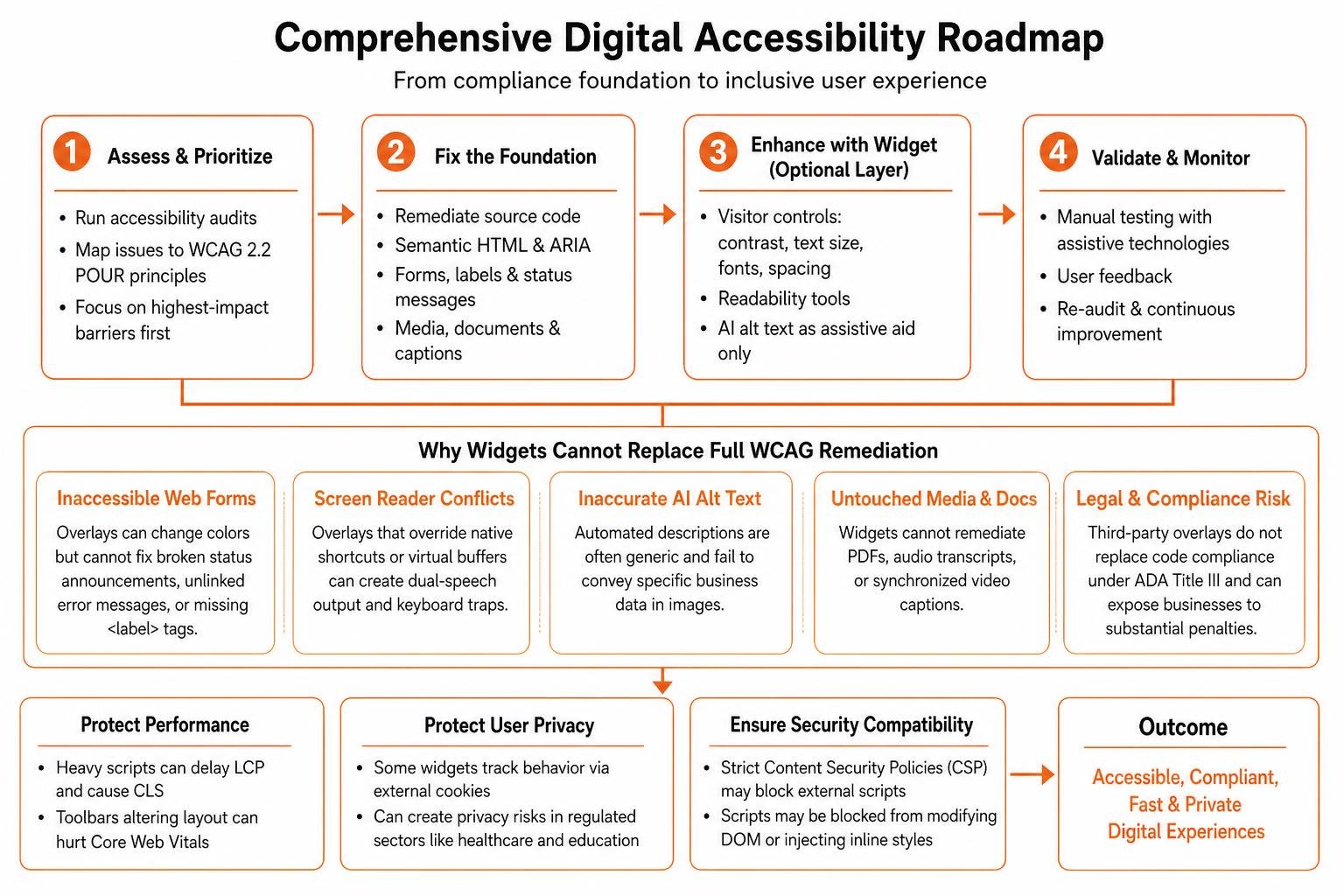
Why a Website Accessibility Widget Cannot Replace Full WCAG 2.2 Remediation
Automated scripts cannot interpret context or fix complex structural issues. The limitations become apparent across several key areas:
- Inaccessible Web Forms: An overlay can change form border colors, but it cannot fix broken status announcements, unlinked error messages, or missing
tags. Learn more about fixing form labels and status messages natively in your templates. - Screen Reader Conflicts: Blind visitors already rely on specialized screen readers like NVDA, JAWS, or VoiceOver. JavaScript overlays that attempt to override native keyboard shortcuts or virtual buffers often create confusing dual-speech output and keyboard traps.
- Inaccurate AI Alt Text: Automated vision algorithms frequently produce generic image descriptions (e.g., “chart with lines”) rather than describing the specific business data shown in the graphic.
- Untouched Media and Documents: Widgets cannot remediate embedded PDF documents, audio transcripts, or synchronized video captions.
From a legal standpoint, more than 4,000 digital accessibility lawsuits were filed in the United States in 2024 alone. Regulatory bodies and courts consistently hold that third-party overlays do not replace underlying code compliance under ADA Title III. Failing to fix underlying source code can expose businesses to substantial civil penalties, reaching up to $50,000 for an initial violation and $100,000 for subsequent violations.
Impact on Site Speed, Core Web Vitals, and User Privacy
Injecting third-party scripts can also impact website performance:
- Core Web Vitals: Heavy JavaScript bundles can delay Largest Contentful Paint (LCP) and cause Cumulative Layout Shift (CLS) when toolbars dynamically alter page margins or font sizes on load.
- User Privacy: Certain commercial overlay vendors track visitor behavior and store profiling data via external cookies. For organizations in regulated sectors like healthcare and education, loading untrusted third-party trackers can violate strict privacy regulations.
- Security Restrictions: Modern sites running strict Content Security Policies (CSP) may block external scripts from dynamically modifying DOM elements or injecting unapproved inline styles.
Best Practices for Integrating Widgets into a Complete Compliance Strategy
A website accessibility widget provides the most value when treated as an optional enhancement layer rather than a total compliance solution. Think of clean source code as the compliance floor and visitor customization tools as the usability ceiling.
You can run free tools to check your website instantly to establish your baseline compliance before exploring whether aiming for AAA accessibility standards makes sense for your audience.
Multi-Platform Integration for WordPress, Shopify, and Custom Stacks
When installing a widget across popular content management systems, follow these practical steps:
- WordPress: Install via dedicated lightweight plugins or by inserting the embed script into your child theme footer just before the closing