
Making Sense of Modern WCAG Website Compliance
What WCAG Website Compliance Means for Your Business
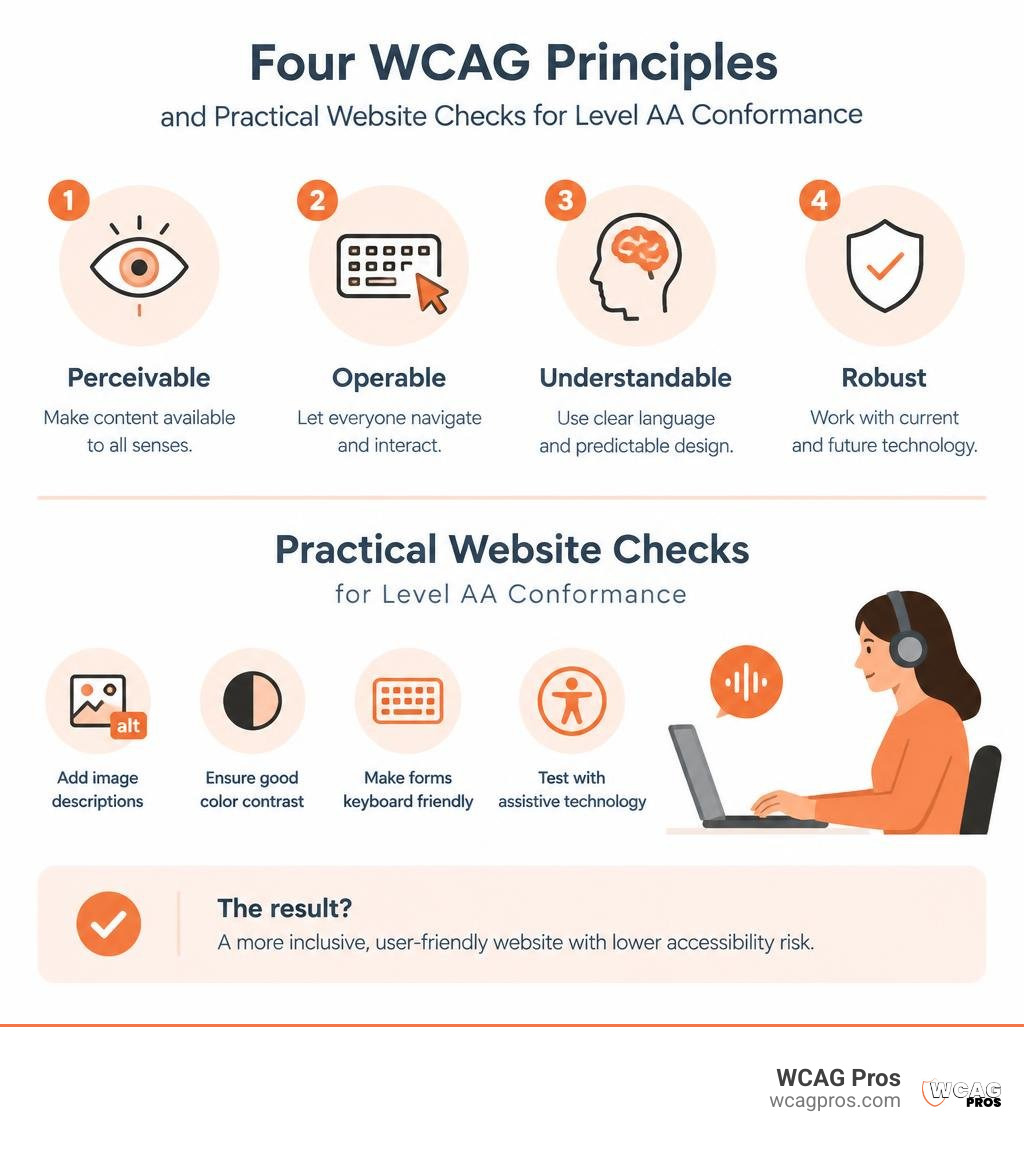
WCAG website compliance means your site meets testable standards that help people with disabilities use it. For a practical starting point, target WCAG 2.2 Level AA. Audit key pages and tasks, fix barriers such as missing image descriptions, low contrast, and forms that cannot be used with a keyboard, then test the fixes with assistive technology.
WCAG is built on four principles: content must be perceivable, operable, understandable, and robust. Meeting these standards can make your site easier to use and help reduce accessibility risk. WCAG conformance and ADA compliance are related, but they are not the same thing.
I’m Matthew Post, co-founder of WCAG Pros and a programmer with more than 20 years of web development experience. I oversee audits and remediation projects that help businesses improve WCAG website compliance.
Quick WCAG website compliance definitions:
- WCAG 2 Compliance: Demystifying Levels A, AA, and AAA
- WCAG Compliant Websites: Practical Takeaways from Accessible Brands
- The Definitive Guide to WCAG Guidelines
Understanding the Foundations of Digital Accessibility
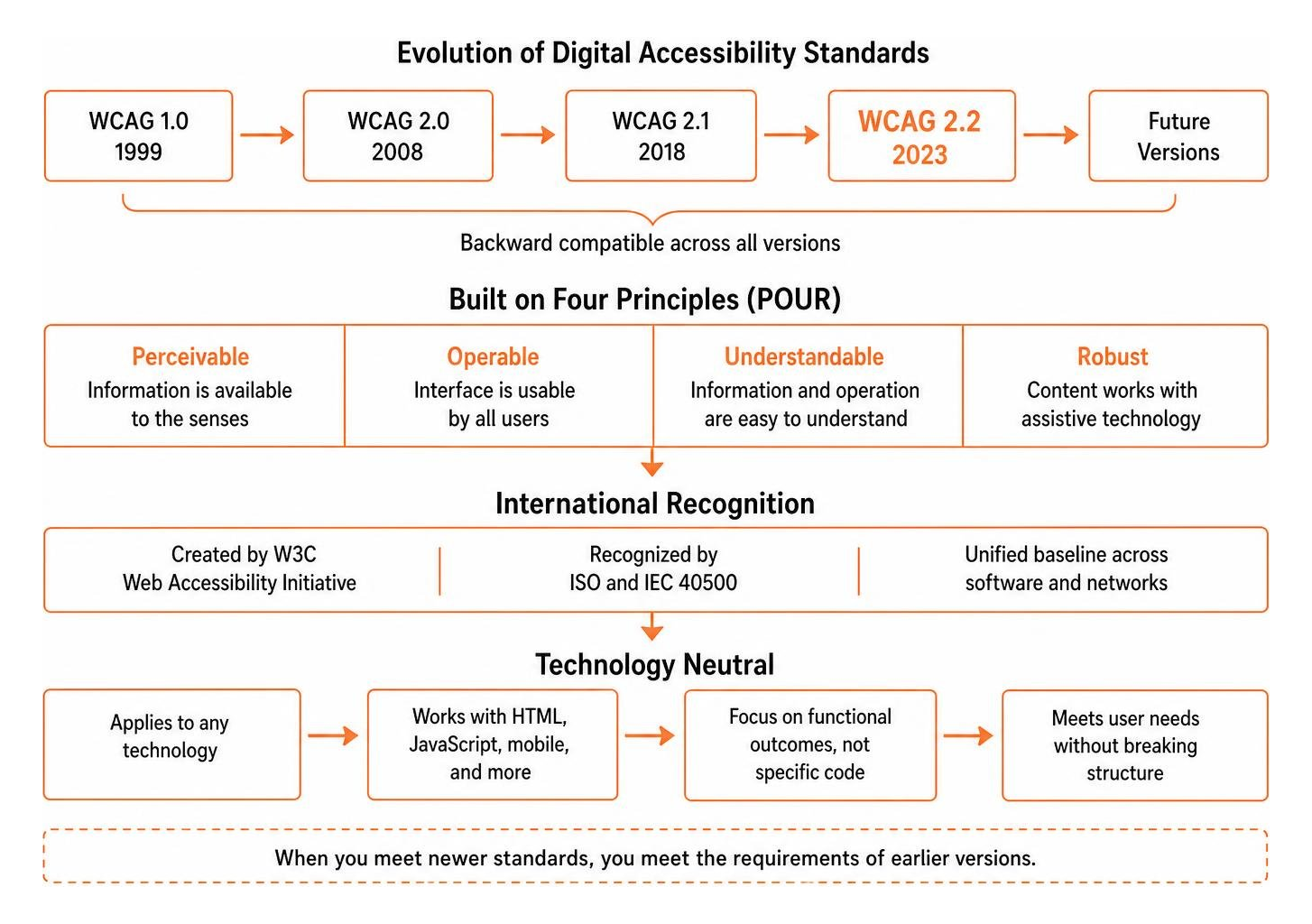
Building an inclusive online presence requires a firm grasp of international technical standards. The World Wide Web Consortium creates the guidelines through its Web Accessibility Initiative. These criteria are recognized internationally through ISO and IEC 40500, establishing a unified baseline across software platforms and global networks.
Technology neutrality is an essential foundation of these specifications. Rather than dictating specific programming frameworks or styling rules, the guidelines establish functional outcomes. Whether a platform utilizes standard HTML, complex JavaScript single-page applications, native mobile interfaces, or dynamic portals, the requirements remain identical. The interface must adapt to user needs without breaking essential structure.
Every iteration retains backward compatibility. When organizations build against newer specifications, they satisfy the underlying criteria of earlier versions automatically. Teams looking to establish robust technical foundations can consult The Definitive Guide to WCAG Guidelines for an exhaustive exploration of these underlying technical layers.
Core Principles That Define WCAG Website Compliance
Digital accessibility rests upon four essential pillars often referred to as the POUR framework. Each pillar addresses a specific interaction barrier that users might encounter.
- Perceivable content ensures that users can comprehend all presented information through their active senses. Digital assets cannot be invisible to all of a person’s senses. Text alternatives must accompany graphics, transcripts must support audio, and interface elements must maintain sufficient visual clarity.
- Operable interfaces allow individuals to control every component through diverse input methods. Users who cannot operate a traditional mouse must be able to execute all functions using keyboards, single-switch hardware, or voice dictation software. Navigation must be intuitive, predictable, and free from restrictive timing traps.
- Understandable information guarantees that both website copy and user interface operations remain clear. Text must read legibly, visual interactions must behave predictably, and complex forms must provide actionable error identification along with recovery instructions.
- Robust architecture demands that code remains structurally sound across modern browsers, legacy platforms, and diverse assistive technologies such as screen readers or refreshable Braille displays.
Comparing Conformance Levels A, AA, and AAA
The technical criteria are divided across three progressive tiers of conformance. Each level introduces increasingly rigorous requirements to expand access for people with visual, auditory, motor, speech, and cognitive differences.
Level A represents the minimum technical baseline. Failing to meet Level A criteria creates severe digital barriers that prevent assistive technology users from completing fundamental actions, such as navigating menus or submitting checkout forms.
Level AA represents the standard benchmark required by statutory frameworks worldwide. It resolves the most widespread digital roadblocks, including color contrast deficiencies, responsive layout reflow issues, and missing form validation cues.
Level AAA addresses specialized requirements for niche audiences. The World Wide Web Consortium notes that satisfying Level AAA across an entire complex website is generally not feasible because certain design criteria conflict across diverse disability categories. Organizations interested in balancing these requirements can explore WCAG 2 Compliance: Demystifying Levels A, AA, and AAA to determine the right technical scope for their public assets.
| Conformance Level | Technical Focus and Impact | Target Audience Scope | Legal and Regulatory Status |
|---|---|---|---|
| Level A | Foundational access, basic markup validity, primitive keyboard access, basic text alternatives | Resolves critical blockers that completely halt screen reader and keyboard access | Minimal legal safe harbor on its own |
| Level AA | Comprehensive barrier removal, color contrast, responsive reflow, clear navigation focus | Broad coverage for low-vision, cognitive, motor, and auditory disabilities | Global legal standard for ADA, Section 508, and international laws |
| Level AAA | Specialized enhancements, advanced sign language interpretation, extreme contrast | Tailored accommodations for specific, highly specialized disability needs | Aspirational tier, rarely mandated across full websites |
Global Regulations and Legal Standards for WCAG Website Compliance
Digital accessibility is recognized internationally as an extension of fundamental civil rights. Regulatory agencies, judicial districts, and legislative bodies mandate equal access to public infrastructure, educational environments, and commercial marketplaces. Utilizing trusted resources like the WebAIM WCAG 2 checklist helps organizations align technical deliverables with global accountability frameworks.
ADA Title II and Title III Digital Mandates
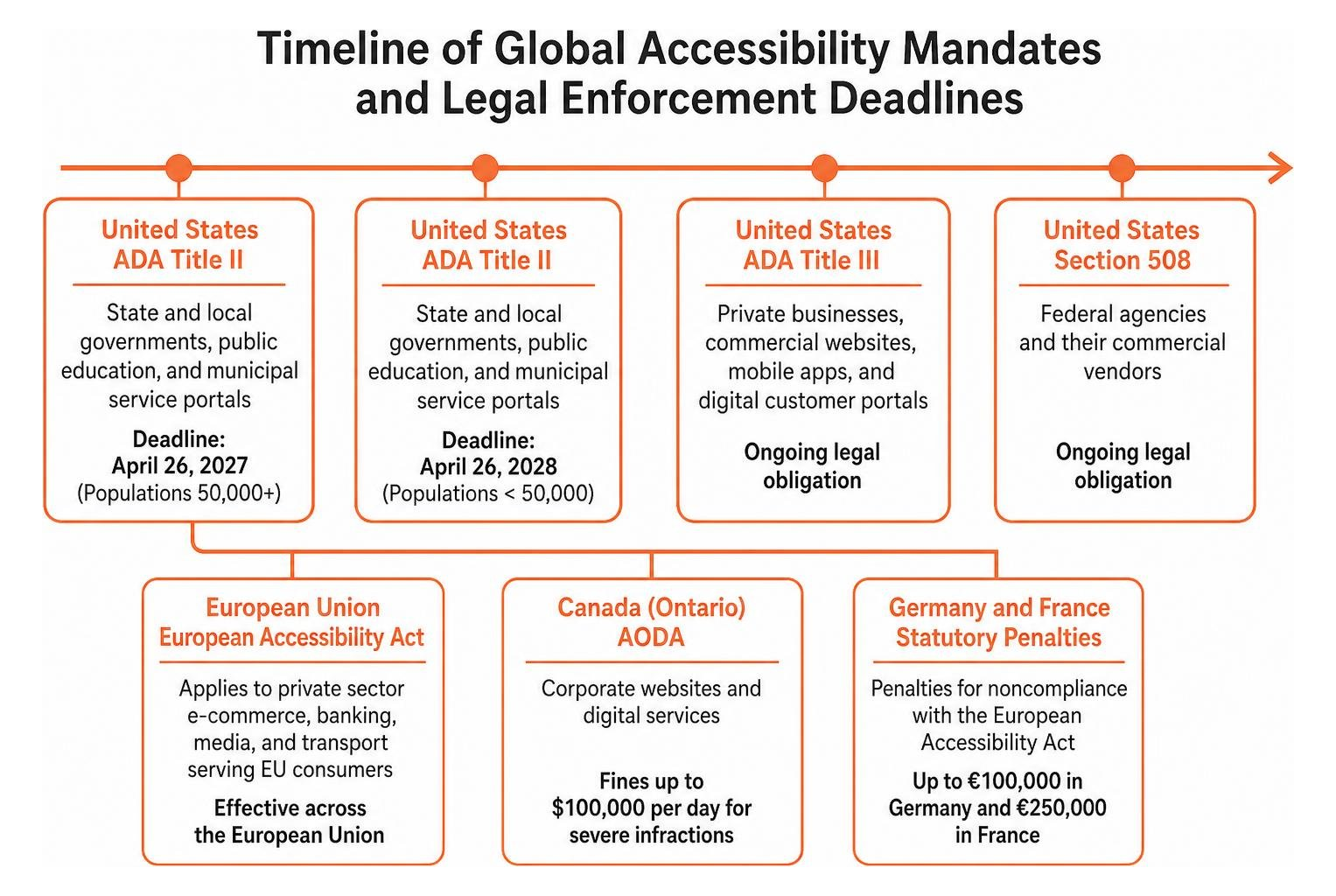
In the United States, the Americans with Disabilities Act serves as the primary enforcement mechanism for digital accessibility. The Department of Justice published a definitive rule under ADA Title II that directly establishes technical accessibility requirements for state and local government entities, public educational institutions, and municipal service portals. Under this mandate, public organizations with populations of 50,000 or more must achieve full digital conformance by April 26, 2027, while smaller jurisdictions have until April 26, 2028.
For private enterprises, ADA Title III prohibits discrimination within places of public accommodation. Federal courts routinely interpret commercial websites, mobile e-commerce applications, and digital customer portals as public accommodations. Organizations that neglect accessibility face substantial exposure to demand letters and federal lawsuits.
Federal agencies and their commercial vendors face separate obligations under Section 508 of the Rehabilitation Act. Government teams can review WCAG Basic Principles, Guidelines, and Tips from the University of Hawaii for actionable implementation advice. To align commercial and institutional web systems with these legal benchmarks, consult our comprehensive guide to WCAG 2.2 Level AA standards.
International Laws and the European Accessibility Act
Organizations operating internationally encounter stringent statutory standards across multiple economic regions. The European Accessibility Act took effect across the European Union, enforcing digital accessibility across private sector e-commerce platforms, banking portals, media sites, and transport hubs that serve European consumers. The standard relies on EN 301 549, which harmonizes international technical criteria into binding regional law. Noncompliance brings severe consequences, with statutory penalties reaching €100,000 in Germany and €250,000 in France.
In Canada, provincial frameworks such as the Accessibility for Ontarians with Disabilities Act enforce rigorous technical requirements for corporate websites. Fines for corporate noncompliance in Ontario can reach $100,000 per day for severe infractions. Navigating these regional regulations requires a unified technical standard across all customer-facing digital properties.
Common Technical Violations and Practical Fixes
Automated testing scans frequently reveal recurring structural failures across modern web properties. Remedying these barriers requires precise code updates and deliberate design enhancements. Reviewing our WCAG accessibility checklist guide allows internal teams to isolate coding errors before deploying assets to production.

Visual Design, Contrast, and Media Alternatives
Visual accessibility failures prevent low-vision users, aging populations, and individuals with color blindness from consuming content efficiently.
- Insufficient color contrast: Body text must maintain a minimum contrast ratio of 4.5:1 against its background. Large-scale text measuring at least 18 points or 14 points bold requires a minimum ratio of 3:1. Interface components and graphical objects require a 3:1 ratio against adjacent colors.
- Missing alternative text: Non-decorative imagery must include meaningful text alternatives within alt attributes. Purely decorative graphics must carry empty alt attributes so screen readers ignore them cleanly.
- Text scaling limitations: Layouts must accommodate up to 200 percent text magnification without breaking functional controls or causing horizontal scrolling traps.
- Multimedia deficiencies: Pre-recorded video requires synchronized closed captions and descriptive audio tracks. Audio recordings, such as company podcasts, require accurate, synchronized transcripts.
Keyboard Operability and Form Controls
Dynamic interfaces must facilitate comprehensive interaction without requiring fine motor precision or mouse input.
- Visible keyboard focus: Interactive elements must display a distinct visual outline when receiving keyboard focus. Custom CSS resets that remove focus rings without providing alternative indicators represent a severe violation.
- Logical focus order: Tab sequences must mirror the logical reading flow of the Document Object Model. Hidden menus, dialog overlays, and background controls must not capture focus when obscured.
- Bypass blocks: Lengthy header menus must offer a functional skip link at the top of the page, allowing keyboard users to jump straight to the primary content area.
- Explicit form labeling: Every form input must pair with an explicit, programmatically linked label element. Relying entirely on visual placeholder text leaves screen reader users without context once typing commences.
- Error prevention and recovery: Input errors must be identified in text, highlighting the exact field and providing understandable instructions for remediation.
Achieving and Maintaining Conformance Through Structured Audits
Long-term accessibility requires a systematic balance of automated software and skilled human evaluation. While automated scanners rapidly detect baseline code errors like missing alt attributes, they catch only 20 to 40 percent of total WCAG violations. Subjective criteria such as keyboard navigation flow, dynamic modal behavior, and alt text accuracy require expert manual validation. Following step-by-step WCAG conformance testing strategies ensures your organization uncovers critical usability hurdles.

Step-by-Step Audit Workflow for WCAG Website Compliance
A comprehensive digital audit requires a methodical evaluation sequence across both shared components and high-priority user journeys.
- Automated template scanning: Run specialized rule engines across all core templates, headers, footers, and design tokens to eliminate widespread programmatic defects.
- Complete keyboard testing: Disconnect the mouse and navigate critical conversion pathways using only the Tab, Enter, Escape, Spacebar, and Arrow keys to confirm focus visibility and prevent trap states.
- Screen reader validation: Verify complex interactive widgets, dynamic notifications, and modal dialogs using active screen reader software like NVDA, JAWS, or VoiceOver.
- Zoom and reflow assessment: Magnify the viewport to 400 percent at a 1280-pixel width to ensure content reflows into a single responsive column without data loss or horizontal clipping.
- Technical remediation roadmap: Document identified failures by severity, assigning prioritized code fixes directly to development sprints.
- Public accessibility statement: Publish a clear statement detailing current conformance goals, active support channels, and an accessible feedback mechanism.
Navigating Statutory Exceptions and Archived Content
Accessibility regulations recognize practical technical boundaries for legacy materials. Statutory frameworks such as the Department of Justice ADA Title II rule define clear exception categories:
- Archived web content: Historical pages retained strictly for research or recordkeeping that are clearly marked and housed in dedicated archive sections do not require active remediation.
- Preexisting conventional electronic documents: Static documents like legacy PDFs published before specific statutory rulemaking dates are exempt, provided they are not actively required to participate in current public services.
- Third-party forum content: Unsolicited text posted by external visitors on message boards or comment sections is exempt, although the hosting platform infrastructure and moderation controls must remain fully accessible.
- Password-protected personal records: Individualized records such as historical utility statements or medical histories stored within secure portals are exempt, provided the surrounding portal and account management tools conform.
- Conforming alternate versions: Maintaining a separate, accessible web page is permissible only when technical or legal constraints make the primary page impossible to remediate directly.
Frequently Asked Questions About Digital Accessibility
What is the difference between WCAG conformance and ADA compliance?
WCAG provides the international technical standard outlining specific, measurable criteria for digital content. The ADA is a comprehensive United States civil rights statute mandating equal opportunity and access for people with disabilities. Meeting technical standards fulfills the digital requirements of the law, but the legal framework encompasses broader organizational practices and auxiliary communication aids.
Which WCAG version is required for modern organizations in 2026?
Modern organizations should target WCAG 2.2 Level AA. While certain existing statutory frameworks historically referenced earlier iterations, WCAG 2.2 represents the most up-to-date standard. It introduces crucial success criteria addressing mobile interactions, accessible authentication, and cognitive clarity, ensuring digital properties remain future-proof against emerging legal revisions.
Can automated testing guarantee complete compliance?
No automated scanning software can deliver complete compliance. Automated scanners identify syntax issues, contrast ratios, and structural elements, but they cannot assess contextual meaning. Human evaluators must confirm whether alt text accurately conveys an image’s message, whether logical tab sequences make sense during dynamic checkouts, and whether complex user journeys operate smoothly via assistive devices.
Conclusion
Establishing a sustainable accessibility program protects your organization from costly litigation while opening your digital storefront to over one billion people with disabilities worldwide. Modern search platforms and emerging AI search engines rely heavily on clean semantic structure, meaning accessibility enhancements directly strengthen discoverability and user conversion rates.
At WCAG Pros, our team delivers complete ADA website compliance consulting for organizations seeking ironclad legal defense and superior user experience. We perform comprehensive page-by-page audits evaluating all 54 WCAG A and AAA success criteria. Our senior programmers provide direct code remediation alongside complimentary re-audits to award validated compliance badges. Discover how our hands-on technical guidance can safeguard your brand by visiting our comprehensive WCAG guidelines resource hub today.
Read more website accessibility articles
Get Help With Your Website
We'll follow up with info about:
- The process
- Cost
- Timeline
We promise to respect your privacy, and never abuse the information you provide. We will not sell or rent your information to any third party.
By submitting this form, you consent to receive SMS messages and/or emails from SEM Dynamics LLC, dba WCAG Pros. To unsubscribe, follow the instructions provided in our communications. Msg & data rates may apply for SMS. Your information is secure and will not be sold to third parties.