
How to Conduct a Thorough WCAG Site Wide Audit on Complex Platforms
How to Start a WCAG Site-Wide Audit
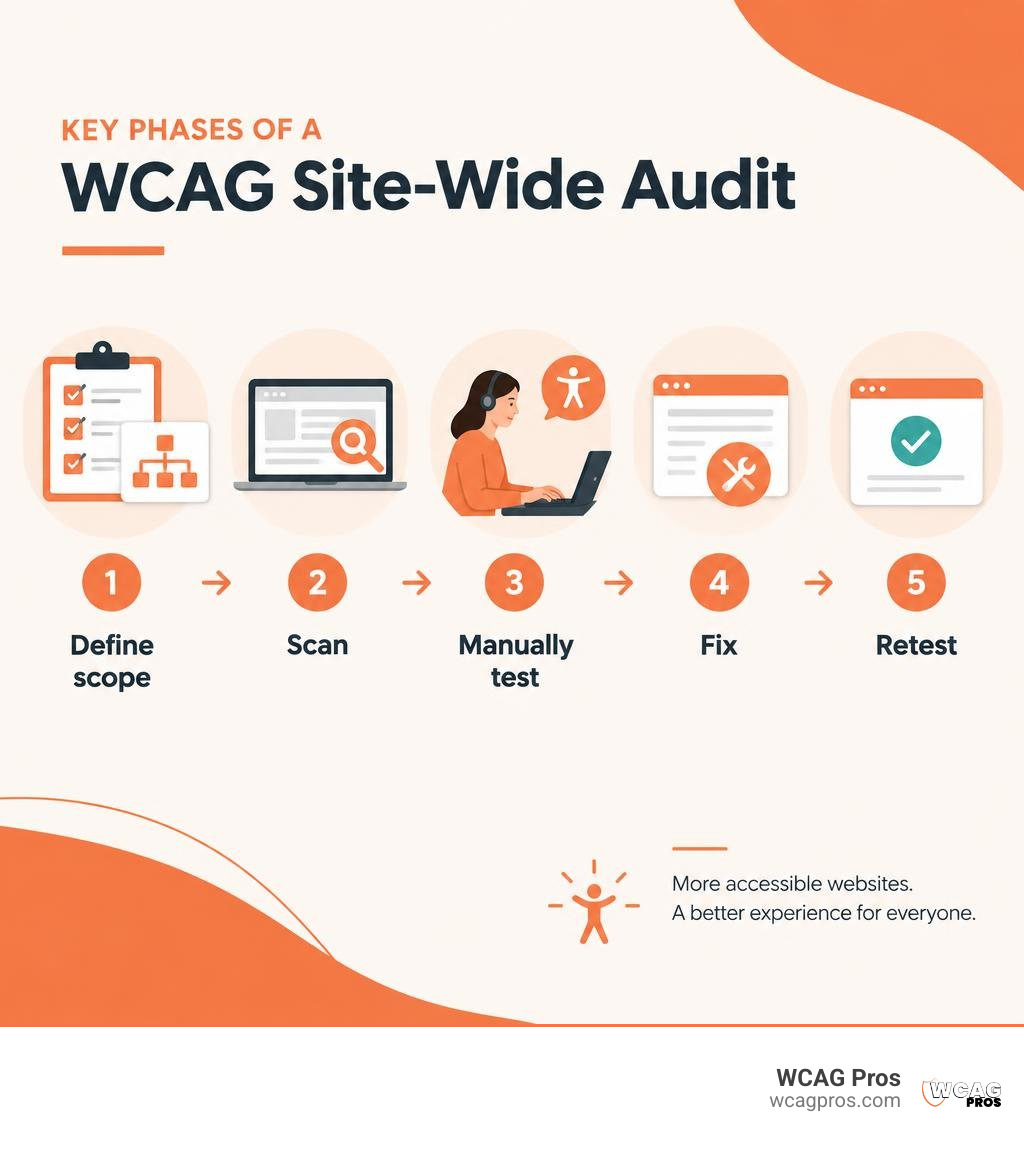
To run a WCAG site-wide audit, list every page, template, user journey, and document in scope. Scan the site for common errors, then manually test key pages and tasks with a keyboard and screen reader against WCAG 2.2 Level AA. Record each barrier, fix shared components first, and retest the affected pages.
A single-page check can miss a broken menu used across hundreds of pages or a checkout step that blocks customers. A full audit helps you find those barriers and plan fixes across the platform.
I’m Matthew Post, co-founder of WCAG Pros. I have more than 20 years of web development experience, and I oversee WCAG site-wide audit and remediation work to help businesses make their sites easier to use.
Basic WCAG site wide audit terms:
Understanding the Scope of a WCAG Site Wide Audit
Evaluating enterprise digital environments requires looking beyond individual URLs to understand how global templates, reusable component libraries, and dynamic user pathways interact. A comprehensive assessment examines the entire ecosystem to locate systemic barriers. Teams embarking on this journey can consult our ADA site-wide audit roadmap to align business objectives with strict technical standards.
A digital asset inventory serves as the operational baseline. This inventory catalog should capture public marketing pages, account creation flows, authenticated customer portals, interactive web applications, downloadable documents, and multimedia assets. When platforms host thousands of dynamic URLs, evaluating every single URL individually is neither practical nor necessary. Instead, auditing relies on mapping core architectural components and templates. When a shared navigation header or footer contains an error, that defect automatically replicates across thousands of downstream pages.
Single Page Checks vs Full Platform Evaluations
Isolated single-page testing tools examine an immediate DOM snapshot, but they cannot assess interactive states, multi-step transaction funnels, or stateful page transitions. For instance, testing an isolated shopping cart page will not reveal if a modal checkout drawer traps keyboard focus or if form validation errors fail to announce themselves dynamically.
Full platform audits evaluate complete user journeys from initial landing through final task completion. By applying smart component deduplication, auditors can isolate unique component errors from repeated template instances. This prevents engineering teams from being overwhelmed by thousands of duplicate tickets when a single code change in a shared design system component resolves issues across the entire web footprint.
Legal Benchmarks Across ADA Title III EAA and AODA
Digital accessibility is governed by specific statutory requirements worldwide. In the United States, ADA Title III requires commercial websites to provide equal access to individuals with disabilities. Federal courts and the Department of Justice routinely reference WCAG standards as the technical measure of compliance. Additionally, public sector platforms and federal contractors must adhere to Section 508 refresh mandates. Organizations operating in California face additional scrutiny under state civil rights laws, making a verified California accessibility audit essential for minimizing exposure to demand letters and statutory damages.
International laws enforce similarly strict standards. The European Accessibility Act (EAA) mandates accessibility across consumer digital products using EN 301 549 specifications, which map directly to WCAG criteria. In Canada, failure to comply with provincial standards like the Accessibility for Ontarians with Disabilities Act (AODA) carries administrative penalties reaching up to $50,000 per day for individuals and up to $100,000 per day for corporations. Targeting full conformance with WCAG 2.2 Level AA provides the strongest baseline for mitigating global legal risk.
Core Methodology: Hybrid Testing for Enterprise Platforms
Achieving genuine accessibility requires a balanced methodology that blends rapid automated crawls with human expert evaluation. Automated tools excel at processing thousands of pages to identify syntactic, contrast, and programmatic flaws, while manual testing uncovers nuanced interaction barriers, screen reader logic gaps, and real-world keyboard traps.
| Testing Dimension | Automated Scanning | Manual Expert Evaluation | Hybrid Audit Approach |
|---|---|---|---|
| Speed and Scale | Scans thousands of pages in minutes | In-depth testing of key flows | Comprehensive coverage at high speed |
| Issue Coverage | Detects 30% to 50% of WCAG criteria | Covers 100% of WCAG criteria | Maximizes rule coverage and functional UX |
| False Positive Rate | Low to moderate depending on engine | Zero false positives with expert validation | Verified findings ready for developers |
| Contextual Analysis | Cannot verify meaningful alt text or focus order | Validates reading flow and interactive logic | Combines automated alerts with human context |
| Dynamic SPAs | Often misses dynamic states without custom waits | Interacts with complex custom widgets | Full coverage of static and stateful interfaces |
Automated Testing Limitations and Strengths
Automated testing engines analyze the rendered DOM against programmatic rules to locate missing alt text, duplicate element IDs, invalid ARIA roles, and color contrast failures. Modern scanners can crawl thousands of pages and flag high-volume baseline errors quickly. Teams looking to establish their initial testing protocols can review website compliance audit fundamentals to understand baseline scanner setups.
However, automated testing tools operate within a structural ceiling, catching roughly 30% to 50% of total WCAG violations. An automated scanner can check whether an image contains an alt attribute, but it cannot determine if the text description accurately conveys the meaning of a complex chart. Automated tools also struggle to verify whether dynamic focus shifts correctly during client-side routing, making automation a starting point rather than a complete assessment.
Manual Assistive Technology and Keyboard Validation
Manual testing by experienced specialists bridges the gap between automated syntax scanning and true human usability. Certified specialists navigate pages using standard desktop and mobile screen readers such as NVDA, JAWS, and VoiceOver to verify that all interface elements announce appropriate names, roles, and states.
Manual verification ensures full keyboard operability without relying on a mouse. Testers verify that focus order follows a logical reading sequence, focus indicators meet WCAG 2.2 contrast and size requirements, and modal dialogs do not create inescapable keyboard traps. Teams can follow structured step-by-step accessibility audit practices to establish disciplined manual testing routines across their design systems.

Step-by-Step Execution of a Thorough Accessibility Evaluation
Executing an enterprise audit requires a systematic sequence of scoping, crawling, functional testing, and documentation. For a deeper breakdown of full-scope technical workflows, our complete guide to website WCAG full audit provides comprehensive architectural blueprints.
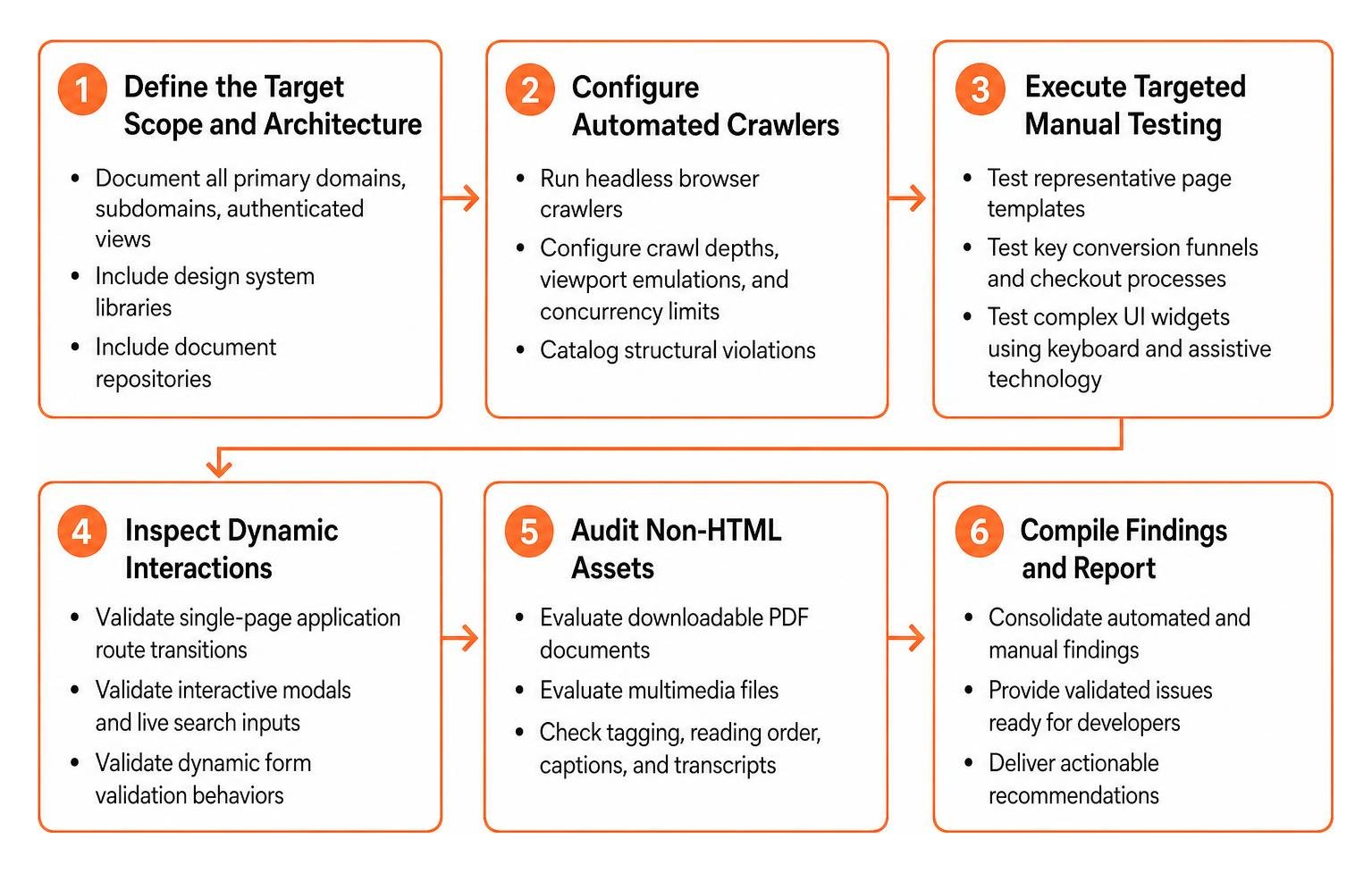
- Define the Target Scope and Architecture: Document all primary domains, subdomains, authenticated views, design system libraries, and document repositories.
- Configure Automated Crawlers: Run headless browser crawlers configured with custom crawl depths, viewport emulations, and concurrency limits to catalog structural violations.
- Execute Targeted Manual Testing: Test representative page templates, key conversion funnels, checkout processes, and complex UI widgets using keyboard and assistive technology.
- Inspect Dynamic Interactions: Validate single-page application route transitions, interactive modals, live search inputs, and dynamic form validation behaviors.
- Audit Non-HTML Assets: Evaluate downloadable PDF documents and multimedia files for tagging, reading order, captions, and transcripts.
- Compile Actionable Remediation Guidance: Consolidate findings into developer-ready tickets containing precise code snippets, DOM selectors, and WCAG success criteria references.
Automated Scanning Tools for a WCAG Site Wide Audit
Automated testing pipelines rely on robust scanning engines. Many open-source utilities utilize the axe-core testing library to parse page structures. Tools like the NarNeil UX accessibility check provide automated visual and smoke testing capabilities, while cloud-based crawlers like the Web Accessibility Checker Actor run headless browser automation to evaluate deep site hierarchies at scale.
Auditing Dynamic Components SPAs and Protected Portals
Modern Single Page Applications built with React, Angular, or Vue introduce unique accessibility challenges because content updates dynamically without triggering traditional page reloads. Automated scanners must be configured with custom wait selectors to ensure JavaScript frameworks finish rendering before running compliance checks.
Authenticated areas like customer portals, billing dashboards, and internal management tools require specialized testing configurations. Auditors use persistent session tokens or authenticated browser sessions to evaluate secure pages, confirming that interactive widgets maintain appropriate ARIA live regions, focus management, and keyboard accessibility.
Testing Non-HTML Assets and Document Files
A complete evaluation extends beyond HTML pages to encompass every digital asset hosted on the platform. Downloadable documents, particularly PDF files, often contain severe accessibility barriers if they lack proper semantic tags, alternative text, and structural reading orders.
Auditors evaluate PDF files using specialized validators such as PAC 2024 to confirm compliance with PDF/UA standards and WCAG guidelines. Multimedia content must also be inspected to ensure that pre-recorded and live video feeds include accurate closed captioning, audio descriptions, and complete text transcripts.
Modern Accessibility in 2026: AI Agents and Assistive Readiness
Digital accessibility now serves both human users and autonomous AI software agents. With AI-driven visits to online stores surging 8x over the past year and orders placed directly through AI search engines climbing nearly 13x, web platforms must maintain machine-readable structures. Today, e-commerce, media, and travel platforms absorb 98% of total AI agent traffic. Understanding how these systems interact with digital products is central to the certified WCAG audit process.

How AI Agents Interact with Your WCAG Site Wide Audit
Autonomous AI agents browse websites by parsing the underlying accessibility tree rather than analyzing visual pixels. If an interface lacks semantic HTML landmarks, proper form labels, or valid button roles, an AI agent cannot navigate the interface or complete transactions.
Ensuring compliance with WCAG 2.2 provides the semantic structure that AI agents need to interpret page hierarchies, locate action triggers, and complete multi-step workflows like booking reservations or submitting support tickets.
Accessibility Tree Optimization for Machine Crawlers
Optimizing the accessibility tree requires clean DOM structures, proper ARIA labeling, and standardized programmatic relationships. Dynamic elements like quantity adjusters, checkout buttons, and interactive filter controls must expose their current states programmatically.
When buttons use generic unsemantic markup without accessible names, both human screen reader users and autonomous AI agents fail to complete transactions. Ensuring that form inputs carry explicit programmatic labels allows machine crawlers to fill out fields accurately, preserving conversion rates across emerging automated channels.
Remediation Planning, Issue Prioritization, and Continuous Monitoring
Gathering audit findings is only the first step. Translating those findings into an actionable engineering roadmap ensures that accessibility barriers are removed efficiently without stalling feature releases. Reviewing a detailed WCAG audit report structure helps engineering managers translate compliance reports into targeted developer sprint backlogs.
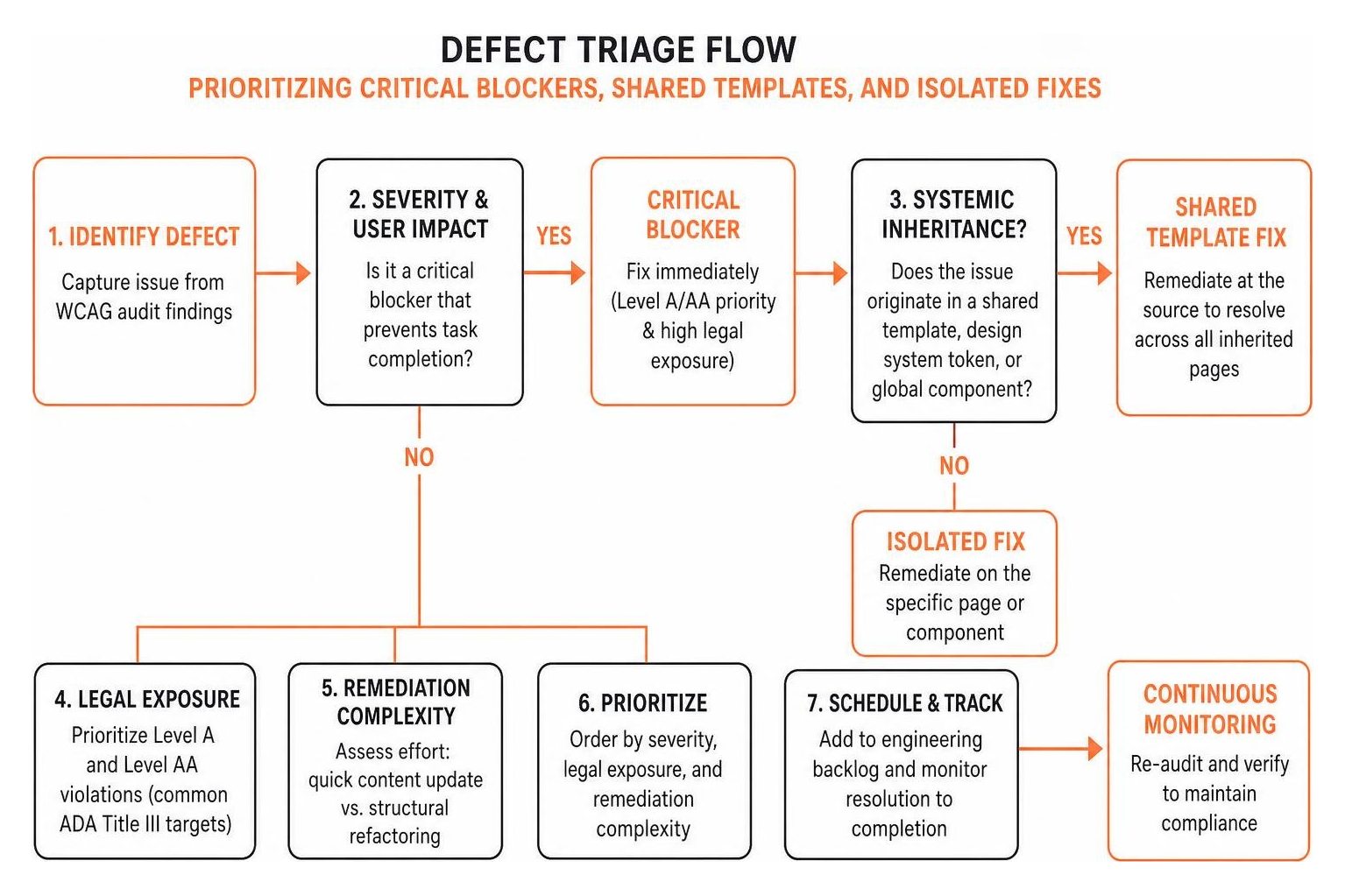
When triaging defects across large web platforms, teams should focus on several critical parameters:
- Severity and User Impact: Categorize issues as critical, serious, moderate, or minor based on whether they completely block task completion.
- Systemic Template Inheritance: Identify whether a defect originates within a shared global template, design system token, or single isolated page.
- Legal Exposure Level: Prioritize Level A and Level AA violations that represent common targets in ADA Title III litigation.
- Remediation Complexity: Group quick content updates separately from complex structural refactoring tasks.
Triage by Impact Level and Shared Templates
Engineering teams must prioritize issues that cause severe functional blockers, such as missing form labels, keyboard traps, and unannounced error states. Addressing defects within shared global templates first yields the highest return on investment.
Fixing a contrast or keyboard navigation defect within the primary site navigation component immediately resolves that violation across every page inheriting that template. This centralized approach streamlines remediation and helps teams make measurable progress quickly.
Integrating Accessibility into CI and CD Pipelines
Maintaining accessibility across frequent software releases requires automated continuous testing. Embedding automated accessibility linters and end-to-end browser tests into CI and CD pipelines prevents code regressions from reaching production environments.
Development teams can run automated testing engines within GitHub Actions or automated build pipelines. By establishing pull request quality gates, builds that introduce new high-severity accessibility violations can be flagged for revision before merging.
Frequently Asked Questions About Site-Wide Accessibility Audits
What is the difference between an automated scan and a complete audit?
An automated scan uses software to crawl web pages and check for rule-based code violations, catching roughly 30% to 50% of potential barriers. A complete audit combines automated crawling with in-depth manual testing by human specialists using screen readers, keyboard navigation, and assistive technologies to evaluate 100% of applicable WCAG success criteria without false positives.
Which WCAG conformance level is required for legal safety?
WCAG 2.2 Level AA serves as the universally recognized benchmark for legal compliance across major statutes including ADA Title III, Section 508, the European Accessibility Act, and the AODA. While Level A represents absolute minimum baseline requirements, Level AAA includes highly specialized criteria that are rarely mandated across entire complex commercial platforms.
How frequently should complex platforms schedule accessibility evaluations?
Enterprise platforms should conduct comprehensive hybrid audits at least once a year, with additional targeted evaluations occurring before major platform redesigns or core template updates. Routine automated scans and continuous integration checks should run continuously alongside code deployments to catch regressions early.
Conclusion
Conducting a thorough site-wide audit is an essential investment for maintaining an inclusive digital presence, improving search visibility, and safeguarding your organization against legal liability. Complex enterprise platforms require a structured hybrid methodology that combines high-scale automated crawling with hands-on manual assistive technology testing.
At WCAG Pros, we specialize in delivering comprehensive page-by-page audits evaluating all 54 WCAG A and AAA success points. Our assessments provide actionable, code-level remediation guidance and include free re-audits to verify your fixes and award official compliance badges. Explore our professional WCAG audit services today to build a compliant, accessible digital platform.
Read more website accessibility articles
Get Help With Your Website
We'll follow up with info about:
- The process
- Cost
- Timeline
We promise to respect your privacy, and never abuse the information you provide. We will not sell or rent your information to any third party.
By submitting this form, you consent to receive SMS messages and/or emails from SEM Dynamics LLC, dba WCAG Pros. To unsubscribe, follow the instructions provided in our communications. Msg & data rates may apply for SMS. Your information is secure and will not be sold to third parties.