
Top Accessibility Tools for Disabled Users Redefining Digital Inclusion
Top Accessibility Tools for Disabled Users Redefining Digital Inclusion
Accessibility Tools for Disabled Users: What to Look For
Start with the barrier, then choose the tool. Screen readers and magnifiers help people access visual content. Captions make audio available as text. Voice control, dictation, and switch access offer ways to use a site without a mouse. Reading modes and contrast controls can make dense pages easier to use.
For website owners, these tools are only part of the answer. Your site must also work with them. Clear labels, keyboard access, readable text, and accurate captions help visitors complete tasks and support testing against WCAG 2.2.
I’m Matthew Post, co-founder of WCAG Pros. For more than 20 years, I’ve worked on web development and accessibility audits, including how accessibility tools for disabled users interact with websites.
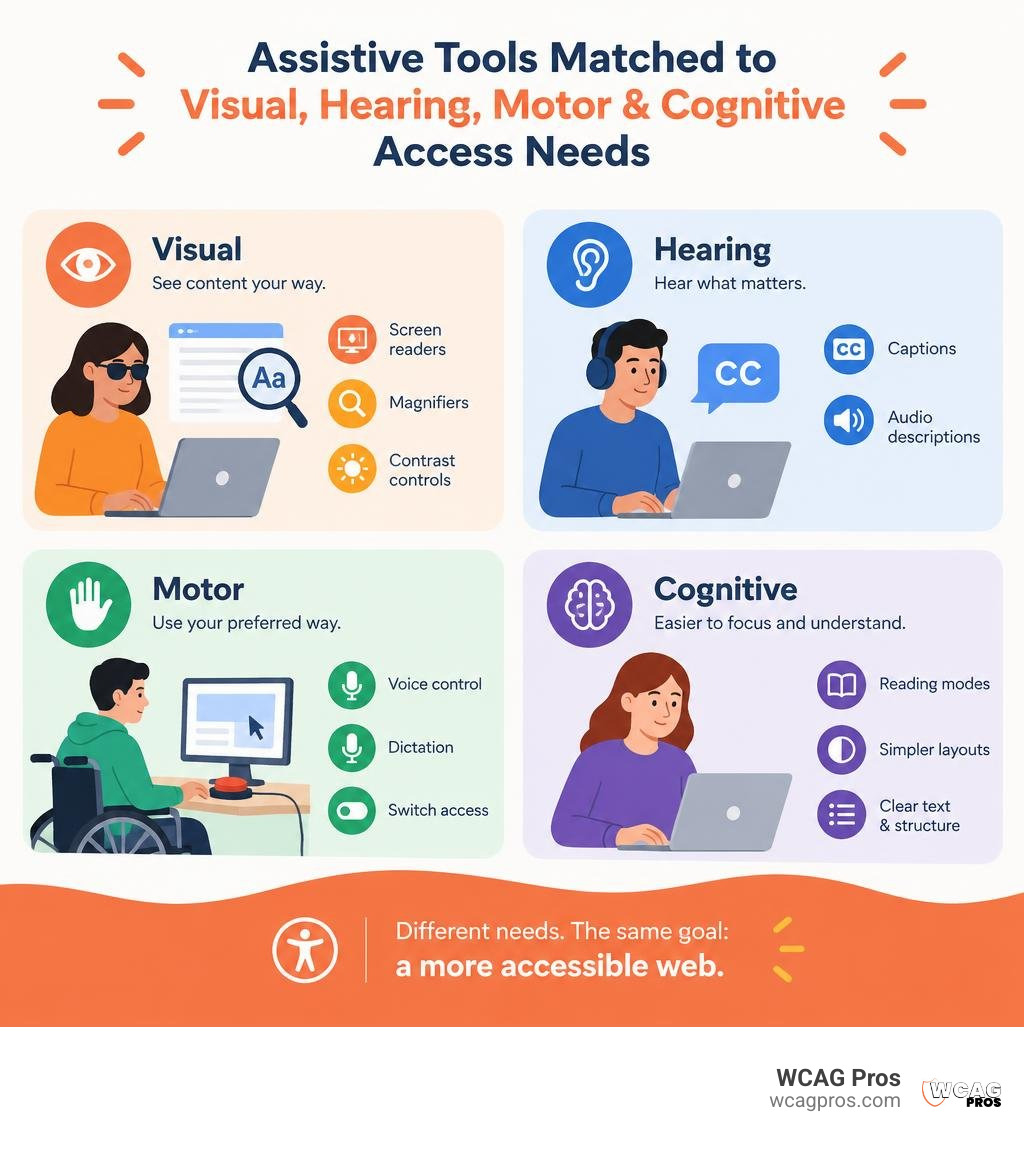
Accessibility tools for disabled word list:
Core Categories of Modern Accessibility Tools for Disabled Users

More than 1 in 4 American adults live with a disability, and roughly 2.2 billion people worldwide experience some form of vision impairment. Navigating the web without the right setup can quickly feel like trying to open a locked door without a key.
Digital barriers appear in many forms. Unlabeled buttons, poor contrast, cluttered layouts, and non-keyboard interfaces break the core principles of web accessibility: Perceivable, Operable, Understandable, and Robust (POUR). Modern assistive technology bridges this gap by converting visual, auditory, and motor inputs into practical ways to interact with digital content. Choosing the right software often begins with exploring a practical guide to comparing the best accessibility tools to match functional limitations with effective solutions.
Screen Readers and Visual Magnification Solutions
Screen reading software and magnification tools are vital for blind and low-vision individuals. Programs like JAWS, NVDA, and built-in options such as Apple VoiceOver translate on-screen code into synthesized speech or output it directly to refreshable Braille displays.
For people experiencing degenerative eye conditions, hybrid tools like Vispero Fusion merge ZoomText magnification with JAWS screen reading into a unified interface. This combined approach allows individuals to switch between visual tracking and audio feedback without relearning separate systems. When legacy documents present barriers, built-in optical character recognition (OCR) engines convert static, scanned PDFs into live, selectable text. Building interfaces that support these tools requires careful markup, especially when developers follow the ultimate manual for screen reader WordPress testing to verify semantic elements and ARIA roles.
Speech Recognition, Voice Control, and Motor Assistive Devices
Motor impairments, repetitive strain injuries, tremors, and paralysis prevent millions of users from operating a standard mouse or keyboard. Voice dictation engines allow hands-free typing and system navigation by turning spoken sentences into functional navigation events.
Mobile and desktop operating systems include advanced gesture tools like Apple AssistiveTouch, which replaces multi-finger pinches with simple single-tap menus. For users with severe physical limitations, switch access systems, eye-tracking cameras, and dwell-clicking utilities enable navigation using head movements or subtle eye pauses. Specialized programs cataloged in resources like the California Assistive Technology Service Listing help connect individuals and workplaces with adaptive equipment to maintain digital independence.
Cognitive Support, Reading Aids, and Contrast Enhancers
Cognitive, neurodivergent, and learning accommodations address challenges tied to attention, memory, and information processing. Distraction-free reading views remove flashing banners, autoplay videos, and dense sidebars so users with ADHD or traumatic brain injuries can focus on core text.
Typography tools applying specialized fonts like OpenDyslexic help minimize letter-swapping for individuals with dyslexia. About 8% of men live with red-green color blindness, making high-contrast modes and monochrome filters essential for distinguishing buttons and text links. Designers can eliminate visual barriers early by learning how to use a color contrast checker to save your design before pushing styles to production.
Breakthrough AI and Ambient Assistive Software Transforming Daily Access
Artificial intelligence and ambient browser capabilities have shifted accessibility tools from static settings into dynamic environments. Instead of digging through multi-level configuration panels, users can rely on intelligent tools that adapt to their specific needs.
| Assistive Tool | Core Purpose | Processing Architecture | Latency & Performance | Key Privacy Guarantee |
|---|---|---|---|---|
| AdaptAble | Natural language voice adjustments | Local deterministic parser with AI fallback | 0.006 ms local parse median | Zero data leaves device for 95.6% of common commands |
| AccessBridge | Ambient struggle detection and auto-repair | On-device passive signal scoring | Under 50 ms DOM adaptation | Local scoring with differential privacy |
| Ally | Multimodal personal assistant | Multi-model cloud AI (LLMs, VLMs, OCR) | Near real-time response | GDPR-compliant confidential processing |
| Live Captions | Real-time speech-to-text display | On-device speech recognition models | Instant dynamic text generation | Local audio stream processing |
| Vispero Fusion | Unified magnification and screen reading | Local system application with AI navigation | Up to 25% faster task completion | Native workstation processing |
AI-Powered Accessibility Tools for Disabled Web Navigators
Natural language interfaces eliminate the friction of technical jargon. Rather than forcing someone to locate line-spacing sliders, tools like kanjustin/AdaptAble let users type or say plain requests such as “the white hurts my eyes.” The extension instantly applies warm themes, enlarges body copy, and dims harsh backgrounds. AdaptAble handles 95.6% of common commands entirely locally with a median parse latency of 0.006 ms, using cloud models only for complex phrases validated by strict schemas.
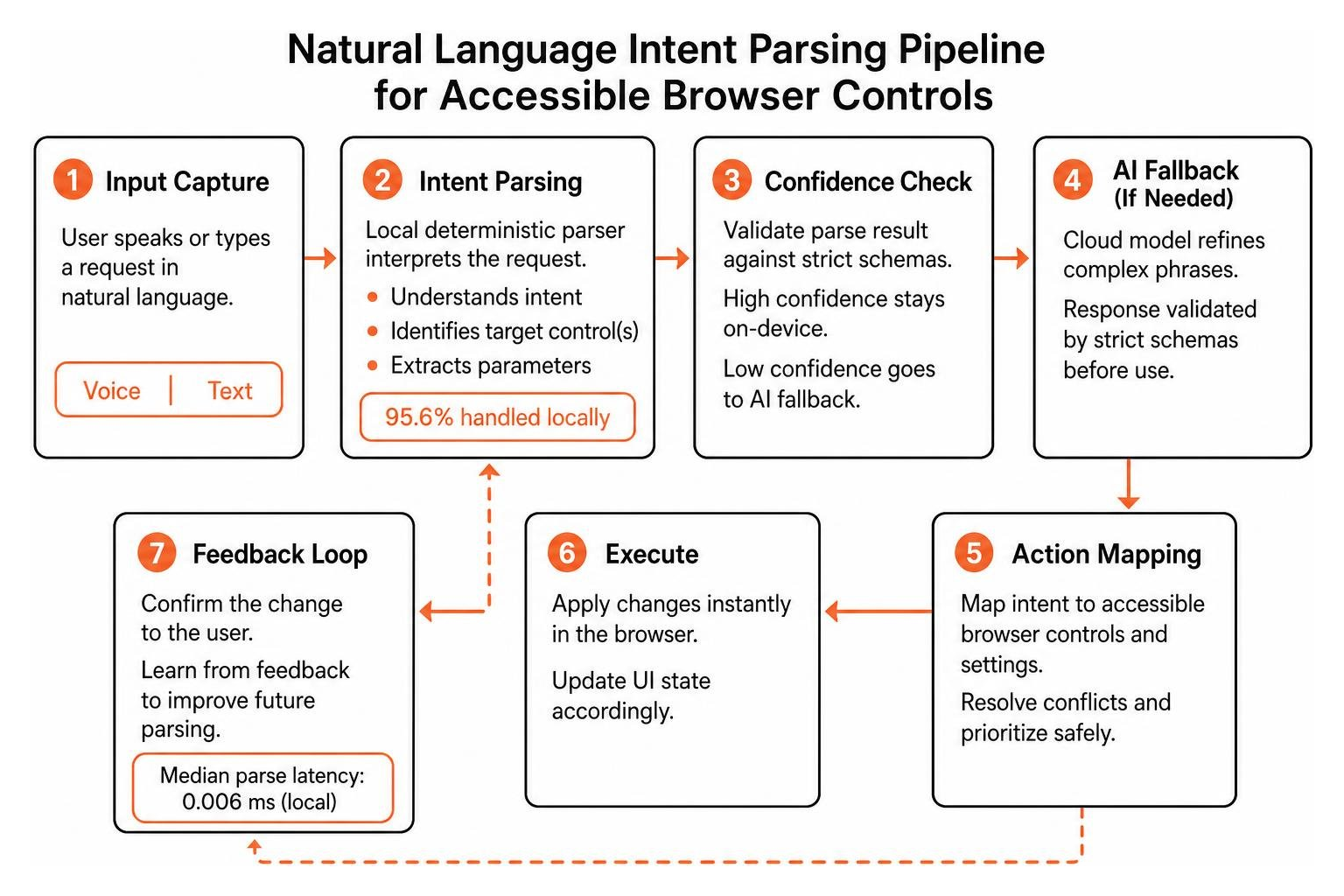
Personal assistants like Ally: AI Assistant for Accessibility & Daily Independence bring multimodal support directly to smartphones and smart glasses. By combining visual language models, optical character recognition, and intent engines, Ally helps blind users identify real-world objects, read printed mail, and navigate digital workflows without complex gestures.
Ambient and On-Device Web Adaptations
AccessBridge provides ambient accessibility by detecting difficulty without requiring manual configuration. The tool monitors passive behavioral signals like erratic mouse paths, repeated misclicks, rapid scroll adjustments, and long dwell times to calculate a live struggle score.
AccessBridge covers 28 languages, reaching roughly 87% of the world population (about 6.96 billion speakers). When frustration signals appear, it adapts the page in under 50 ms by deepening contrast, activating dwell-click, or softening layouts with fatigue-adaptive styling. Because all behavioral scoring occurs on-device, sensitive personal habits remain private.
Real-Time Browser Adaptations and Multilingual Reading Options
Modern browser-level adaptations modify page presentations on the fly to help resolve immediate visual and auditory hurdles. Built-in speech engines and live transcription tools process audio streams locally, generating accurate real-time subtitles across multiple languages.
These user-driven adjustments provide preset modes for motor impairments, low vision, ADHD, and seizure safety. Supporting more than 100 languages, browser-side tools offer immediate personalization for global audiences while web development teams work on source-code enhancements.
Automated Testing Engines and Developer Compliance Checkers

Building an inclusive website requires regular evaluation throughout the software development lifecycle. With 94.9% of the top 100,000 websites exhibiting measurable accessibility failures, development teams need fast, accurate testing suites to catch issues before deployment.
Fast Open-Source Evaluation Engines and Browser Extensions
Modern audit extensions help developers catch regressions directly in the browser. The open-source pour engine evaluates pages locally, automating checks for 51 of the 86 WCAG 2.2 success criteria across 98 automated rules while offering 55+ visual simulations for conditions like tunnel vision and hand tremors.
Browser extensions give developers immediate visual feedback on page structure. Teams can integrate tools like the WAVE tool accessibility complete guide into daily reviews, or follow steps on how to find Accessibility Insights for Web Edge extension to run automated checks and guided manual tab stops.
Automated Audit Pipelines and Contrast Verification Tools
Large environments with thousands of URLs require centralized monitoring workflows to track code quality over time. Open-source scanning engines and command-line test suites allow testers to trigger in-browser audits during local testing and log automated findings directly to project dashboards.
Teams can select effective checkers by reviewing the ultimate list of free online accessibility checkers to balance fast scans with deep code insights. For larger corporate initiatives, consulting Accessibility Audit Tools 101: Compare WCAG 2.2 Options helps compliance managers choose suitable developer-focused testing frameworks.
Regulatory Frameworks and Enterprise Implementation Strategies
Digital accessibility is both an ethical responsibility and a strict legal requirement. In the United States, Title III of the ADA requires public accommodations, including commercial websites, to provide equal access to individuals with disabilities. Internationally, the European Accessibility Act sets strict digital inclusion requirements across consumer products, banking, and online retail.
Meeting WCAG 2.2 Level AA standards protects organizations from legal liability while improving usability for all visitors. Clean markup, clear navigation, and robust mobile layouts enhance search engine visibility and improve conversion rates across diverse user groups.
How Organizations Select Accessibility Tools for Disabled Employees and Customers
Workplace inclusion requires providing the right assistive equipment for staff. Enterprise IT teams must ensure that screen readers and magnification tools operate reliably within virtual desktop environments like Citrix, VMware, and Remote Desktop Protocol.
Before rolling out new software across departments, IT leaders should consult the Web Accessibility Testing Tools Guide 2026 to verify operating system compatibility, licensing flexibility, and single-installer options.
Integrating Inclusive Design and Continuous Testing Workflows
Accessibility cannot be an afterthought left for the final QA stage. Organizations succeed by shifting accessibility left into wireframes, component design systems, and pull-request checks.
Automated CLI scanners should run inside continuous integration pipelines to block builds with clear contrast or labeling errors. However, automated scripts cannot evaluate subjective usability, such as whether alt text accurately describes a photo. Teams should reference the Website Accessibility Tools Survival Guide to establish balanced workflows that pair automated linters with regular manual audits.
Frequently Asked Questions About Accessibility Tools
How do accessibility tools benefit individuals with cognitive and visual disabilities?
Visual accessibility tools like screen readers, text scalers, and high-contrast filters translate visual UI elements into clear audio, Braille, or high-visibility graphics. Cognitive tools simplify complex pages by removing animated clutter, applying readable fonts, and providing plain-language summaries that make navigation manageable for users with ADHD, dyslexia, or processing fatigue.
Can AI-driven accessibility tools ensure full ADA and WCAG 2.2 compliance?
No automated tool or AI overlay can guarantee 100% ADA and WCAG 2.2 compliance on its own. While AI tools remediate many common DOM issues in real time, 35 WCAG criteria require human judgment, such as verifying logical reading order, keyboard trap avoidance, and meaningful text alternatives. Legal compliance requires human-verified code remediation alongside automated tooling.
What is the difference between on-device assistive tools and cloud-based AI tools?
On-device assistive tools run scripts and parsers locally inside the browser or operating system. This guarantees that user interactions, eye movements, and browsing histories never leave the device, providing low latency and strong privacy. Cloud-based AI tools send data to remote servers to handle resource-heavy tasks like complex image recognition, which requires strict adherence to privacy regulations like GDPR.
Conclusion
Building an inclusive web is an ongoing commitment to user equity and technical quality. Modern assistive technologies, from ambient on-device adaptations to AI-powered personal guides, continue to transform how individuals with disabilities interact with digital services.
At WCAG Pros, based in Norco CA, we deliver comprehensive page-by-page audits across all 54 WCAG points, provide code fixes, and run free re-audits to help your business earn verified compliance badges. If you want to evaluate your digital assets and strengthen your accessibility pipeline, take the next step to pick the best web accessibility evaluation tool for your team and build an accessible digital experience for all users.
Read more website accessibility articles
Get Help With Your Website
We'll follow up with info about:
- The process
- Cost
- Timeline
We promise to respect your privacy, and never abuse the information you provide. We will not sell or rent your information to any third party.
By submitting this form, you consent to receive SMS messages and/or emails from SEM Dynamics LLC, dba WCAG Pros. To unsubscribe, follow the instructions provided in our communications. Msg & data rates may apply for SMS. Your information is secure and will not be sold to third parties.